How can I tell where a file is stored within a project in Workfront | Adobe Higher Education
Skip to main content
Level 2
December 18, 2024
해결됨

How can I tell where a file is stored within a project in Workfront

  • December 18, 2024
  • 3 답변들
  • 2284 조회

I can easily search and find files in WF, but how do I tell where that file is stored within a project? For instance, which project folder, task, etc?


Thanks,

Dave

최고의 답변: KellieGardner

We are getting there 🙂 Here is what I get, it's giving me the url path folder name and not the actual name of the folder.
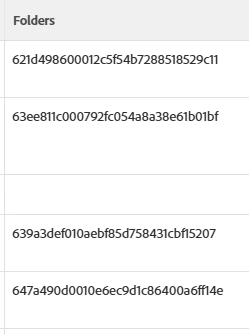


So sorry. I forgot to edit the text I posted.


displayname=Folders listdelimiter= listmethod=nested(Folders).lists textmode=true type=iterate valueexpression={name} valueformat=HTML

3 답변

KellieGardner
Community Advisor
Community Advisor
December 18, 2024

If you are trying to see where the file is just by using the search bar you will be limited to what is shown on the results page (that's driven by the UI setup in place by Adobe/Workfront). Once you click on the document, you should be able to see breadcrumbs in the top left of your screen that shows you where the document is.


Additionally, you can run reports that will show the task, project, etc information.

DaveWi5작성자
Level 2
December 19, 2024

The breadcrumbs aren't there, it only shows the project name, vertical divider and the name of the file. It's doesn't show the folder name(s). Is that a setting that our admin needs to turn on?

Srinija_N
Level 7
December 20, 2024

I dont think there is an option to enable or disable the Breadcrumb view.

Srinija_N
Level 7
December 20, 2024

In Fact, you can create a Document Type report with all the Project name, Task Name, Issue Name, Portfolio, Program, Template, Iteration etc fields you require. This way you will be able to know from where exactly that document is coming from/stays in.


If this is helpful, Please mark this as 'correct reply' to help the other community members.

DaveWi5작성자
Level 2
December 20, 2024

Thanks for trying to help. This won't help me as I can't pull a report every time I need to know where a document is located. I really need those breadcrumbs so I can go straight to the folder/task. I'm really surprised those aren't available. I used them all the time when we were using inmotion. Thanks again.

Srinija_N
Level 7
December 20, 2024

No need of creating the report everytime. You can create it once and pin it on your Navigation bar for easy access.

December 22, 2024

Hi Dave!


To find where a file is stored in Workfront, just open the file details – it will show the project, task, or folder it's linked to.

DaveWi5작성자
Level 2
December 23, 2024

Not the way ours is set up. It doesn't. It's not in the detail information and expanding the breadcrumbs doesn't show anything more than the "less" view shows. I get project and document name and that's it.

February 5, 2025

Hi - I have exactly the same issue and would love this to get resolved so that by default you see the full location of a document in breadcrumb.


Does anyone know if this is on the Workfront roadmap to get implemented?