Hours Report Grouped by Milestone | Community
Skip to main content
Level 9
March 12, 2024
Solved

Hours Report Grouped by Milestone

  • March 12, 2024
  • 2 replies
  • 1702 views

Hi WF Community,


Does anyone know if it's possible to have an hours report that is grouped by task milestone?


The idea would be that users can see the actual hour entries (as rows) and an aggregate/sum of those hours rolled up to the grouping level (which is the task Milestone Name).


Thanks,

Nick

This post is no longer active and is closed to new replies. Need help? Start a new post to ask your question.
Best answer by Doug_Den_Hoed_AtAppStore

Thanks, Doug.
I thought the same, but the only place this new field populates the Milestone Name is on the Milestone Task.  It doesn't populate the Milestone Name in this new custom field for all child tasks below it, which is what I need, which is what I need in order to group hour entries (on an hours report) by Milestone Name.


Gotcha @nickva7,


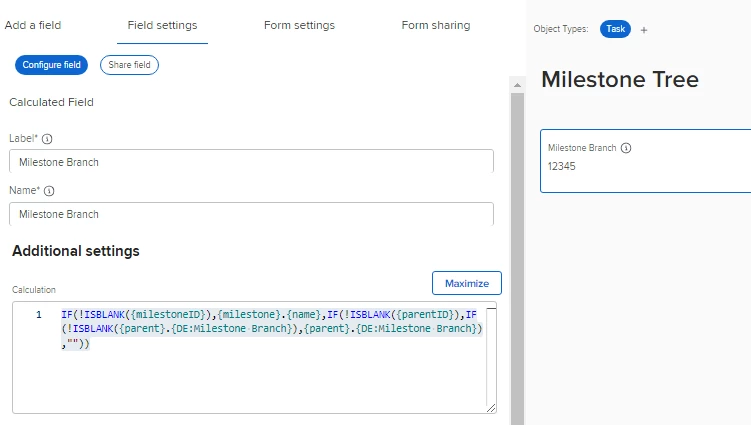
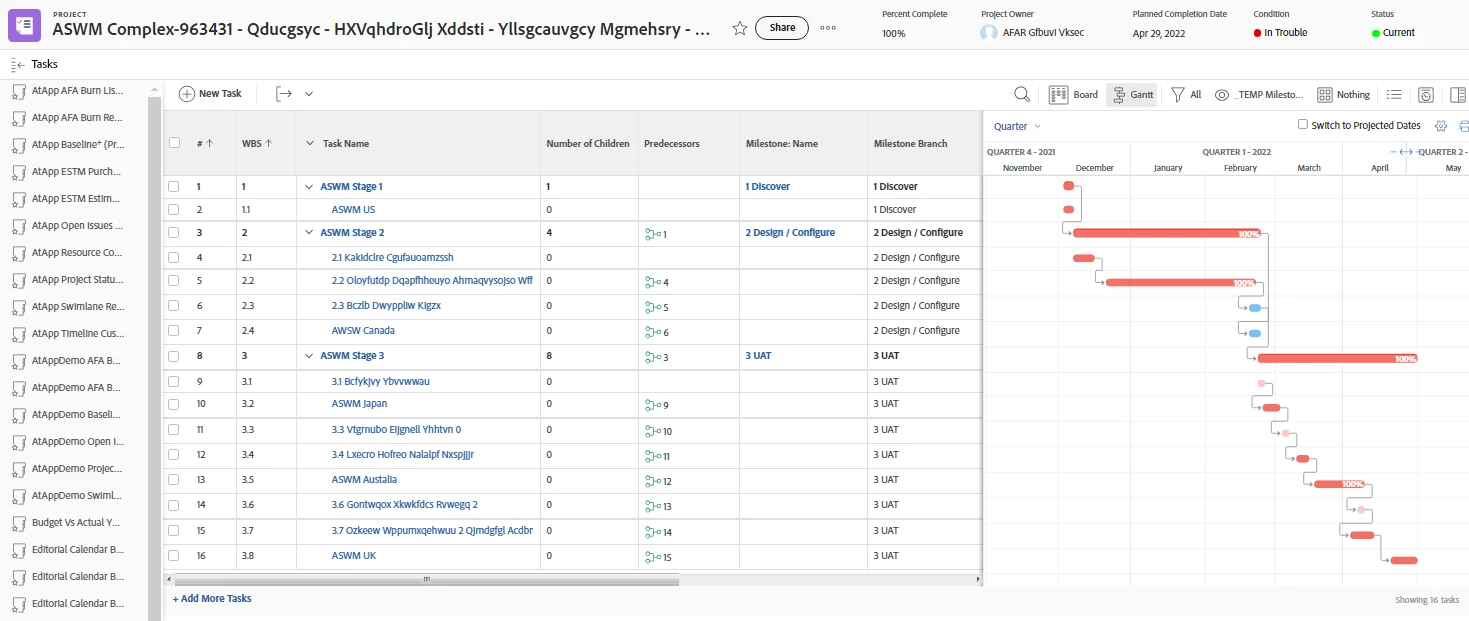
In that case, provided you have a custom form on every such parent and child task (heck, you use Templates and have Fusion, so just do them all) with the following formula, as shown below.


IF(!ISBLANK({milestoneID}),{milestone}.{name},IF(!ISBLANK({parentID}),IF(!ISBLANK({parent}.{DE:Milestone Branch}),{parent}.{DE:Milestone Branch}),""))


Regards,

Doug


P.S. Excellent challenge! Shall we celebrate over an extra large Americano with cream at Vendome sometime and call it square? 


2 replies

KIMBERLYREA
Community Advisor
Community Advisor
March 13, 2024

I have Milestone reports. It's a task report and filtered by milestones. Those are parent tasks in our timing plans so they don't have children tasks associated to them.  These are my filters: 


Task -> Milestone ID = (list out the milestones you want included)

Project -> Milestone Path = 

Project -> Group ID = 

Project -> Status = 

Task -> status = Complete 

Project -> Planned start date = (date range)

I then grouped by:
Project custom data field

Task planned start date

Milestone Name

This is my view along with some custom data fields. 


We look more at average duration of the milestones rather than the hours but this is our chart based off it. 


NickVa7Author
Level 9
March 13, 2024

Thanks for sharing, Kimberlyrea!
Unfortunately, this won't work as I need to see hour entries and aggregate them by hour entry date (month).

KIMBERLYREA
Community Advisor
Community Advisor
March 13, 2024

Gotcha. Yeah that's hard. I wish you luck. 

KellieGardner
Community Advisor
Community Advisor
March 13, 2024

Hi Nick - I have a reporting custom form on our tasks that has a calculated field on it to capture what milestone that task is tied to so that I can report on this from an hour report. I would suggest using a calculated field. 

NickVa7Author
Level 9
March 13, 2024

Hi Kellie - can you share your calculated field formula?

Doug_Den_Hoed_AtAppStore
Community Advisor
Community Advisor
March 13, 2024


Hi Nick,


I suspect @kelliegardner is suggesting a simple calc on the Task that points to its {milestone}.{name} so that it is the "close enough" for the Hours report to then get at it, without having too many hops (although I'd've thought {task}.{milestone}.{name} would also have worked), along the same principal as described in this How's My Portfolio post.


Regards,

Doug