
Home Widgets - Why can't our team see the "next page" 1, 2,..." option on the lower right corner??? | Community
Skip to main content
MegSVT
Level 4
February 3, 2025
Solved

Home Widgets - Why can't our team see the "next page" 1, 2,..." option on the lower right corner???

  • February 3, 2025
  • 3 replies
  • 1051 views

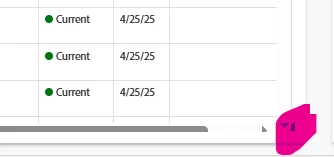
Our users are not able to see the next page option on the widgets on the home page. Is this happening to anyone else? is there a way to resolve this? you can click on that almost hidden dark spot and it shows up for a second and then slides down before you can click anything. help!


Best answer by KellieGardner

Sometimes it has to do with the zoom on the browser. Try zooming out to see if shows up. 

3 replies

KellieGardner
Community Advisor
KellieGardnerCommunity AdvisorAccepted solution
Community Advisor
February 3, 2025

Sometimes it has to do with the zoom on the browser. Try zooming out to see if shows up. 

MegSVT
MegSVTAuthor
Level 4
February 3, 2025

Unfortunately, that did not solve the issue. 

KellieGardner
Community Advisor
Community Advisor
February 3, 2025

What browser are you using? Does it happen in all browsers?

skyehansen
Community Advisor
February 4, 2025

Have you tried resizing the widget window? You have three triangles in the corner -- two are for scroll bars and the other one that you can see a partial of, is to resize the widget (you just click and drag that corner). I'd be interested to see if you can size is wider and taller and see if the page numbers show up. That's what happened for me.

MegSVT
MegSVTAuthor
Level 4
February 4, 2025

We have resized the widgets taller (longer?), wider, and also rectangle vs square and the tiny arrow still disappears. As mentioned above, we have tried different browsers and also zooming in and out and does not seem to be the issue either. 

skyehansen
Community Advisor
February 4, 2025

the only other thing I would try is an incognito browser and deleting cache and cookies, as well as switching off some of your browser extensions (this isn't really necessary unless you think you have similar extensions on all the browsers you're trying). After this, the only thing you can do is have your authorized service contact (usually the system admin) open a case with the workfront support team.

MegSVT
MegSVTAuthor
Level 4
February 4, 2025

I am going to add an update here:


We realized that when our laptops were not connected to our docking stations, were able to see the page options (1, 2, ..etc) correctly.


Unfortunately, it seems when we plug out computers into our stations, it messes with the screen size and we have to make sure we zoom in at a much larger % than we normally would. 


Very odd but seems to work! My apologies for the confusion!


KellieGardner
Community Advisor
Community Advisor
February 4, 2025

That's odd and definitely annoying. Might be worth checking out your display settings on your computer to make sure they're accurate. It will vary for everyone depending on screen size but there is usually a recommended scale and display resolution for each monitor that could maybe fix it.