Help needed with Boards! Intaking requests through a form + linking projects | Community
Skip to main content
Level 5
March 20, 2025
Solved

Help needed with Boards! Intaking requests through a form + linking projects

  • March 20, 2025
  • 1 reply
  • 311 views

New to using Boards and am looking for some suggestions here – I am stumped!


We are currently dealing with 2 scenarios for our Video team’s board… With a key piece to keep mind, we must have it connected to Workfront so that we can have reporting around this work. 


SCENARIO 1: Connected Cards are manually entered to the board once there has already been a project created. We connect to task(s) which generate individual cards for each video needed.


This displays the connected project on the face of the card that we can easily navigate to view the whole project, the assignees and status are synced, etc. PERFECT!
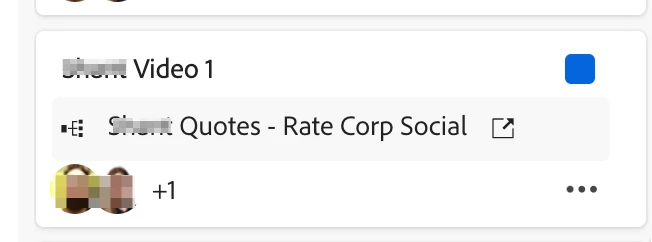


SCENARIO 2 (our problem child): Requests are submitted through our Video Request Form, which populate in our Backlog column. From here, we are converting this to a project. However, I cannot figure out how to be able to display that converted project as the connected project on the face of the card like scenario 1.. It just shows the name of the request queue project (Video Request Form).
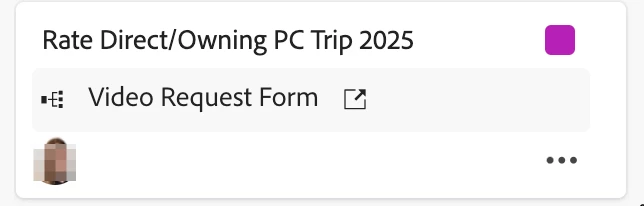
 

I’m sure there is something I’m missing.. there MUST be a better way to handle.. Looking for any suggestions 😊


THANK YOU!

Best answer by skyehansen

haha I'm new to Boards too. But if I understand your ask correctly, below I've suggested a potential path to a solution. It'll take some configuring.


1) Those converted requests are going to need to come off. Normally I would suggest a filter, that filters them out in some way. Maybe along the lines of requests that do not have a resolving object (e.g. resolving project ID is blank). Your board needs to be reconfigured to add this additional filter somehow.


2) The converted projects are going to need to pull in. The way we configure our projects is there's a parent task that represents the entire workflow, and this is the one that gets pulled in somehow. Up to you as to how. It could be a specific custom form, the task number (whatever task has task number 1), etc. (needless to say, this filter also needs to be added to your board)


1 reply

skyehansen
Community Advisor
skyehansenCommunity AdvisorAccepted solution
Community Advisor
March 22, 2025

haha I'm new to Boards too. But if I understand your ask correctly, below I've suggested a potential path to a solution. It'll take some configuring.


1) Those converted requests are going to need to come off. Normally I would suggest a filter, that filters them out in some way. Maybe along the lines of requests that do not have a resolving object (e.g. resolving project ID is blank). Your board needs to be reconfigured to add this additional filter somehow.


2) The converted projects are going to need to pull in. The way we configure our projects is there's a parent task that represents the entire workflow, and this is the one that gets pulled in somehow. Up to you as to how. It could be a specific custom form, the task number (whatever task has task number 1), etc. (needless to say, this filter also needs to be added to your board)