global settings for sharing and uploading | Community
Skip to main content
Level 3
January 24, 2020
Question

global settings for sharing and uploading

  • January 24, 2020
  • 1 reply
  • 440 views
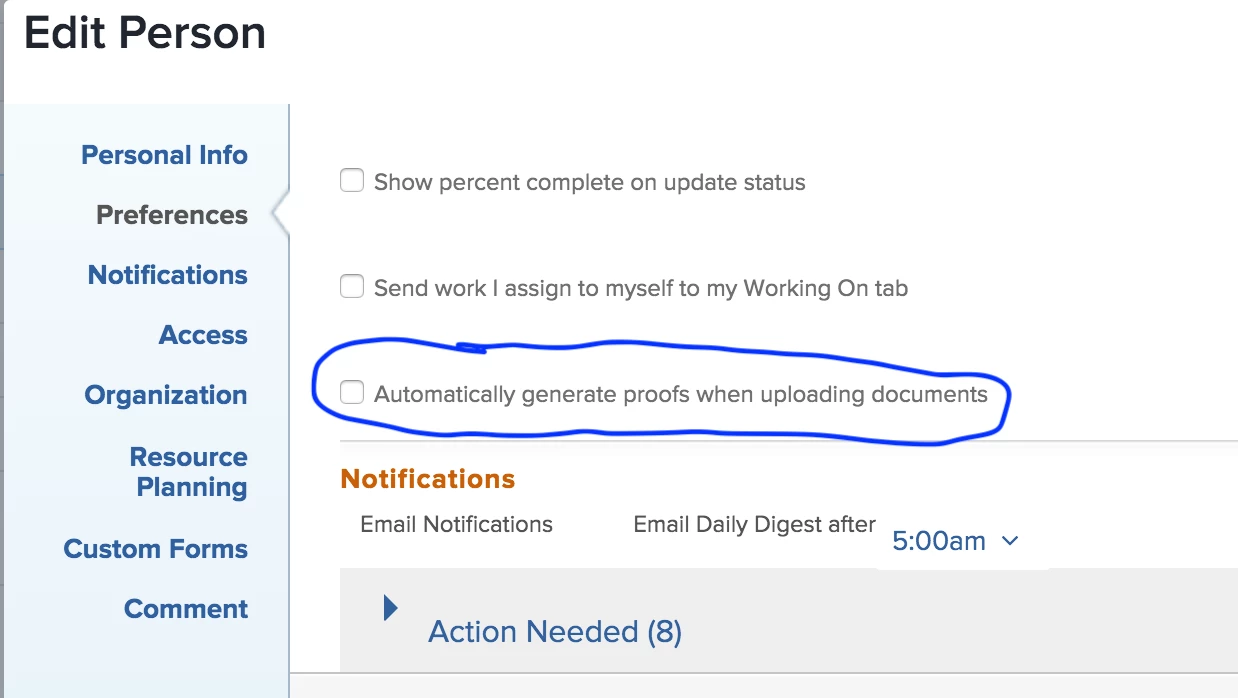
More newbie questions (and I am searching documentation first!). I want to set it so all the items (projects, tasks, issues, etc.) are shared with the entire company by default. Any way to do that? And I want to set it so all users default to uploading files WITHOUT being proofs. I see that's a setting on the user setup, and it defaults to the opposite of what I want. Is there any way to change that? Thanks in advance for any help! Mavis Moon
This post is no longer active and is closed to new replies. Need help? Start a new post to ask your question.

1 reply

Level 4
January 27, 2020

Regarding the proofing ... There's a setting in each User's settings called "automatically generate proofs when uploading documents." Just make sure this is unchecked. If you're not able to change it for your users, you might need Workfront admin permissions. Allison Lippert allisonlippert@workfront.com