
Fusion 2.0 Proof module help | Community
Skip to main content
BrandonNW
November 10, 2020
Solved

Fusion 2.0 Proof module help

  • November 10, 2020
  • 5 replies
  • 2223 views

Hello!

I have been playing around with this module for a few days to see what I can get out of it. The super basic use case we have right now is to simply automate the Proof name and check the subscription button. I have the default email for subscribers set to "disabled", but it still seems to be switching it back to "daily" in the proof details. I have to be missing something really obvious, but I cannot see it. Anyone else run into this type of issue? I would also like the "Subscriber must click a link in an email to access a proof" to be set to "no emails" as it is in the account settings for the proof users, but it seems to revert back to the "proof notifications by email" option as well. Any suggestions from my Fusion 2.0 users?
This post is no longer active and is closed to new replies. Need help? Start a new post to ask your question.
Best answer by darin_patterson

Hi Brandon,

I haven't forgotten about you and this, seemingly simple need. I've actually worked with our team to both fix an issue in the proof API and update our Workfront Proof connector to have all the necessary fields available.

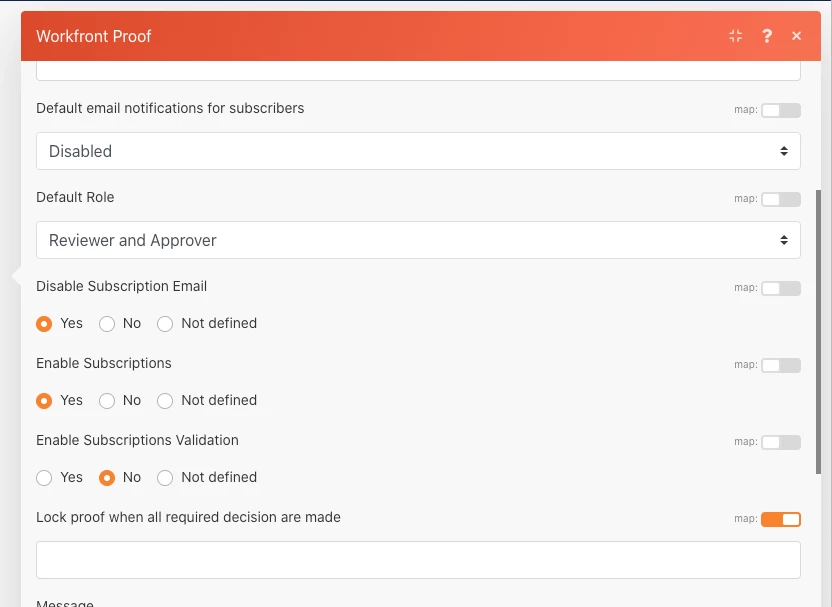
I'm pleased to say that you can now accomplish this update by setting the "Update Proof" fields as identified in this screenshot. I've confirmed that this will result in those settings you have identified above.

I hope this helps. Cheers.

5 replies

kynabaker16
Adobe Employee
Adobe Employee
November 10, 2020

Hi @Brandon Pritchard‚ in case you didn't know we have a group dedicated to Workfront Fusion 2.0!

I'm tagging that group here so that this question will also get posted there, but since you use that product I think it would be useful for you to join that group too - AND our product team over Fusion 2.0 watches that group pretty closely - for future questions. @Workfront Fusion 2.0‚

BrandonNW
BrandonNWAuthor
November 10, 2020

Thanks @Kyna Baker - inactive‚! I am a member already, I just completely forgot about it. Terrible, I know. 😋 We just started looking into the vast possibilities in 2.0, so I will probably be in here often. Thanks again.

kynabaker16
Adobe Employee
Adobe Employee
November 10, 2020

Oh, well that's even better! I'm excited to hear what you guys decide to automate with Workfront Fusion 2.0. So many possibilities - it's exciting and overwhelming at the same time I bet.

November 12, 2020

Hi Brandon, I hope you are doing well.

I'm not sure I have all the answers, but maybe more questions at this point.

I'm assuming, based upon your post, that you are using the "Workfront Proof Connector" in Fusion 2.0 and the "Create Proof" module up to this point?

I've configured this module with a "Proof with Basic Workflow" type and selected "yes" for "Enable Subscriptions" and "disabled" for the "Default email notifications for subscribers". (see screenshot).

When I run this I get a new proof created in proof (not Workfront) with Subscription checked and "when people subscribe....give them an alert of" set to "Disabled" (see screenshot).

I know you also have a question about setting the "subscriber must click a link in an email to access a proof" field...but I wanted to make sure I was tracking so far. Let me know if this aligns and/or whether you are able to get this far.

BrandonNW
BrandonNWAuthor
November 12, 2020

Hey Darin! Appreciate the response. You have interpreted this very well considering my lack of detail. 😉 The trigger for this scenario, as it plays into other paths as well, is a Watch Record module looking for new projects or updated projects. After a router and a couple of read modules, I have a Proof connector with a Update Proof module. The settings look like this:

I don't want to use a Create Proof module b/c our project owners manually generate those after some rounds of approval as a document. There is probably a way to do this as well, but I am not that clever yet in Fusion. In regards to the second part, I need the generated proof with the auto-selected settings to show in Workfront and not just Proofing.

Let me provide context here for how our process is set up.

  1. project is created w/o document
  2. document is uploaded by designer after requirements are given/reviewed
  3. document is approved by proofreaders and account manager to move into review (proofing)
  4. project owner generates proof and manually assigns the necessary users for the 1st round of review (this is where we need the subscription settings to auto-select) If I do not use Fusion to automate this, the subscription settings default to the user's proof account settings, but the subscription button needs manually checked. If I do use Fusion, the the subscription button is auto-selected, but the settings no longer default to the user's proof defaults.

I hope this helps clarify... or maybe it makes it more cloudy. Let me know you're thinking...

November 12, 2020

Thanks Brandon -- I am getting a slightly clearer picture.

Let me see if I can boil this down to the simplest form:

  • You are using an "update Proof" module
  • and you want to update the proof with the settings you highlighted in the red boxes on your screenshot?

Is that it?

BrandonNW
BrandonNWAuthor
November 12, 2020

lol. It seems so basic, right?

4 things.

  1. subscription box checked
  2. role = reviewer and approver
  3. default email = disabled
  4. email access to a proof = no emails
darin_pattersonAccepted solution
December 17, 2020

Hi Brandon,

I haven't forgotten about you and this, seemingly simple need. I've actually worked with our team to both fix an issue in the proof API and update our Workfront Proof connector to have all the necessary fields available.

I'm pleased to say that you can now accomplish this update by setting the "Update Proof" fields as identified in this screenshot. I've confirmed that this will result in those settings you have identified above.

I hope this helps. Cheers.

May 5, 2022

Hey Sorry to jump in here, Ive been able to create the proof via Fusion using the above steps etc.

but how do you actually link to the document in WF. I can see the proof creating in the proofing admin section but when I click onthe document detials I cannot see the proof info.

BrandonNW
BrandonNWAuthor
May 9, 2022

hmmm. Our proofs are manually created and then updated in fusion, so the scenario is a bit different. I am having trouble with this as well.

May 9, 2022

Hey Brandon,

i managed to find a way to link it. So what my scenario in Fusion does is create the proof using the create proof module in Fusion. I use the setting to select an existing template.

The proof is now created and is an unlinked state.

I then create a new document version record, and when creating I update the ProofID with the "unlinked" proofID.

so we will now have v1, which is just the document and then v2 which will be the document with the proof linked .

............. However I am still having other issues which is that the createproof module in fusion only works for jpeg files haha. Honestly getting tired battling the system with its many limitations and bugs. but hopefully the above helps you .

Feel free to reach out to me; if you need help. nitesh.dsouza@acensy.com

Nitesh

BrandonNW
BrandonNWAuthor
May 9, 2022

ahhh makes sense. And, I agree. many benefits, but also many headaches with fusion.