Forms not copying over from Issues converted to Projects | Community
Skip to main content
April 23, 2024
Question

Forms not copying over from Issues converted to Projects

  • April 23, 2024
  • 1 reply
  • 447 views

I manage a request queue and Issues come in from a request form**, then are assigned to an Owner who converts them to a project with a template. The problem is that the Issue Details shows the request form information, but the Project Details does not. You can search for it in Project Overview>Project Relationships>This Resolves, to get to the Issue, but that is time consuming.

  1. Need to know what settings need to be made/changed so the request information on the form is shown in the project. 
  2. How to take current/older projects and bring in the Project Details of that request form.

**NOTE: This request form was built the "old way" back when we had a separate Issue and separate Project version.
This post is no longer active and is closed to new replies. Need help? Start a new post to ask your question.

1 reply

Level 6
April 23, 2024

Hi Heather, 

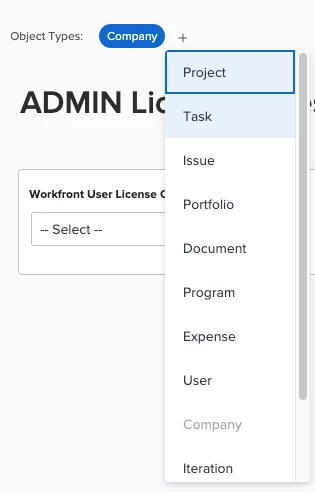
First, make sure that the custom form that is associated with your Issue is also associated with the project object by adding it from the dropdown at the top of the form.


Then, add the custom form to the project template that is being used when the issue is converted.

Once you've done this, the data from the issue will convert to the project automatically. 

Hope this helps, 

Teale

April 23, 2024

Thanks, @tealemccleaf . I will check my templates. We have many, and maybe the form fell off on some of them.