Formatting combined columns in text mode (so close to the right answer!)
Okay here is the goal: We have project managers and product managers (sometimes) on projects. I wanted to combine the project manager and product managers into one column so you can see both in one column. This made it difficult to tell who's who so I wanted to add labels prefixing the users so you knew (Examples: PjM: Kyle Mills and PdM: John Doe). Then to just make it easier on the eyes I wanted to bold the labels (so PjM: Kyle Mills would become PjM: Kyle Mills)
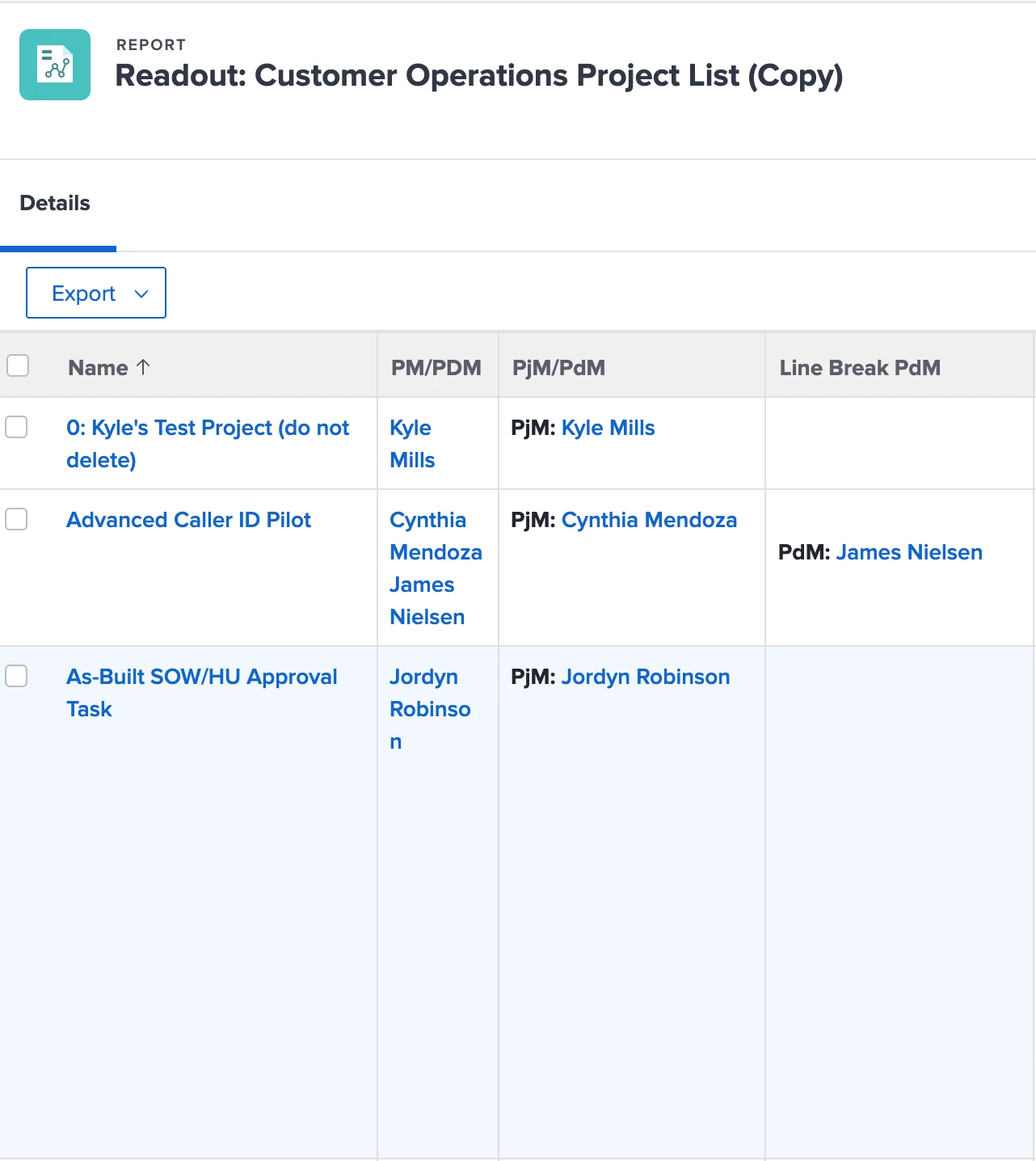
Now it has taken a lot of trial and error to get to where I am at. I believe in order to get just the label to be bold I have to create columns specifically for them, which I have and I've gotten that part to work. Furthermore it took some playing around to get the PdM label to only show up when there is a PdM on the project which is identified with a custom project typeahead (user) field. Anyways you can see in the attached image I now have two columns with bolded labels one with a line break just waiting to be combined with the other.
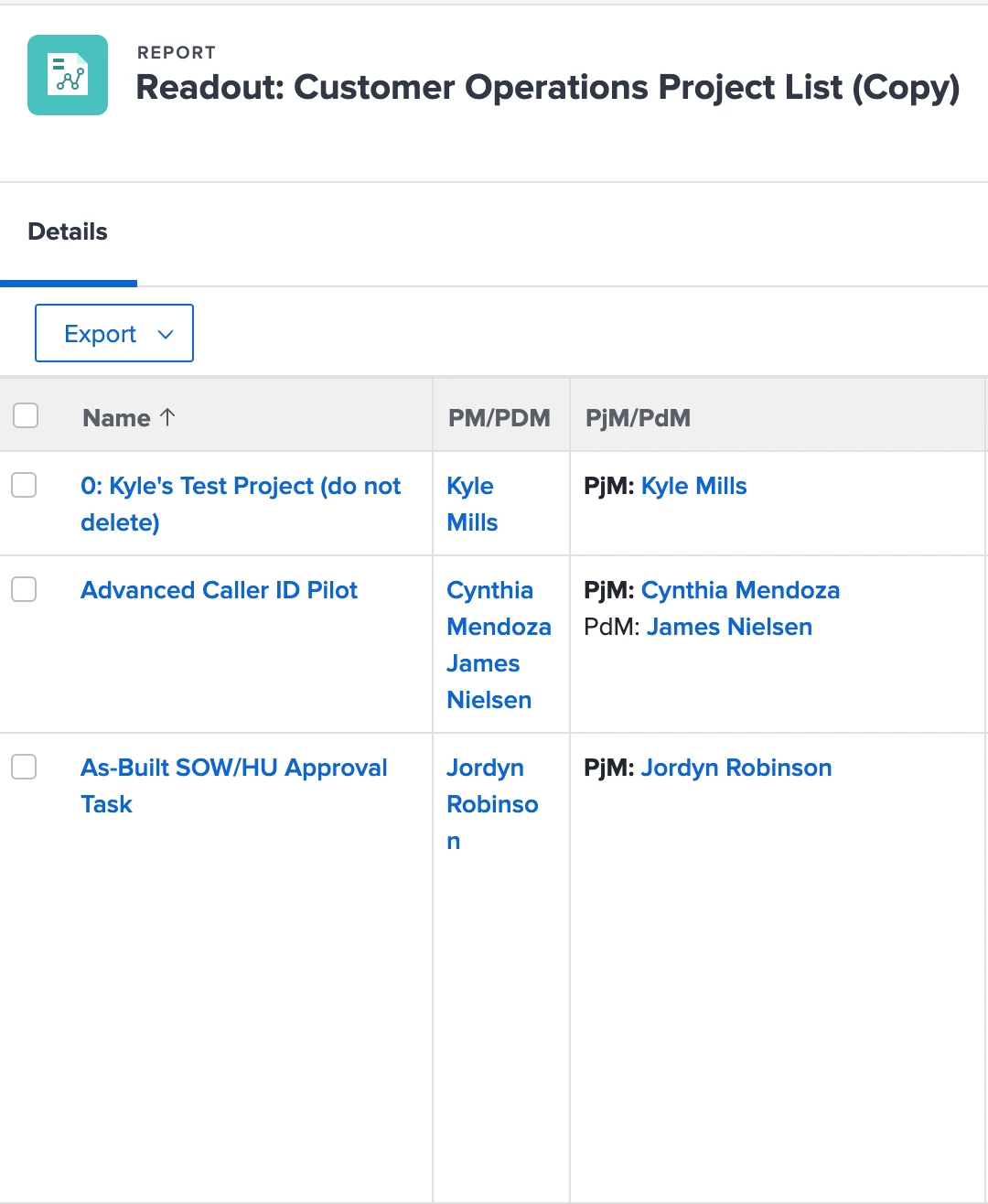
My Issue: The problem is when I add the sharecol=true line to the left column the "PdM: " label no longer stays bold (as displayed in second pic) and it's driving me mad. For context, this happened when adding the line break to the column with the PdM in it as well however I was able to resolve the issue by reducing the column number of the style lines by 1 (used to read column.10.styledef... now reads column.9.styledef...or used to before I reordered the columns either way that rebolded the text)
PjM/PdM column code:
column.4.displayname=PjM/PdM
column.4.sharecol=true
column.4.textmode=true
column.4.value=<b>PjM: </b>
column.4.valueformat=HTML
column.5.displayname=
column.5.linkedname=owner
column.5.namekey=view.relatedcolumn
column.5.namekeyargkey.0=owner
column.5.namekeyargkey.1=name
column.5.querysort=owner:name
column.5.textmode=true
column.5.valuefield=owner:name
column.5.valueformat=HTML
Line Break PdM Column Code:
column.6.displayname=Line Break PdM
column.6.sharecol=true
column.6.styledef.case.0.comparison.icon=false
column.6.styledef.case.0.comparison.leftmethod=company:name
column.6.styledef.case.0.comparison.lefttext=company:name
column.6.styledef.case.0.comparison.operator=notblank
column.6.styledef.case.0.comparison.operatortype=string
column.6.styledef.case.0.comparison.righttext=
column.6.styledef.case.0.comparison.trueproperty.0.name=fontstyle
column.6.styledef.case.0.comparison.trueproperty.0.value=bold
column.6.styledef.case.0.comparison.truetext=
column.6.textmode=true
column.6.value=<br>
column.6.valueformat=HTML
column.7.displayname=PdM Label
column.7.linkedname=Product Manager - PdM
column.7.namekey=view.relatedcolumn
column.7.namekeyargkey.0=Product Manager - PdM
column.7.namekeyargkey.1=name
column.7.querysort=DE:Product Manager - PdM:name
column.7.sharecol=true
column.7.textmode=true
column.7.valueformat=HTML
column.8.sharecol=true
column.8.textmode=true
column.8.valueexpression=IF(ISBLANK({DE:Product Manager - PdM:name}),"","PdM: ")
column.8.valueformat=HTML
column.9.displayname=
column.9.linkedname=Product Manager - PdM
column.9.namekey=view.relatedcolumn
column.9.namekeyargkey.0=Product Manager - PdM
column.9.namekeyargkey.1=name
column.9.querysort=DE:Product Manager - PdM:name
column.9.textmode=true
column.9.valuefield=Product Manager - PdM:name
column.9.valueformat=customReferenceObjectAsString
Combined column that doesn't work (result shown in second pic):
column.4.displayname=PjM/PdM
column.4.sharecol=true
column.4.textmode=true
column.4.value=<b>PjM: </b>
column.4.valueformat=HTML
column.5.displayname=
column.5.linkedname=owner
column.5.namekey=view.relatedcolumn
column.5.namekeyargkey.0=owner
column.5.namekeyargkey.1=name
column.5.querysort=owner:name
column.5.sharecol=true
column.5.textmode=true
column.5.valuefield=owner:name
column.5.valueformat=HTML
column.6.displayname=Line Break PdM
column.6.sharecol=true
column.6.styledef.case.0.comparison.icon=false
column.6.styledef.case.0.comparison.leftmethod=company:name
column.6.styledef.case.0.comparison.lefttext=company:name
column.6.styledef.case.0.comparison.operator=notblank
column.6.styledef.case.0.comparison.operatortype=string
column.6.styledef.case.0.comparison.righttext=
column.6.styledef.case.0.comparison.trueproperty.0.name=fontstyle
column.6.styledef.case.0.comparison.trueproperty.0.value=bold
column.6.styledef.case.0.comparison.truetext=
column.6.textmode=true
column.6.value=<br>
column.6.valueformat=HTML
column.7.displayname=PdM Label
column.7.linkedname=Product Manager - PdM
column.7.namekey=view.relatedcolumn
column.7.namekeyargkey.0=Product Manager - PdM
column.7.namekeyargkey.1=name
column.7.querysort=DE:Product Manager - PdM:name
column.7.sharecol=true
column.7.textmode=true
column.7.valueformat=HTML
column.8.sharecol=true
column.8.textmode=true
column.8.valueexpression=IF(ISBLANK({DE:Product Manager - PdM:name}),"","PdM: ")
column.8.valueformat=HTML
column.9.displayname=
column.9.linkedname=Product Manager - PdM
column.9.namekey=view.relatedcolumn
column.9.namekeyargkey.0=Product Manager - PdM
column.9.namekeyargkey.1=name
column.9.querysort=DE:Product Manager - PdM:name
column.9.textmode=true
column.9.valuefield=Product Manager - PdM:name
column.9.valueformat=customReferenceObjectAsString
---------------------------
Any help would be greatly appreciated. I took different approaches to bolding the labels because the "PjM: " label will be present on every single project so I could make it a static element to the report. The "PdM: " label should only be present if there is a PdM on the project (denoted by custom field) so I had to use a valuexpression to make it conditionally display and I could only get it to bold via the styledef lines. Again when I did the first step to combining the PjM and PdM columns (adding line break to PdM column) the "PdM: " label unbolded and I fixed that issue by reducing the value in the styledef lines column value by 1 (no idea why that worked I just had a hunch). Now when I add the sharecol=true line to the PjM column it does combine everything exactly how I want it to but "PdM: " is not bolded ("PjM: " does stay bolded though). I did try reducing the styledef lines column value by 1 but that didn't work this time. Furthermore if I set the PdM column to be the left most column it works fine and both labels stay bolded but I don't want the PdM to be displayed on top since it won't always be there and I don't want people to start associating the first name with the PdM.
Sorry that was a lot of text but I am just trying to dump everything out of my brain before I quit thinking about this. Thank you!