Filter out specific parent task using valueexpression | Community
Skip to main content
Level 2
March 5, 2024
Solved

Filter out specific parent task using valueexpression

  • March 5, 2024
  • 2 replies
  • 2098 views

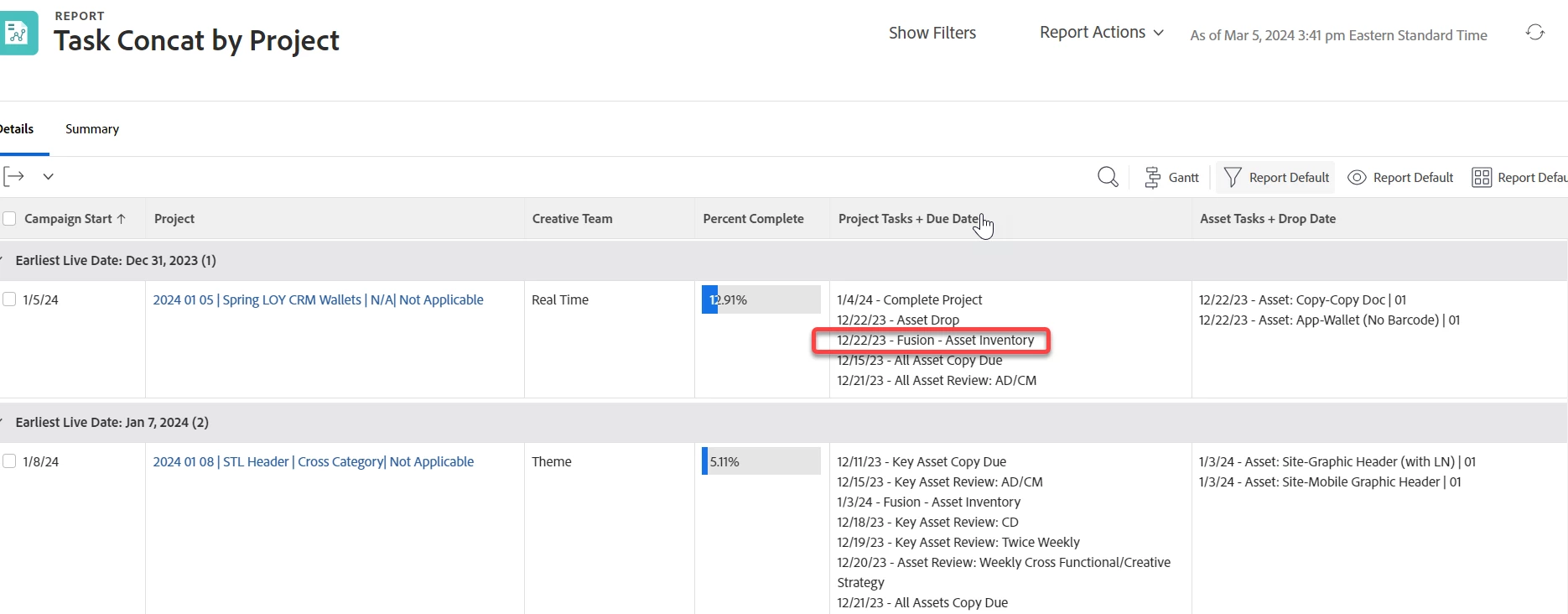
Hi! I'd like to filter out a specific parent task from showing in a report. However, a filter is not working now that I've combined all tasks into one field. Anyone know how I might manipulate the valueexpression for the Project Tasks + Due Date column to also NOT CONTAIN "Fusion - Asset Inventory" parent task? Thanks in advance! New to using text mode!


displayname=Project Tasks + Due Date
listdelimiter=<p>
listmethod=nested(tasks).lists
textmode=true
type=iterate
valueexpression=IF(CONTAINS('Asset:',{name})=true," ",CONCAT({plannedCompletionDate}," - ",{name}))
valueformat=HTML
 

This post is no longer active and is closed to new replies. Need help? Start a new post to ask your question.
Best answer by KellieGardner

It looks like you would also need to remove the : as well since the parent task isn't formatted as "Asset:"


IF(CONTAINS('Asset',{name})," ",CONCAT({plannedCompletionDate}," - ",{name}))


I just looked at your task list you posted and see that it would filter out additional items in the milestones below so I would do 2 IF statements combined.


Try this:


IF(CONTAINS('Asset:',{name})," ",IF(CONTAINS('Fusion - Asset Inventory',{name}),"",CONCAT({plannedCompletionDate}," - ",{name})))

2 replies

KellieGardner
Community Advisor
Community Advisor
March 5, 2024

HI @colleenkl - You don't need the "= true" after the contains statement. 


CONTAINS(findText, withinText)


See if this works:

IF(CONTAINS('Asset:',{name})," ",CONCAT({plannedCompletionDate}," - ",{name}))

ColleenKlAuthor
Level 2
March 5, 2024

hey Kellie!
I need to keep the "Asset" statement in there b/c it's differentiating the two different task types we have - project column does NOT contain tasks with "Asset:" but the Asset Task column does. I want to also remove the "Fusion - Asset Inventory" parent task from what's showing in the project column, however. Does that make sense?

ColleenKlAuthor
Level 2
March 5, 2024


Then you should stick with your original code and remove the =true as mentioned above as it's not needed for a Contains statement.


IF(CONTAINS('Asset:',{name})," ",CONCAT({plannedCompletionDate}," - ",{name}))


This will not show any task where the name contains the word "asset" in any fashion.


Sorry @kelliegardner apparently i'm not being very clear 😛


This works in the project task column:
valueexpression=IF(CONTAINS('Asset:',{name})=true," ",CONCAT({plannedCompletionDate}," - ",{name}))


This works in the asset task column:

valueexpression=IF(CONTAINS('Asset:',{name})=false," ",CONCAT({plannedCompletionDate}," - ",{name}))


For the project task column though, I want to ALSO filter out the parent task "Fusion - Asset Inventory" as it is not a "real" task assigned to anyone. It only holds all of our digital marketing asset tasks under it in the Task list of the project.


So the project task column shows all project milestones, and the asset task column shows all of the Asset Inventory from issues created within the project that have been converted to tasks. (see screen grab!)


Level 6
March 6, 2024

Hi Colleen, 


You said that the Project tasks are milestones. Are you using a milestone path on the project and do you have them tagged?  If so, you can use this textmode on a Project report to pull only those Project tasks:


valueexpression=IF(!ISBLANK({milestoneID}),CONCAT({plannedCompletionDate}," - ",{name}))
listdelimiter=<p>
listmethod=nested(tasks).lists
valueformat=HTML
displayname=Project Tasks + Due Date
textmode=true
type=iterate


This is my test schedule:


My test renders the following results:


I hope this helps, 

Teale

ColleenKlAuthor
Level 2
March 6, 2024

Hey Teale - interesting to see another perspective! We aren't using WF milestones currently. Internally, we reference project tasks as "milestones" to differentiate them from asset tasks. But cool to understand something different!