Filter on a Custom Column | Community
Skip to main content
Level 2
January 30, 2020
Question

Filter on a Custom Column

  • January 30, 2020
  • 6 replies
  • 1232 views
I created a custom status column for our tasks (Overdue, Missing, In Progress, etc.). In a report, I now need to filter by just the tasks that have a specific value from that custom column (just the Missing tasks, for example). Is it possible to do that? If so, how? Thanks, Aidan Aidan Grey Tri-State
This post is no longer active and is closed to new replies. Need help? Start a new post to ask your question.

6 replies

Level 10
January 30, 2020
Absolutely. Create a Task Report, go to the Filter tab, type in your field name, Equals, and start typing Missing and it'll display your field selections. Just choose the one(s) you want. And in the View tab ensure you see the columns you want to see. You can Filter, View, and Group on virtually any custom field you create (as well as the WF native fields).
AidanGrAuthor
Level 2
January 30, 2020
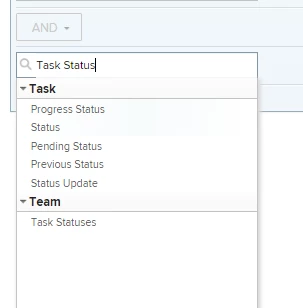
Thanks Vic. Unfortunately, that doesn't work (for some reason, I can't upload a screenshot). Basically, Task Status is not an option in the filter drop downs. I am guessing I will need to create a filter in textmode, but don't know how to refer to my calculated column. Here's my calculated column textmode code: displayname=Task Status textmode=true valueexpression=if(number({projectedCompletionDate})
Level 10
January 31, 2020
Hi Aidan, OK I didn't realize you were talking about a calculated field. You should still be able to find your filed name the same way though. But it won't prepopulate the selections so you'll have to spell out the selection you wan (Missing). But I don't see you setting this field to Missing in this IF statement. Am I missing something there? For screen shots I just copy and paste right into this email reply. Have you tried that?
AidanGrAuthor
Level 2
January 31, 2020

Oh, oops! No, you're not missing anything - I just picked a value from a similar calculated field that's not actually in this one. That's on me. Let's see if I can get this to work via email – the calculated column (NOT on a custom form, just in the report, as it needs to be dynamic) is called Task Status, but it's not in the available selections anywhere (Task Statuses is something else).

Level 10
January 31, 2020
Ahhhh, that's what I didn't catch. I thought you had created the column with a field as opposed to in the report. Unfortunately I don't think you can do that. I tried some text mode in the filter but couldn't get it to work. I think the problem is the field isn't established in the database so WF is unable to use it in a Filter or Group. I couldn't sort it either. Sorry. You might try creating the calculated field though. They can be pretty dynamic. In most cases you simply have to "touch" the object (i.e. task) for it to recalc. And you would also have the option to do a bulk edit of the custom form by running a report, selecting all the tasks, and simply select the Custom Forms check box without changing any fields and it should recalculate. So that might be an option. Hope that makes sense.
AidanGrAuthor
Level 2
January 31, 2020
Thanks Vic – that's about what I was coming to as well. I even tried replicating the valueexpression as part of a filter spec, but no go. It's a bummer. I'll check and see if using a custom form will do what I need – that may work well enough, for this particular need. Appreciate your help nonetheless!