Favorites: Add Current page is grayed out in Workfront | Community
Skip to main content
Level 3
April 5, 2024
Solved

Favorites: Add Current page is grayed out in Workfront

  • April 5, 2024
  • 2 replies
  • 1201 views

Hi Community,

Favorites: Add Current page is grayed out in Workfront, any idea why and how can this be enabled? please see screenshot below.
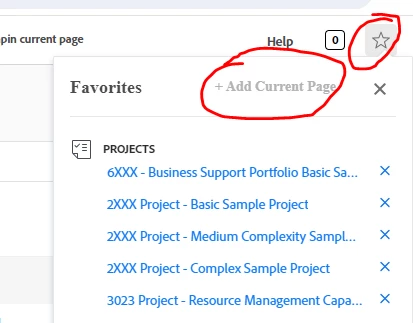


Thanks 


Mesh

This post is no longer active and is closed to new replies. Need help? Start a new post to ask your question.
Best answer by ChloeWY

@meshackom1 that's the problem then.  Neither of those screens are able to be favorited.  Favorites is more for specific projects, specific reports, specific dashboards, etc. not general pages like Resource Management or Projects.  

I recommend you pin Resource Management and Projects to your top bar (global navigation bar).  You'll be able to do that, and it will accomplish a very similar goal.

2 replies

ChloeWY
Level 6
April 5, 2024

What type of object are you trying to favorite?  Not all objects can be favorited.  

Level 2
April 6, 2024

@chloewy I was trying to add resource management and project window 

ChloeWY
ChloeWYAccepted solution
Level 6
April 9, 2024

@meshackom1 that's the problem then.  Neither of those screens are able to be favorited.  Favorites is more for specific projects, specific reports, specific dashboards, etc. not general pages like Resource Management or Projects.  

I recommend you pin Resource Management and Projects to your top bar (global navigation bar).  You'll be able to do that, and it will accomplish a very similar goal.

Level 3
April 5, 2024

Or, you have reached the max limit of items you can favorite.

Level 2
April 6, 2024

@nryan2  thanks for you input. I believe I have reached the Max (see screenshot below). Do you know the maximum favorite a user can add?