Displaying Parent Task Status in Columns on Project Report | Community
Skip to main content
March 16, 2022
Solved

Displaying Parent Task Status in Columns on Project Report

  • March 16, 2022
  • 2 replies
  • 1642 views

Hi all!

I am very new to Workfront; our team is just going live now with it. We've been using Excel for project/task management and we have a summary worksheet that provides a nice at-a-glance view of project/task completion, etc. I'd like to come up with something similar in WF. We looked at Milestone reporting but it's a lot more detailed than I'm looking for.

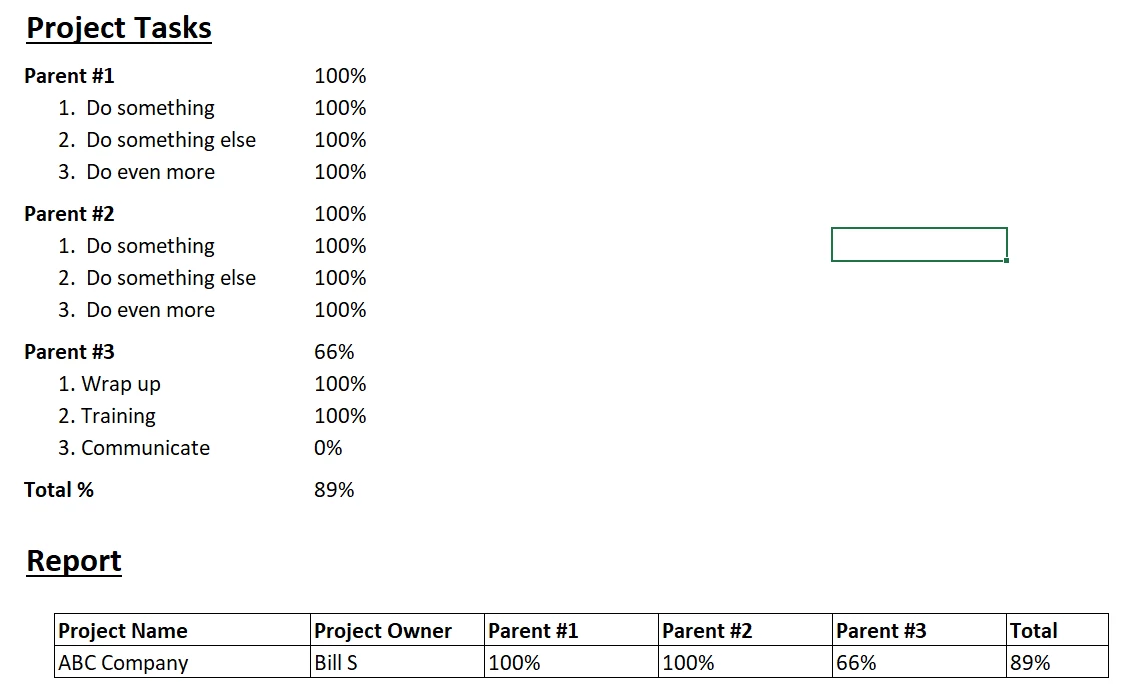
Here's a quick example of what I'm wanting to do. The report would look something like what's at the bottom, showing a status of each Parent Task in the project. I've done some digging and it looks like a Project Report with Text Mode columns added will work but I can't figure out how to pull the status from each Parent Task. I have the overall % which came from the default Project Report and I added the extra columns and gave them the display names I need but stuck on how to link the status % to the specific Parent Task.

Is this possible and, if so, any suggestions? Thanks!

This post is no longer active and is closed to new replies. Need help? Start a new post to ask your question.
Best answer by RKirk

I've tested a similar idea for a milestone report I was working on, but the upkeep on the report ended up not being worth the effort comparted to using the built in grouping functionality.

Basically, this is looking for a particular milestone name to show info, you can replicate this with different milestone names to just show their relevant data. Might work for what you're looking for regarding the parent task.

Here's the textmode edits for the named milestone column "Charter Complete". I've bolded the rows that really force the "if milestone name = x" to generate the below info on planned complete, projected complete, and % complete. You should be able to modifty that from:

IF({milestone}.{name}="Charter Complete",CONCAT({percentComplete},"%"))

to something like:

IF({task}.{name}="Parent #1",CONCAT({percentComplete},"%"))

column.7.displayname=Charter Complete

column.7.sharecol=true

column.7.styledef.case.0.comparison.icon=false

column.7.styledef.case.0.comparison.leftmethod=condition

column.7.styledef.case.0.comparison.lefttext=condition

column.7.styledef.case.0.comparison.operator=in

column.7.styledef.case.0.comparison.operatortype=string

column.7.styledef.case.0.comparison.righttext=AR

column.7.styledef.case.0.comparison.trueproperty.0.name=bgcolor

column.7.styledef.case.0.comparison.trueproperty.0.value=feecc8

column.7.styledef.case.0.comparison.truetext=

column.7.styledef.case.1.comparison.icon=false

column.7.styledef.case.1.comparison.leftmethod=condition

column.7.styledef.case.1.comparison.lefttext=condition

column.7.styledef.case.1.comparison.operator=in

column.7.styledef.case.1.comparison.operatortype=string

column.7.styledef.case.1.comparison.righttext=IT

column.7.styledef.case.1.comparison.trueproperty.0.name=bgcolor

column.7.styledef.case.1.comparison.trueproperty.0.value=eac6c9

column.7.styledef.case.1.comparison.truetext=

column.7.styledef.case.2.comparison.icon=false

column.7.styledef.case.2.comparison.leftmethod=condition

column.7.styledef.case.2.comparison.lefttext=condition

column.7.styledef.case.2.comparison.operator=in

column.7.styledef.case.2.comparison.operatortype=string

column.7.styledef.case.2.comparison.righttext=ON

column.7.styledef.case.2.comparison.trueproperty.0.name=bgcolor

column.7.styledef.case.2.comparison.trueproperty.0.value=def6e2

column.7.styledef.case.2.comparison.truetext=

column.7.textmode=true

column.7.value=<b><strong>Task: &nbsp;&nbsp</strong>

column.7.valueformat=HTML

column.7.width=150

column.8.displayname=Task Name

column.8.listdelimiter=<div>

column.8.listmethod=nested(tasks).lists

column.8.sharecol=true

column.8.textmode=true

column.8.type=iterate

column.8.valueexpression=IF({milestone}.{name}="Charter Complete",{name})

column.8.valueformat=HTML

column.9.sharecol=true

column.9.textmode=true

column.9.value=</b><hr><strong>Planned Completion:&nbsp;&nbsp</strong>

column.9.valueformat=HTML

column.9.width=150

column.10.displayname=Charter Complete Date

column.10.listdelimiter=<div>

column.10.listmethod=nested(tasks).lists

column.10.sharecol=true

column.10.textmode=true

column.10.type=iterate

column.10.valueexpression=IF({milestone}.{name}="Charter Complete",{plannedCompletionDate})

column.10.valueformat=HTML

column.11.sharecol=true

column.11.textmode=true

column.11.value=<hr><strong>Projected Completion:&nbsp;&nbsp</strong>

column.11.valueformat=HTML

column.11.width=150

column.12.listdelimiter=<div>

column.12.listmethod=nested(tasks).lists

column.12.sharecol=true

column.12.textmode=true

column.12.type=iterate

column.12.valueexpression=IF({milestone}.{name}="Charter Complete",{projectedCompletionDate})

column.12.valueformat=HTML

column.13.sharecol=true

column.13.textmode=true

column.13.value=<hr><strong>% Complete:&nbsp;&nbsp</strong>

column.13.valueformat=HTML

column.13.width=150

column.14.displayname=Charter Complete %

column.14.listdelimiter=<div>

column.14.listmethod=nested(tasks).lists

column.14.textmode=true

column.14.type=iterate

column.14.valueexpression=IF({milestone}.{name}="Charter Complete",CONCAT({percentComplete},"%"))

column.14.valueformat=HTML
2 replies

RKirkAccepted solution
Level 4
March 17, 2022

I've tested a similar idea for a milestone report I was working on, but the upkeep on the report ended up not being worth the effort comparted to using the built in grouping functionality.

Basically, this is looking for a particular milestone name to show info, you can replicate this with different milestone names to just show their relevant data. Might work for what you're looking for regarding the parent task.

Here's the textmode edits for the named milestone column "Charter Complete". I've bolded the rows that really force the "if milestone name = x" to generate the below info on planned complete, projected complete, and % complete. You should be able to modifty that from:

IF({milestone}.{name}="Charter Complete",CONCAT({percentComplete},"%"))

to something like:

IF({task}.{name}="Parent #1",CONCAT({percentComplete},"%"))

column.7.displayname=Charter Complete

column.7.sharecol=true

column.7.styledef.case.0.comparison.icon=false

column.7.styledef.case.0.comparison.leftmethod=condition

column.7.styledef.case.0.comparison.lefttext=condition

column.7.styledef.case.0.comparison.operator=in

column.7.styledef.case.0.comparison.operatortype=string

column.7.styledef.case.0.comparison.righttext=AR

column.7.styledef.case.0.comparison.trueproperty.0.name=bgcolor

column.7.styledef.case.0.comparison.trueproperty.0.value=feecc8

column.7.styledef.case.0.comparison.truetext=

column.7.styledef.case.1.comparison.icon=false

column.7.styledef.case.1.comparison.leftmethod=condition

column.7.styledef.case.1.comparison.lefttext=condition

column.7.styledef.case.1.comparison.operator=in

column.7.styledef.case.1.comparison.operatortype=string

column.7.styledef.case.1.comparison.righttext=IT

column.7.styledef.case.1.comparison.trueproperty.0.name=bgcolor

column.7.styledef.case.1.comparison.trueproperty.0.value=eac6c9

column.7.styledef.case.1.comparison.truetext=

column.7.styledef.case.2.comparison.icon=false

column.7.styledef.case.2.comparison.leftmethod=condition

column.7.styledef.case.2.comparison.lefttext=condition

column.7.styledef.case.2.comparison.operator=in

column.7.styledef.case.2.comparison.operatortype=string

column.7.styledef.case.2.comparison.righttext=ON

column.7.styledef.case.2.comparison.trueproperty.0.name=bgcolor

column.7.styledef.case.2.comparison.trueproperty.0.value=def6e2

column.7.styledef.case.2.comparison.truetext=

column.7.textmode=true

column.7.value=<b><strong>Task: &nbsp;&nbsp</strong>

column.7.valueformat=HTML

column.7.width=150

column.8.displayname=Task Name

column.8.listdelimiter=<div>

column.8.listmethod=nested(tasks).lists

column.8.sharecol=true

column.8.textmode=true

column.8.type=iterate

column.8.valueexpression=IF({milestone}.{name}="Charter Complete",{name})

column.8.valueformat=HTML

column.9.sharecol=true

column.9.textmode=true

column.9.value=</b><hr><strong>Planned Completion:&nbsp;&nbsp</strong>

column.9.valueformat=HTML

column.9.width=150

column.10.displayname=Charter Complete Date

column.10.listdelimiter=<div>

column.10.listmethod=nested(tasks).lists

column.10.sharecol=true

column.10.textmode=true

column.10.type=iterate

column.10.valueexpression=IF({milestone}.{name}="Charter Complete",{plannedCompletionDate})

column.10.valueformat=HTML

column.11.sharecol=true

column.11.textmode=true

column.11.value=<hr><strong>Projected Completion:&nbsp;&nbsp</strong>

column.11.valueformat=HTML

column.11.width=150

column.12.listdelimiter=<div>

column.12.listmethod=nested(tasks).lists

column.12.sharecol=true

column.12.textmode=true

column.12.type=iterate

column.12.valueexpression=IF({milestone}.{name}="Charter Complete",{projectedCompletionDate})

column.12.valueformat=HTML

column.13.sharecol=true

column.13.textmode=true

column.13.value=<hr><strong>% Complete:&nbsp;&nbsp</strong>

column.13.valueformat=HTML

column.13.width=150

column.14.displayname=Charter Complete %

column.14.listdelimiter=<div>

column.14.listmethod=nested(tasks).lists

column.14.textmode=true

column.14.type=iterate

column.14.valueexpression=IF({milestone}.{name}="Charter Complete",CONCAT({percentComplete},"%"))

column.14.valueformat=HTML

March 17, 2022

Hey Ryan,

Thanks for the reply! That is VERY close to what I'm looking for!

The Parent Task/Milestone value is correct. Is it possible to get the formatting in each column to be like the % Complete column at the right (with the progress bar, etc.)? I tried a few different options but couldn't get it to work.

Here's the text I'm using:

displayname=Parent #1

listdelimiter=<div>

listmethod=nested(tasks).lists

textmode=true

type=iterate

valueexpression=IF({milestone}.{name}="Parent #1",CONCAT({percentComplete},"%"))

valueformat=HTML

Thanks!

Matt

Level 4
March 17, 2022

Hi Matt,

Unfortunately, I've not been able to get that progress bar to carry through via my text mode edits. Would love to have it, or modify the color based on velocity or something.

Doug_Den_Hoed__AtAppStore
Community Advisor
Community Advisor
March 22, 2022

Hi Ryan and Matt,

Since the progress bar is not available, I invite you to consider rolling your own using an IF statement such as this:

IF(Percent Complete < 10, "",

IF(Percent Complete < 20, "#",

IF(Percent Complete < 30, "##",

IF(Percent Complete < 40, "###",

IF(Percent Complete < 50, "####",

IF(Percent Complete < 60, "#####",

IF(Percent Complete < 70, "######",

IF(Percent Complete < 80, "########",

IF(Percent Complete < 90, "#########",

IF(Percent Complete < 100, "##########","##########"

))))))))))

You could embellish it by using a different character than #, and (super bonus marks) even take a crack at an HTML version using spans, divs, and/or the progress tag.

Regards,

Doug

March 23, 2022

Thanks, Doug! Interesting thought! I will give that a try.