Detailed Gantt charts for Programs | Community
Skip to main content
Level 2
December 17, 2024
Solved

Detailed Gantt charts for Programs

  • December 17, 2024
  • 5 replies
  • 1537 views

Is there a way to see task milestones in individual projects from a Program level? I am looking for a way to view/share a Gantt chart that shows multiple projects within a Program and the various steps required for each of the projects. Currently when I open a Gantt chart view within a program, it just shows a single line for the project as a whole. 

Best answer by Doug_Den_Hoed__AtAppStore


Hi @coreyma4,


In addition to the kind words from @scottmo1, and although I appreciate your current budget might not accommodate an additional plug-in, what you described sounds like it could also be a good usecase for our MarCom Gantt, Swimlane Report, and/or Swimlane ADVANCED solutions.


Each of them have screenshots and videos that explain more -- some of which is based on custom data techniques that might be useful even whether you proceed with the solution or not -- so I invite you to review them at your convenience, and would be happy to chat further via doug.denhoed@atappstore.com.


Regards,

Doug

5 replies

Level 4
December 17, 2024

Hi CoryMa4 - this was a common issue for our business.  I encourage you to check out the Lite-Brite solution at AtAppStore.  We were instrumental in developing this functionality.   You can watch the video I did with Doug to explain the features of Lite-Brite.    This is a very instrumental tool in running our business as well as to help departments plan upcoming resources (we do not use Resource Manager in Workfront).  Let me know if you would like to chat further on this topic.

CoreyMa4Author
Level 2
December 17, 2024

Thank you Scott, unfortunately I do not think our company is currently open to paying for an additional program at this time.

Level 4
December 17, 2024

I encourage you to at least watch the video - the concept might be of help even if you don't get the full visual benefits of the AtAppStore solution.   But it is a life saver for us - if have a chance you should consider it 


PS.   I don't work for AtAppStore (haha) - we just love the tool.

skyehansen
Community Advisor
Community Advisor
December 17, 2024

I'm not sure, but are you referring to the instructions in this article:

https://experienceleague.adobe.com/en/docs/workfront/using/manage-work/the-gantt-chart/gantt-chart-overview/view-info-in-gantt


Under the section "View task information in the project list Gantt Chart"

KellieGardner
Community Advisor
Community Advisor
December 17, 2024

I'm not exactly sure what you are looking for when you say detailed information. Are you looking for project information or are you looking for task information?


If you are looking for project information you can build a view that has those columns and then select the Gantt chart option to get more information plus the Gantt view.


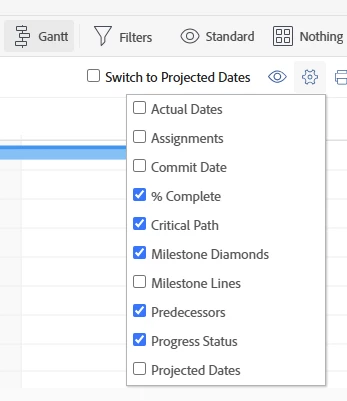
Or if you are looking for task details you can select the settings to add more details like milestone markers. Or select to include task information (eye icon next to settings wheel)


CoreyMa4Author
Level 2
December 17, 2024

Hello Kellie, I am not sure it might be how Workfront is set up at our company or my access level or how the individual projects were set up, but when in a Program and looking at all projects within said program, I am still unable to see a breakdown of the tasks/milestones within each project, even when the "Show Task List" option is selected. In an ideal world, I would like if the project tasks or task groups could be visible for all projects at once within a program. 


KellieGardner
Community Advisor
Community Advisor
January 2, 2025

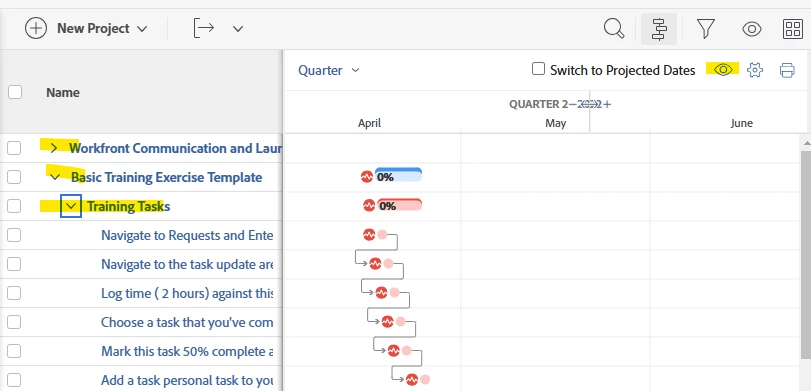
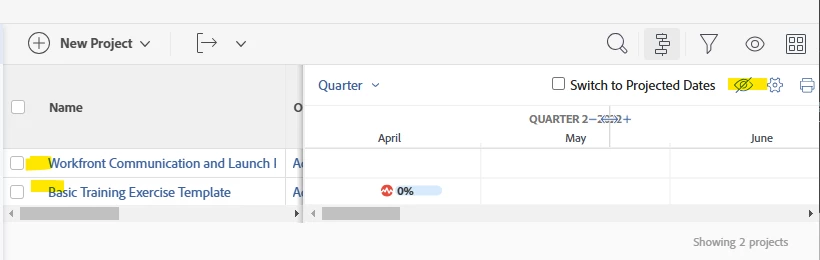
Hi Corey - To see the task information you need to select the Eye Icon to remove the slash (as you have done) and then you can expand the task details, and it will show below the line for the project.


I don't have a great example for you from my instance, but it will look like this:


Without the eye icon it looks like this:


Doug_Den_Hoed__AtAppStore
Community Advisor
Doug_Den_Hoed__AtAppStoreCommunity AdvisorAccepted solution
Community Advisor
December 17, 2024


Hi @coreyma4,


In addition to the kind words from @scottmo1, and although I appreciate your current budget might not accommodate an additional plug-in, what you described sounds like it could also be a good usecase for our MarCom Gantt, Swimlane Report, and/or Swimlane ADVANCED solutions.


Each of them have screenshots and videos that explain more -- some of which is based on custom data techniques that might be useful even whether you proceed with the solution or not -- so I invite you to review them at your convenience, and would be happy to chat further via doug.denhoed@atappstore.com.


Regards,

Doug

kautuk_sahni
Community Manager
Community Manager
September 1, 2025

@coreyma4 Hi there, just checking in. Were you able to get this resolved? If one of the replies above helped, even if it didn’t fully solve the issue but pointed you in the right direction, marking it as accepted can still guide others who may face a similar question. And if you discovered another way to fix it, sharing your approach would be a big help to the community. Your follow-up not only closes the loop but also ensures others benefit from your experience. Thanks again for being part of the conversation!

Kautuk Sahni