Customize a parent task row in a project | Community
Skip to main content
JennyWi
Level 3
February 2, 2023
Solved

Customize a parent task row in a project

  • February 2, 2023
  • 1 reply
  • 2153 views

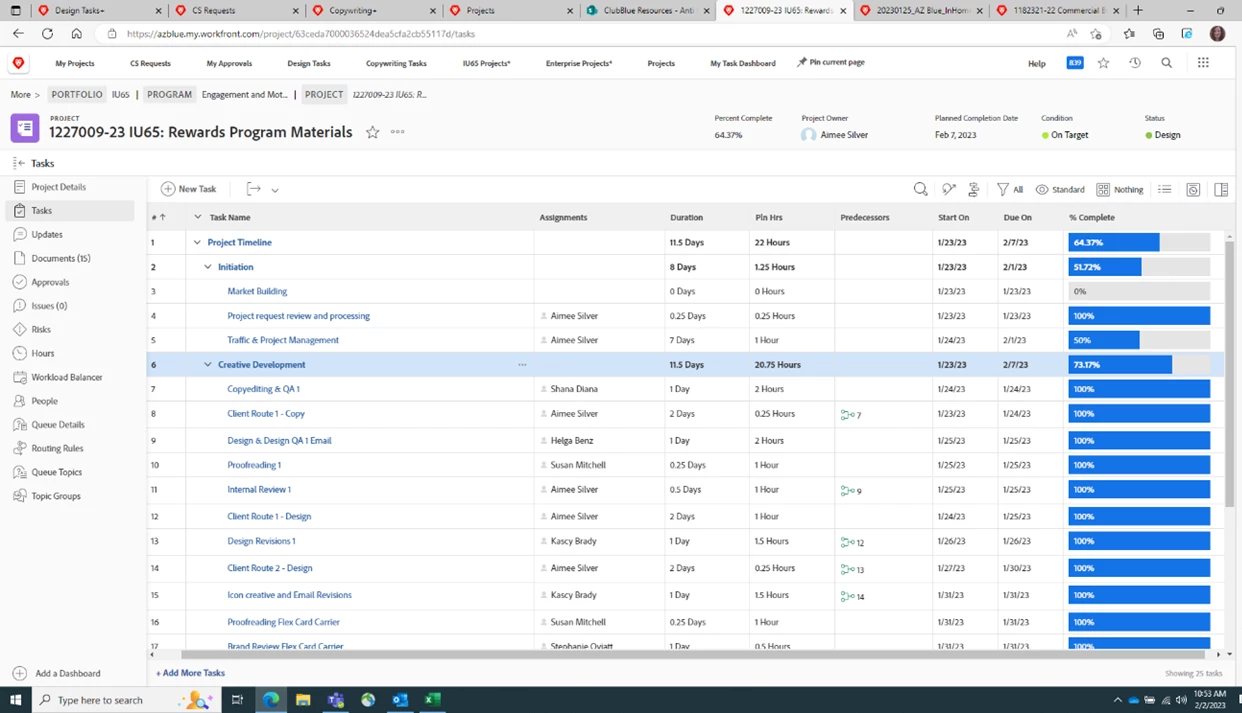
Hello! I'd like to customize a parent task ROW in a task template - this task template is used in projects. See highlighted row in blue - we'd like to make this parent task row a different color to make it stand out more.

Is this possible? 

This post is no longer active and is closed to new replies. Need help? Start a new post to ask your question.
Best answer by RandyRoberts

I think this is the issue - our Task Templates are not built as Reports.

They live under Templates -- Main Menu > Templates.

Is there a way to customize rows within a Template?


https://experienceleague.adobe.com/docs/workfront/using/manage-work/projects/create-and-manage-project-templates/create-template.html?lang=en


You would have to use a Task report view, which is how you see a task list in a project. When you open a project and go to "tasks", that's just a task report. You can create or edit a view by selecting the "View" menu while in a project, and selecting a view to edit, then follow the 3 steps below.

Select any column (preferably the Task "Name" column)

Select "Advanced Options"

Select "Add a Rule For this Column"

1 reply

RandyRoberts
Community Advisor
Community Advisor
February 2, 2023

Make a rule that looks like this:

JennyWi
JennyWiAuthor
Level 3
February 2, 2023

@randyroberts thanks for your quick response, where would I go to create this new column rule?

Note: Our task templates live under Templates, they are not reports.

RandyRoberts
Community Advisor
Community Advisor
February 2, 2023

Go to "Report Actions> Edit"

Select any column (preferably the Task "Name" column)

Select "Advanced Options"

Select "Add a Rule For this Column"