Custom view for a request queue - how to include the requester's name | Community
Skip to main content
April 21, 2023
Solved

Custom view for a request queue - how to include the requester's name

  • April 21, 2023
  • 3 replies
  • 1337 views

Hi,

I'm trying to put together a custom view for our request queues and one of the column's that I would like to add is the name of the person that entered the request. The only option that I can find that matches the "entered by" field in the issue details section is "entered by ID" which appears in the custom view as a series of numbers and letters that will mean nothing to my team.  How do I get the view to show the name of the requester?


I feel like I'm overlooking something super obvious... but I just don't see what.


TIA
This post is no longer active and is closed to new replies. Need help? Start a new post to ask your question.
Best answer by Madalyn_Destafney

As @the_real_melinda_layten mentions, primary contact (natively added to request queue details) is typically understood to be the person submitting the request.

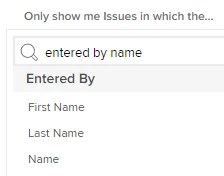
In your report though, you should be able to pull name, instead of look at Issue (which is what first comes up) you'll see it under 'Entered By'


Please mark this correct if you found this helpful in order to help others : )

3 replies

The_Real_Melinda_Layten
April 21, 2023

Your best field is actually Primary Contact/Owner as this can be updated if a request is created on behalf of someone else.


If you type name in the standard view you should see Entered By Name as an additional section underneath the request area.

Madalyn_Destafney
Community Advisor
Madalyn_DestafneyCommunity AdvisorAccepted solution
Community Advisor
April 21, 2023

As @the_real_melinda_layten mentions, primary contact (natively added to request queue details) is typically understood to be the person submitting the request.

In your report though, you should be able to pull name, instead of look at Issue (which is what first comes up) you'll see it under 'Entered By'


Please mark this correct if you found this helpful in order to help others : )

If this helped you, please mark correct to help others : )
April 24, 2023

@madalyn_destafney I'm trying to do the same but not in a report view. When viewing "Requests" as a System Admin, we would like to see an additional column for the individual who submitted the request. Currently, we can see: "Name" (of request), "Converted To", "Path", "Status", "Entry Date", and "Last Update". Is there a way to add in another column when viewing submitted requests, not in report form? Thanks!

Madalyn_Destafney
Community Advisor
Community Advisor
April 24, 2023

Unfortunately there is not a place to create a View for the Submitted Requests page like you can in other similar places in WF. That's why most people end up creating a report to accomplish this. There's an Idea to upvote to be able to create a view for that page, go upvote it! https://experienceleaguecommunities.adobe.com/t5/workfront-ideas/ability-to-adjust-view-on-the-submitted-requests-page/idi-p/528472

If this helped you, please mark correct to help others : )
April 24, 2023

Thank you!