Create a folder inside an existing linked folder via API | Community
Skip to main content
September 16, 2024
Solved

Create a folder inside an existing linked folder via API

  • September 16, 2024
  • 1 reply
  • 2605 views

Hello everyone,

I've a Fusion job where I create a folder in AEM and then through a custom call to Workfront, I add it as a linked folder in the desired project. I do all this in Fusion because I have a business logic that handles how and what folder i need to create and in which project i need to add it.
The problem arises when i've to create a new folder inside the Linked Folder created in the previous step.

i'm making the following POST request:


URL

 /attask/api/v18.0/DOCFDR


request JSON body

{"name":"folderName","taskID":"xxyyzz","objCode":"DOCFDR","parentID":"aabbcc"}
 
the error I get in both fusion and postam if I try the same request
{
    "error": {
               "message": "Authorization is required.",
               "title": null,
               "msgKey": "exception.attask",
               "attributes": [""],
                "code": 0
            }        
}
 
Note:  i'm using the Workfront Custom API call module in Workfront Fusion and the connection is working fine because the rest of calls are working as expected
 
I have also checked what the Workfront UI does if I try to create the folder using Add New-> Folder, and I have seen that it makes a call to the internal api with the same parameters that I'm using.
 
If I remove the parentID, the folder is created correctly, but obviously it is created as a normal folder in the documents section of the task.
 
Any help is welcome.
Thanks in advance

Best answer by VictorTo2

Hi, 


I couldn't let go of it, so I gave it a try. I get the same error message again with the PUT call.


So, I would create a support ticket, as everything from here would be based on workarounds...


One possible solution could be to "simulate" the UI action as you already traced using your browsers dev tools.

In this thread you can read, how that is done to turn of inheritance of permissions, as there is no regular API-way for it yet...


Regards

Lars


Hi Lars, 

just to let you know the adobe's response on this. It seems that there is a workaround to solve the problem and that is to use the new authentication/custom call module to be able to log in first and then do what we need.


Steps


  1. Generate an AEM Technical Cccount
  2. Add the technical account to Workfront
  3. Ensure it has API privileges in the admin console 
  4. Run a Workfront API call against the user endpoint for that account (hit the initializeStatelessDocumentProviderForUser action)
  5. Use the Adobe Authenticator module to then send the moveToFolder action to Workfront:

Once steps 1-4 are completed step 5 should always work (if you get a 403 error, one of the above steps wasn't completed correctly)


And here is what i did

1) call to search user to get the user id in workfront (tech user)

/attask/api/v18.0/USER/search

2) for next step we need the documentProviderConfigID, for this is used this endpoint

/attask/api-internal/DOCCFG/search

3) userID from point 1, docProvId from point 2

attask/api-internal/USER/{{userID}}/initializeStatelessDocumentProviderForUser?documentProviderConfigID={{docProvId}}&providerType=AEM

4) add the Adobe Authenticator module on fusion scenario, configure the technical user account for login and call

PUT /attask/api-internal/DOCU/moveToFolder


1 reply

lgaertner
September 19, 2024

Hello Victor,


good question, I do get the same error message, when trying to create a folder within a linked folder using the Workfront API.


As a workaround, as you already set up a Fusion scenario to create a folder in AEM, would it be a possibility to create the subfolder directly in AEM Assets via Fusion?

This should be shown in Workfront as well.


Regards

Lars

VictorTo2Author
September 19, 2024

Hi Lars, 

thanks for your response.

yes, if the folder is added through AEM, it will work. That's how I have it in another part of the scenario. But that folder is not visible by the API until the user navigates into the UI and the linked folders are opened. On the other hand I need to be able to upload a file from the API to that new linked folder. And I can't do that either.

VictorTo2Author
September 19, 2024

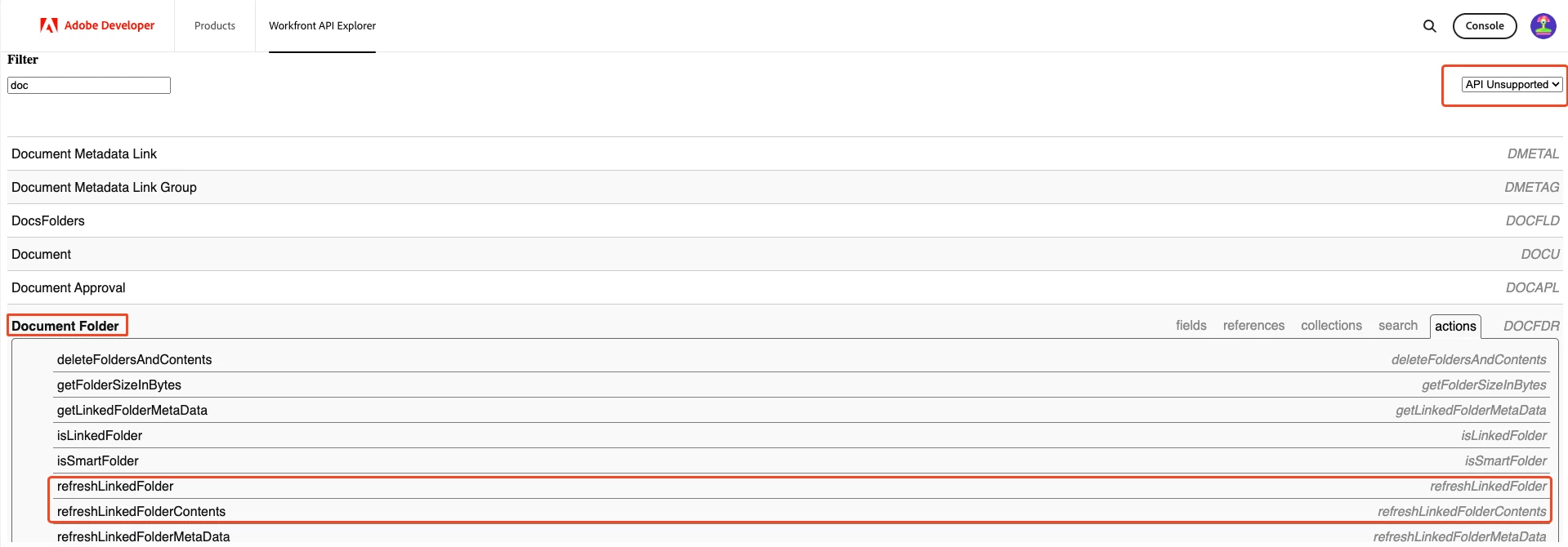
API-Explorer 


Regards

 Lars


/attask/api-internal/DOCFDR/refreshLinkedFolder?linkedFolderID=3498573094570394 is not working for me


{
"error": {
"message": "unrecognized URI format: too many parts"
}
}
 
with PUT method 
 
/attask/api-internal/DOCFDR/refreshLinkedFolder?linkedFolderID=66e9bb3e001469c64fc3790dd9a535bd&action=refreshLinkedFolder
 
using the same apiKey for all my requests i get 
{
"error": {
"message": "Authorization is required.",
"title": null,
"msgKey": "exception.attask",
"attributes": [
""
],
"code": 0
}
}