Classic vs. NWE: User Report + Environment + Layout Template | Community
Skip to main content
Level 10
May 21, 2021
Solved

Classic vs. NWE: User Report + Environment + Layout Template

  • May 21, 2021
  • 4 replies
  • 1355 views

As we move from Classic to NWE, trying to get our User reports to help us, but having issues:

  1. How do I get a column that tells me if the user's account is set for Classic or NWE?
  2. How do I get a column that shows a user's layout template regardless of whether they are in Classic vs. NWE? "layoutTemplate:name" doesn't seem to work if the user is in NWE with one layout template, but was in a different one in Classic first.
This post is no longer active and is closed to new replies. Need help? Start a new post to ask your question.
Best answer by RandyRoberts

I have a pretty comprehensive User Report regarding UI and layout.

Screenshot and text mode below:
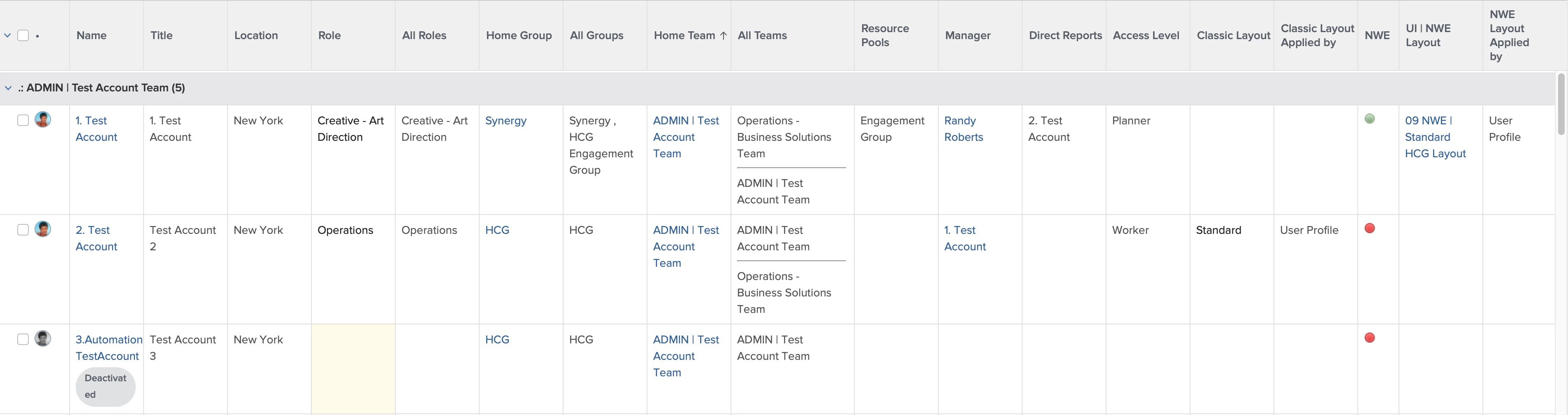
displayname=Classic Layout

linkedname=layoutTemplate

namekey=view.relatedcolumn

namekeyargkey.0=layoutTemplate

namekeyargkey.1=name

querysort=layoutTemplate:name

textmode=true

valuefield=layoutTemplate:name

valueformat=HTML

displayname=Classic Layout Applied by

textmode=true

valueexpression=IF(!ISBLANK({layoutTemplateID}),"User Profile",IF(ISBLANK({layoutTemplateID})&&!ISBLANK({role}.{layoutTemplateID}),"Primary Role",IF(ISBLANK({layoutTemplateID})&&ISBLANK({role}.{layoutTemplateID})&&!ISBLANK({homeTeam}.{layoutTemplateID}),"Home Team",IF(ISBLANK({layoutTemplateID})&&ISBLANK({role}.{layoutTemplateID})&&ISBLANK({homeTeam}.{layoutTemplateID})&&!ISBLANK({homeGroup}.{layoutTemplateID}),"Home Group"))))

valueformat=HTML

displayname=NWE

image.case.0.comparison.icon=true

image.case.0.comparison.leftmethod=hasQuicksilver

image.case.0.comparison.lefttext=hasQuicksilver

image.case.0.comparison.operator=eq

image.case.0.comparison.operatortype=boolean

image.case.0.comparison.righttext=true

image.case.0.comparison.truetext=/static/img/r15/icons/casebuilder/light_green.gif

image.case.1.comparison.icon=true

image.case.1.comparison.leftmethod=hasQuicksilver

image.case.1.comparison.lefttext=hasQuicksilver

image.case.1.comparison.operator=eq

image.case.1.comparison.operatortype=boolean

image.case.1.comparison.righttext=false

image.case.1.comparison.truetext=/static/img/r15/icons/casebuilder/light_red.gif

querysort=hasQuicksilver

textmode=true

usewidths=true

valuefield=hasQuicksilver

valueformat=booleanMessage

width=50

UI | NWE Layout

Select effectiveUITemplate >> Name

displayname=NWE Layout Applied by

textmode=true

valueexpression=IF(!ISBLANK({uiTemplate}),"User Profile",IF(ISBLANK({uiTemplate})&&!ISBLANK({role}.{uiTemplate}),"Primary Role",IF(ISBLANK({uiTemplate})&&ISBLANK({role}.{uiTemplate})&&!ISBLANK({homeTeam}.{uiTemplate}),"Home Team",IF(ISBLANK({uiTemplate})&&ISBLANK({role}.{uiTemplate})&&ISBLANK({homeTeam}.{uiTemplate})&&!ISBLANK({homeGroup}.{uiTemplate}),"Home Group"))))

valueformat=HTML

4 replies

skyehansen
Community Advisor
Community Advisor
May 21, 2021

I asked a similar question to Support last year (why is my layout template report showing differently depending on whether I am in NWE v Classic) and the answer at that time was that there's no way to run a report that shows layout templates from both experiences at the same time.

skyehansen
Community Advisor
Community Advisor
May 21, 2021
RandyRoberts
Community Advisor
RandyRobertsCommunity AdvisorAccepted solution
Community Advisor
May 21, 2021

I have a pretty comprehensive User Report regarding UI and layout.

Screenshot and text mode below:

displayname=Classic Layout

linkedname=layoutTemplate

namekey=view.relatedcolumn

namekeyargkey.0=layoutTemplate

namekeyargkey.1=name

querysort=layoutTemplate:name

textmode=true

valuefield=layoutTemplate:name

valueformat=HTML

displayname=Classic Layout Applied by

textmode=true

valueexpression=IF(!ISBLANK({layoutTemplateID}),"User Profile",IF(ISBLANK({layoutTemplateID})&&!ISBLANK({role}.{layoutTemplateID}),"Primary Role",IF(ISBLANK({layoutTemplateID})&&ISBLANK({role}.{layoutTemplateID})&&!ISBLANK({homeTeam}.{layoutTemplateID}),"Home Team",IF(ISBLANK({layoutTemplateID})&&ISBLANK({role}.{layoutTemplateID})&&ISBLANK({homeTeam}.{layoutTemplateID})&&!ISBLANK({homeGroup}.{layoutTemplateID}),"Home Group"))))

valueformat=HTML

displayname=NWE

image.case.0.comparison.icon=true

image.case.0.comparison.leftmethod=hasQuicksilver

image.case.0.comparison.lefttext=hasQuicksilver

image.case.0.comparison.operator=eq

image.case.0.comparison.operatortype=boolean

image.case.0.comparison.righttext=true

image.case.0.comparison.truetext=/static/img/r15/icons/casebuilder/light_green.gif

image.case.1.comparison.icon=true

image.case.1.comparison.leftmethod=hasQuicksilver

image.case.1.comparison.lefttext=hasQuicksilver

image.case.1.comparison.operator=eq

image.case.1.comparison.operatortype=boolean

image.case.1.comparison.righttext=false

image.case.1.comparison.truetext=/static/img/r15/icons/casebuilder/light_red.gif

querysort=hasQuicksilver

textmode=true

usewidths=true

valuefield=hasQuicksilver

valueformat=booleanMessage

width=50

UI | NWE Layout

Select effectiveUITemplate >> Name

displayname=NWE Layout Applied by

textmode=true

valueexpression=IF(!ISBLANK({uiTemplate}),"User Profile",IF(ISBLANK({uiTemplate})&&!ISBLANK({role}.{uiTemplate}),"Primary Role",IF(ISBLANK({uiTemplate})&&ISBLANK({role}.{uiTemplate})&&!ISBLANK({homeTeam}.{uiTemplate}),"Home Team",IF(ISBLANK({uiTemplate})&&ISBLANK({role}.{uiTemplate})&&ISBLANK({homeTeam}.{uiTemplate})&&!ISBLANK({homeGroup}.{uiTemplate}),"Home Group"))))

valueformat=HTML

KevinQu1Author
Level 10
May 24, 2021

Just…wow. And thank you!

Level 5
October 21, 2021

@Randy Roberts‚ I love your report so much! Thank you for sharing it.

I'm not getting any information to show in the NWE Layout template column, though.

  • Some users that are in NWE have the Classic Layout name showing (in the Classic Layout column)
  • Other users that are in NWE don't show anything in the Classic Layout column, or in the NWE Layout column

Any idea on what I’m missing? Perhaps I need to assign users to the layout templates differently?

I will mention that all of my NWE layout templates were migrated from classic.

Thank you, Cathy

RandyRoberts
Community Advisor
Community Advisor
October 21, 2021

I have some of that going on as well. It has something to do with (some of) the Classic layouts are inaccessible in NWE. If the user is viewing a layout made in Classic (even if it's viewable in NWE), it won't show in that column. And of course some users may not have a layout at all. I don't fully understand the how's or why's but when you go fully NWE, it will resolve itself. Maybe someone knows more about it and can chime in here.

I think for that first one, if you go assign an NWE layout to that persons role, it will show up.

There is a hierarchy in the way layouts are handed out. User takes precedence over role, which takes precedence over team, which takes precedence over group.

I have assigned a general layout to all groups. Then I assign Role based layouts to all roles, (this trumps groups), then if certain users need certain things I will assign a user layout (which trumps roles, teams and groups). I pretty much ignore team layouts, but you don't have to. I prefer users have role based layouts so all Client Services see the same thing, as do creatives, editors, etc.

Doing it this way ensures all users at least have a layout.