
Change to Layout Template reports | Community
Skip to main content
skyehansen
Community Advisor
Community Advisor
April 9, 2020
Solved

Change to Layout Template reports

  • April 9, 2020
  • 3 replies
  • 1282 views

I didn't see this in the release overview, but just want to let folks know that Workfront rolled out a new report type last night, that is a replacement for their existing layout template report.

We had submitted a helpdesk ticket asking why (in the old layout template report type) we could only see our NWE layout templates, and not any of our existing Classic layout templates.

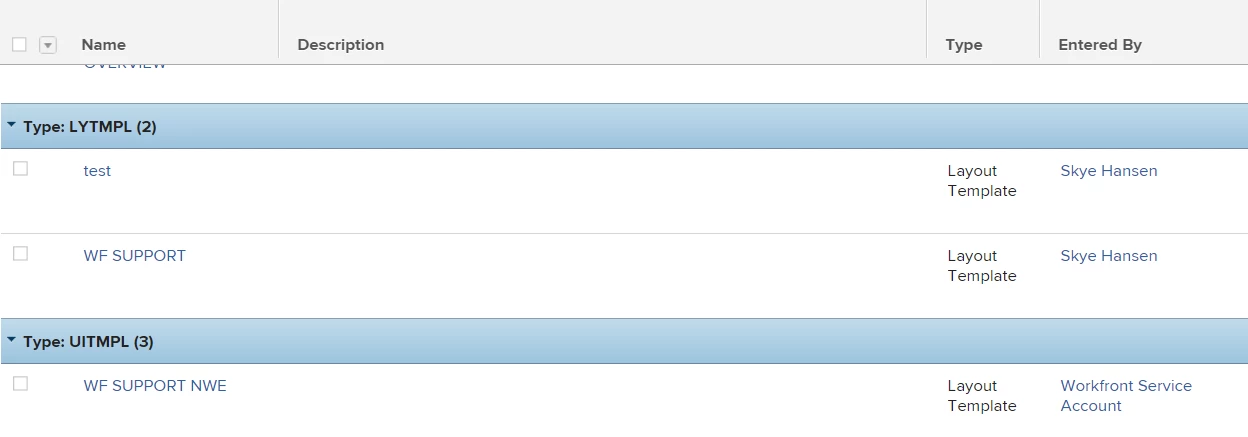
I'm enclosing a screenshot. You can see the new report type is called LYTMPL and the old one is called UITMPL. Really though, the summary of this post is, if you have an old style UITMPL, it will not show you layout templates in Classic. You will have to recreate your report. Also, when you create new layout template reports in the future, you don't get a choice, they are created in the LYTMPL type automatically.

This post is no longer active and is closed to new replies. Need help? Start a new post to ask your question.
Best answer by gevorgkazaryan

Hi Skye,

You're exactly right, the expected result is as you described:

If you create a layout template report in the NWE, it will come in under report type UITMPL and will report only NWE layout templates.

If you create a layout template report in Classic, it will come in under report type LYTMP, and will report only Classic layout templates.

I'm sorry to hear that there was a miscommunication on this and happy to answer any further questions.

Thanks,

3 replies

Level 4
April 9, 2020

Hi @Skye Hansen‚ ,

Thanks much for sharing this!

We will investigate this further, as no changes were intended to happen to reports and so far I couldn't reproduce this behavior on my environments.

The only thing that we recently did is addressed the ticket you've submitted on displaying proper data depending on the environments and right now you can see the NWE Layout Templates data in NWE and Classic Layout Templates data in Classic.

I hope that makes sense.

Thanks again for calling this out!

skyehansen
Community Advisor
Community Advisor
April 9, 2020

hi Gevorg, so I went for a walk around the block and came back to do some testing. Here's what I'm finding.

If you create a layout template report in the NWE, it will come in under report type UITMPL and will report only NWE layout templates.

If you create a layout template report in Classic, it will come in under report type LYTMP, and will report only Classic layout templates.

We were told that we'd be able to see all layout templates on one report, and it looks like this is not the case. We're going to need two reports, one of each type, and the custom views, filters and groupings for each type also do not carry over.

Does that sound about right?

gevorgkazaryanAccepted solution
Level 4
April 10, 2020

Hi Skye,

You're exactly right, the expected result is as you described:

If you create a layout template report in the NWE, it will come in under report type UITMPL and will report only NWE layout templates.

If you create a layout template report in Classic, it will come in under report type LYTMP, and will report only Classic layout templates.

I'm sorry to hear that there was a miscommunication on this and happy to answer any further questions.

Thanks,

Doug_Den_Hoed__AtAppStore
Community Advisor
Community Advisor
April 9, 2020

Hmm...nice catch, Skye. Following (Gevorg) to see if it reverts...

Regards,

Doug

Level 2
November 9, 2021

Hi, I'm just curious to know if there is a way to report on inactive (no assignments) Layout Templates in NWE?

skyehansen
Community Advisor
Community Advisor
November 10, 2021

I just went in and tried, and feel like this can't be done. I could only pull up the layout templates that had not been personally assigned.