Can you set display rules on reports that are directly linked to display logic in a custom form? | Community
Skip to main content
Level 5
September 21, 2021
Solved

Can you set display rules on reports that are directly linked to display logic in a custom form?

  • September 21, 2021
  • 3 replies
  • 921 views

I have a custom form that has display logic to display specific trainings that are required based on the department that was chosen in a field. Ex If Dept A is chosen Training A, Training B and Training F are required.

I then created a report that would show all of the possible trainings and added a display rule to change the color of the field if it was required. I set it to be gray if it was blank (indicating that training was not needed by this user), Green once it was marked complete. The only way I could get it to turn yellow of required was by adding the option of required in the form and making the requestor check required for all of the trainings that displayed for them. (Not ideal) I tried setting required as the default but that made all of the trainings (even the ones the display logic hid) on the report.

Does anyone know of a way to make a display rule in a report to only apply to the fields that were shown using the display logic in a custom form?

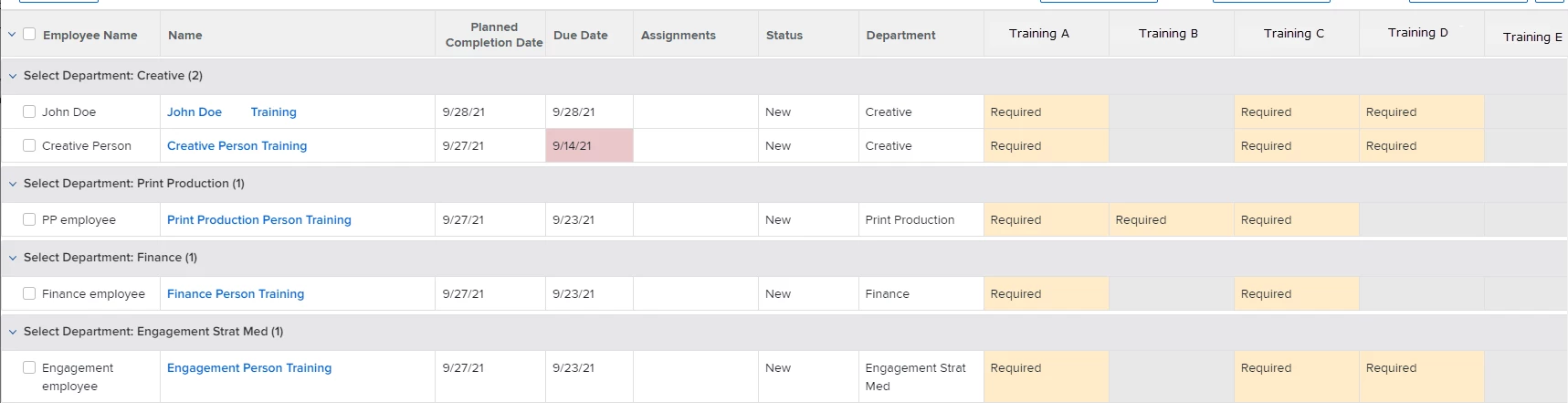
Below is an image of the report and how I want it to display, I am just looking for a way that doesn't require them to check required in the form since the display logic already only displays the ones that are required. Hopefully that makes sense.
This post is no longer active and is closed to new replies. Need help? Start a new post to ask your question.
Best answer by ChloeRo

Okay, I think I have Monday brain on a Tuesday. 😴

There were a series of issues with my initial formula. Mainly parenthesis like you mentioned, but also quotations. I think this should be it.

Training A: IFIN(Department,"Creative","Print Production","Finance","Engagement Strat Med","Required","")

Training B: IFIN(Department,"Print Production","Required","")

Training C: IFIN(Department,"Creative","Print Production","Finance","Engagement Strat Med","Required","")

Training D: IFIN(Department,"Creative","Engagement Strat Med","Required","").

The formula calls for IFIN({field},{name1},{name2}....{true expression},{false expression}). So in the first example, as long as someone selects Creative, Print Production, Finance, or Engagement Strat Med from the drop down field labeled "Department", it will return "Required". Otherwise it'll be blank. Is that what you were asking?

3 replies

Level 4
September 21, 2021

Tracy - would it be a possibility to set up calculated fields that can determine if the training is needed, based on their response for "Department"? So you'd have a calculated field for all of the trainings and it would look like this:

Training A: IFIN(Department,Creative,Print Production,Finance,Engagement Strat Med),"Required","")

Training B: IFIN(Department,Print Production),"Required","")

Training C: IFIN(Department,Creative,Print Production,Finance,Engagement Strat Med),"Required","")

Training D: IFIN(Department,Creative,Engagement Strat Med),"Required","")

It's a little manual and depending on the number of departments/trainings, could become a maintenance nightmare. But might be a good workaround.

Level 5
September 21, 2021

Hi Chloe,

I am trying to do this but it keeps saying the value expression is invalid. This is what I am using.

IFIN(Select Department,IP,Account,RegOps),Required,"")

Select Department because that is what the field is called on this form. I do see that there are 2 closing parenthesis but only one open one. Could that be the problem?

I also notice that if I try to build this using the fields drop-down box that you use for calculated fields that none of the department names are in there. Should they be in order for this to work?

Level 4
September 21, 2021

Hi!

That was totally my fault. It was invalid because I had initially forgotten to add quotations around Required. Try IFIN(Select Department,"IP","Account","RegOps"),"Required","") and see if that works for you.

ChloeRoAccepted solution
Level 4
September 21, 2021

Okay, I think I have Monday brain on a Tuesday. 😴

There were a series of issues with my initial formula. Mainly parenthesis like you mentioned, but also quotations. I think this should be it.

Training A: IFIN(Department,"Creative","Print Production","Finance","Engagement Strat Med","Required","")

Training B: IFIN(Department,"Print Production","Required","")

Training C: IFIN(Department,"Creative","Print Production","Finance","Engagement Strat Med","Required","")

Training D: IFIN(Department,"Creative","Engagement Strat Med","Required","").

The formula calls for IFIN({field},{name1},{name2}....{true expression},{false expression}). So in the first example, as long as someone selects Creative, Print Production, Finance, or Engagement Strat Med from the drop down field labeled "Department", it will return "Required". Otherwise it'll be blank. Is that what you were asking?

Level 5
September 22, 2021

This worked! Thank you so much.

I was trying to write it all out in an email draft and then copy over but I forgot how the " change to a different format. Once I remembered that and fixed them all this worked perfectly.