Can not complete the project even thought task are 100% complete | Community
Skip to main content
October 8, 2022
Solved

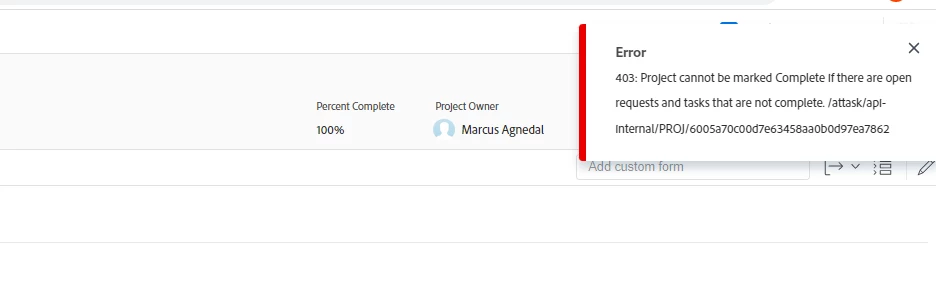
Can not complete the project even thought task are 100% complete
  • October 8, 2022
  • 4 replies
  • 1129 views


This post is no longer active and is closed to new replies. Need help? Start a new post to ask your question.
Best answer by NicholeVargas

If you don't see any "open" tasks or issues/requests on your project, add a column for Status to your task and issue list views. You may have a task or issue that is marked 100% but has a status of Complete - Pending Approval. 

4 replies

Level 10
October 8, 2022

Did you check to see if you have open requests (issues) tied to the project?

ChrisBudgen
Level 5
October 10, 2022

We sometimes have cases in which users have added an adhoc Workflow to a task by accident needing the closing of that task to be approved.

Level 10
October 10, 2022

Can also be cause by date conflicts (as we just found out): make sure the end date of a task is after the start date (and also not the exact same time).

Another cause is if a parent task was originally a child task and for whatever reason had time against it, assignements, or is maybe just gitchy. Recalculate usually fixes these.

Also make sure all parent tasks are aggregating properly: that all child tasks being 100% also causes the parent to be 100%.

We've been running into these more frequently lately. We don't know if these are new habits, or the system being pickier now about bad existing habits.

NicholeVargas
Adobe Employee
NicholeVargasAdobe EmployeeAccepted solution
Adobe Employee
October 10, 2022

If you don't see any "open" tasks or issues/requests on your project, add a column for Status to your task and issue list views. You may have a task or issue that is marked 100% but has a status of Complete - Pending Approval.