Can I build a report or custom view to find what requests/projects templates are used on? | Community
Skip to main content
Level 4
February 2, 2023
Solved

Can I build a report or custom view to find what requests/projects templates are used on?

  • February 2, 2023
  • 1 reply
  • 1115 views

I am hoping someone might have some ideas that I'm overlooking. I have custom templates that a team admin in my company has created in the past. The current team admin wants to deprecate some of these templates and migrate info tied to the old ones onto the new. I want to update a view on a custom report I have, or possibly build a report to see where these templates are being used, but when I go to build a new report or view, I can't seem to find these templates in the dropdown under Templates. I can find a host of others, but not the ones I'm looking for. Is this normal, or is there something else that I need to look at? Or is it even possible to find these templates through a report or view?


Thank you for any help that you can provide.


This post is no longer active and is closed to new replies. Need help? Start a new post to ask your question.
Best answer by SuryaLakhani

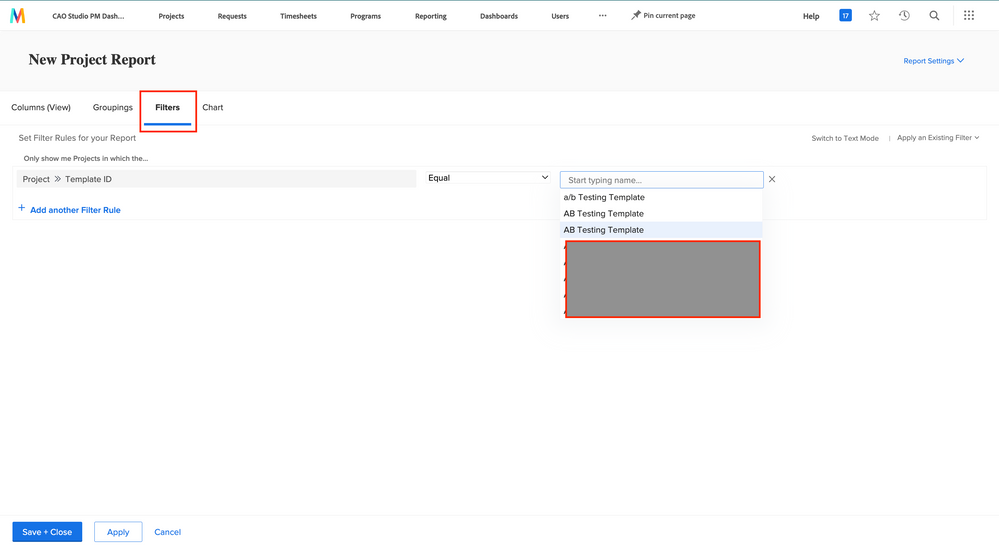
I think you might be looking in the wrong place, the name does not show on the left panel those are the fields associated with the template. Create a new project report, go to the filters tab, and add a Template ID filter or Template>Name filter and you should see the names there. See screenshot.

1 reply

SuryaLakhani
Level 4
February 2, 2023

Hi there,

To view where the templates were used just create a project report and filter with Template>Name. You should be able to get a list of projects that used the templates you picked. For the view, just add Template>Name as a column and you should see the name of the template used for each project in the view. 


MPH2Author
Level 4
February 2, 2023

So, that's where the hang-up happens. When I filter by Template name, regardless if I type the templates you see in my original post into the search bar or scroll for them, they aren't showing up at all in the drop-down at all. Not under the team admin's account or my own global admin account. Do I need to switch to text mode and code that filtering in? If that's the case, I am clueless as to how to do that. I'm still very new to adminning our Workfront instance, and I inherited a mess.

SuryaLakhani
SuryaLakhaniAccepted solution
Level 4
February 2, 2023

I think you might be looking in the wrong place, the name does not show on the left panel those are the fields associated with the template. Create a new project report, go to the filters tab, and add a Template ID filter or Template>Name filter and you should see the names there. See screenshot.