
Calendar filter for viewing others on the same "secondary" team as you. | Community
Skip to main content
RandyRoberts
Community Advisor
Community Advisor
September 18, 2020
Question

Calendar filter for viewing others on the same "secondary" team as you.

  • September 18, 2020
  • 2 replies
  • 819 views

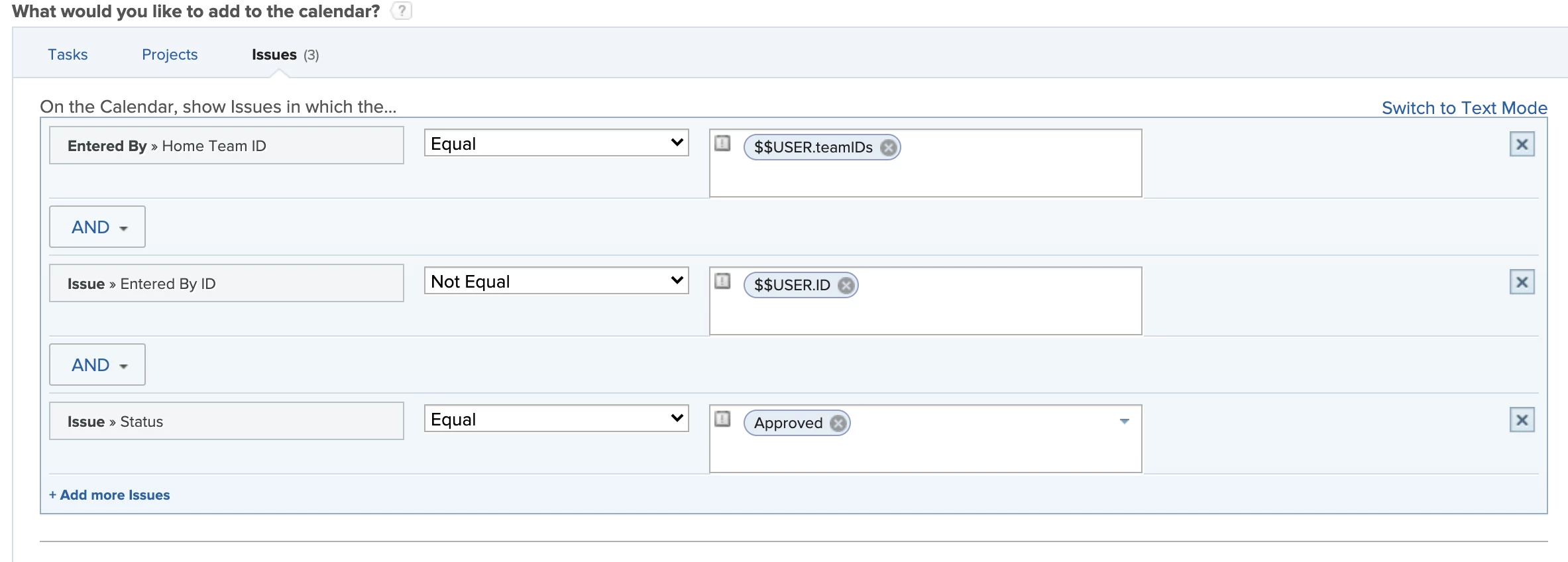
We use a calendar to view PTO for members of our team. Currently I have a filter for managers to view their direct reports, people to view members of their team. Right now members can only view other if a team they are is the other users' Home Team using "Entered By >> Home Team ID Equal $$USER.teamIDs". This does not show other members who are on the same secondary team as you. If only the "Entered By >> Home Team ID" were "Entered By >> Team ID"

Does anyone know the text mode for allowing two users who are on the same secondary team see each others entries?

This is what I'm using now. I only see "Home team" choices. I've looked through the API fields but it's not clear which to use.
This post is no longer active and is closed to new replies. Need help? Start a new post to ask your question.

2 replies

Doug_Den_Hoed__AtAppStore
Community Advisor
Community Advisor
September 19, 2020

Hi Randy,

Conceptually, since EnteredBy is a an object, I believe what you're after is "EnteredBy.teamIDs IN $$USER.teamIDs"...but I suspect that syntax (comparing two collections) is not supported in the type of filter you're using, and I cannot recall seeing anyone whose noodled it out yet using an EXISTS statement (although it might be possible).

Regards,

Doug

RandyRoberts
Community Advisor
Community Advisor
September 21, 2020

Thanks Doug, that's actually a nice approach I think. If I can get two collections ( the users' and the colleague's) and compare them then that may work.

I wonder if anyone has done this before with any other fields?

Level 2
September 21, 2020

Hi Randy,

Try this in text mode:

EXISTS:A:$$OBJCODE=USER

EXISTS:A:ID=FIELD:enteredByID

EXISTS:A:teamIDs=$$USER.teamIDs

EXISTS:A:teamIDs_Mod=in

RandyRoberts
Community Advisor
Community Advisor
September 22, 2020

Unfortunately, I got the dreaded "Invalid Parameter"