Calculated Field / Column Question
Hi. I have 4 custom fields that have large single-select dropdown fields; all the columns have the same values. The fields are added as individual columns in a report where the user can select value in each column for each project. My report columns have this layout > Project, Menu 1, Menu 2, Menu 3, Menu 4
| Project Name | Menu 1 | Menu 2 | Menu 3 | Menu 4 |
| Test 1 | A1 | B2 | C1 | A2 |
| Test 2 | B2 | A1 | B1 | A2 |
| Test 3 | A1 | C1 | B2 | B1 |
I have created a calculated field that will show the number of instances each that value occurs per project & built another report.
| Project Name | A1 Value Count | A2 Value Count | B1 Value Count | B2 Value Count | C1 Value Count |
| Test 1 | 1 | 1 | 0 | 1 | 1 |
| Test 2 | 0 | 1 | 1 | 1 | 0 |
| Test 3 | 1 | 0 | 1 | 1 | 1 |
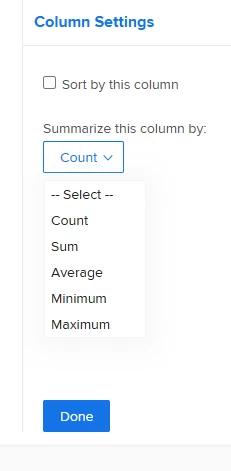
My question - Is there a way to create a calculated column to add the totals of each Value Count column? The goal is to have the total from each column reported on a graph (i.e. a pie chart showing there are 2 results for A1 Value Count, 2 for A2 Value Count, 2 for B1 Value Count, 3 for B2 Value Count, 2 for C1 Value Count. I have tried different ways in text mode but haven't been able to work it out. Thanks!