Building a simplified Project Overview Report | Community
Skip to main content
April 2, 2025
Solved

Building a simplified Project Overview Report

  • April 2, 2025
  • 3 replies
  • 936 views

Hi community... trying to create something like the Project Details of a project... a type of "Project Summary" of sorts. In it I'm hoping to have certain particular fields from the project, including budget, actuals, custom form fields, etc. I can't seem to find how to get this done nicely... kind of an executive summary of a project that's a clean report of that one project alone (not a list of projects). The Project Details section has several fields our company does not use, and has several fields missing that I need to present to our executives. Any thoughts? 
This post is no longer active and is closed to new replies. Need help? Start a new post to ask your question.
Best answer by Sven-iX

Hi @keah 
If you have Fusion here's another approach: 

Fusion has WordTemplate modules that allow you to populate a template with data. I won't lie - it's tedious depending on what you want to do, but it works. My example only shows out of box fields but any custom fields could be pulled in as well. 
https://experienceleague.adobe.com/en/docs/workfront-fusion/using/references/apps-and-their-modules/third-party-app-connectors/microsoft-word-templates-modules


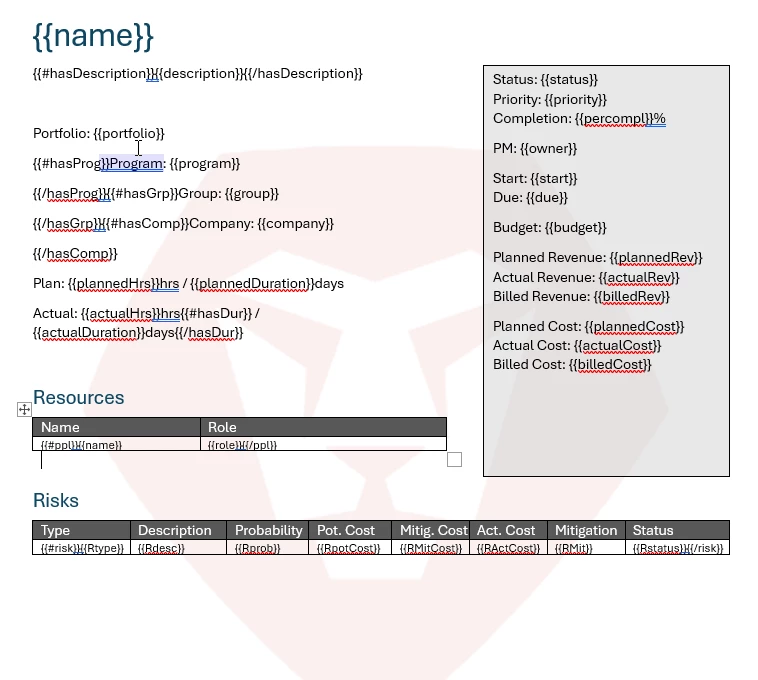
So a template like this


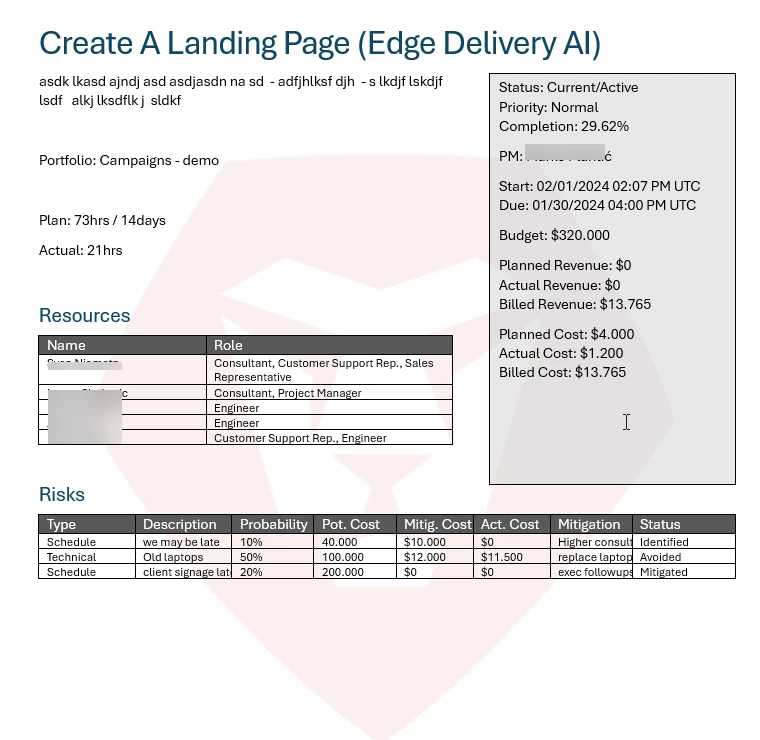
Could be populated like this


3 replies

Sven-iX
Community Advisor
Community Advisor
April 2, 2025

I know what you mean - using reporting would mean stitching all the fields together, using sharecol=true, so you can display multiple fields together, So you could make the report have e.g. all schedule-related fields in column 1, budget related in column 2 etc. But that's really tedious. 


I don't know if this meets your needs, but you could create a Layout template for the execs where you hide certain fields in the Overview/Financials sections and nav bars. 


If you have Fusion you could create a custom "dashboard" that pulls the desired fields into a HTML document.

Sven-iX
Community Advisor
Sven-iXCommunity AdvisorAccepted solution
Community Advisor
April 3, 2025

Hi @keah 
If you have Fusion here's another approach: 

Fusion has WordTemplate modules that allow you to populate a template with data. I won't lie - it's tedious depending on what you want to do, but it works. My example only shows out of box fields but any custom fields could be pulled in as well. 
https://experienceleague.adobe.com/en/docs/workfront-fusion/using/references/apps-and-their-modules/third-party-app-connectors/microsoft-word-templates-modules


So a template like this


Could be populated like this


KeaHAuthor
April 9, 2025

Thank you @sven-ix ... I am trying to digest what youʻve provided. Although tedious, it looks definitely doable. 


Doug_Den_Hoed__AtAppStore
Community Advisor
Community Advisor
April 4, 2025


Hi @keah


In addition to the roll-your-own options for Workfront or Fusion @sven-ix mentioned, I invite you to consider our Project Status Report, Executive Status Report, and/or Magic Reports solutions. Each of those (among many others) render live data, immediately, right from within Workfront, and can be tailored to your ideal specification. I'd be happy to chat further via doug.denhoed@atappstore.com when you're ready for more details.


Regards,

Doug

KeaHAuthor
April 9, 2025

Thank you Doug... looking at your solutions now. 


KierstenKollins
Community Advisor
Community Advisor
April 9, 2025

At the Summit, there was a Fusion lab where they walked through creating a PDF with Project details. Details and guides can be found in this post: https://experienceleaguecommunities.adobe.com/t5/workfront-discussions/adobe-summit-2025-workfront-post-lab-thread-l816-intermediate/m-p/739694#M3779


KeaHAuthor
April 9, 2025

Very cool @kierstenkollins ! Reviewing today.