Adobe Workfront Console Migration : SSO | Community
Skip to main content
May 16, 2024
Solved

Adobe Workfront Console Migration : SSO

  • May 16, 2024
  • 1 reply
  • 2067 views

Hello,


We are having Workfront migrated into the Adobe Admin Console next month. One of the questions that we are having difficulty around is SSO (single sign on).


Workfront has SSO in my organisation.

All other Adobe Products do not.


I would like to understand the impact of migration - we do not want to lose the ability to have SSO on Workfront but also to keep all other Adobe products using username/password log-in.


Has anyone been through the migration with this want ?? Any help would be amazing.


Thank You


Emma
This post is no longer active and is closed to new replies. Need help? Start a new post to ask your question.
Best answer by Sheri_Whitten

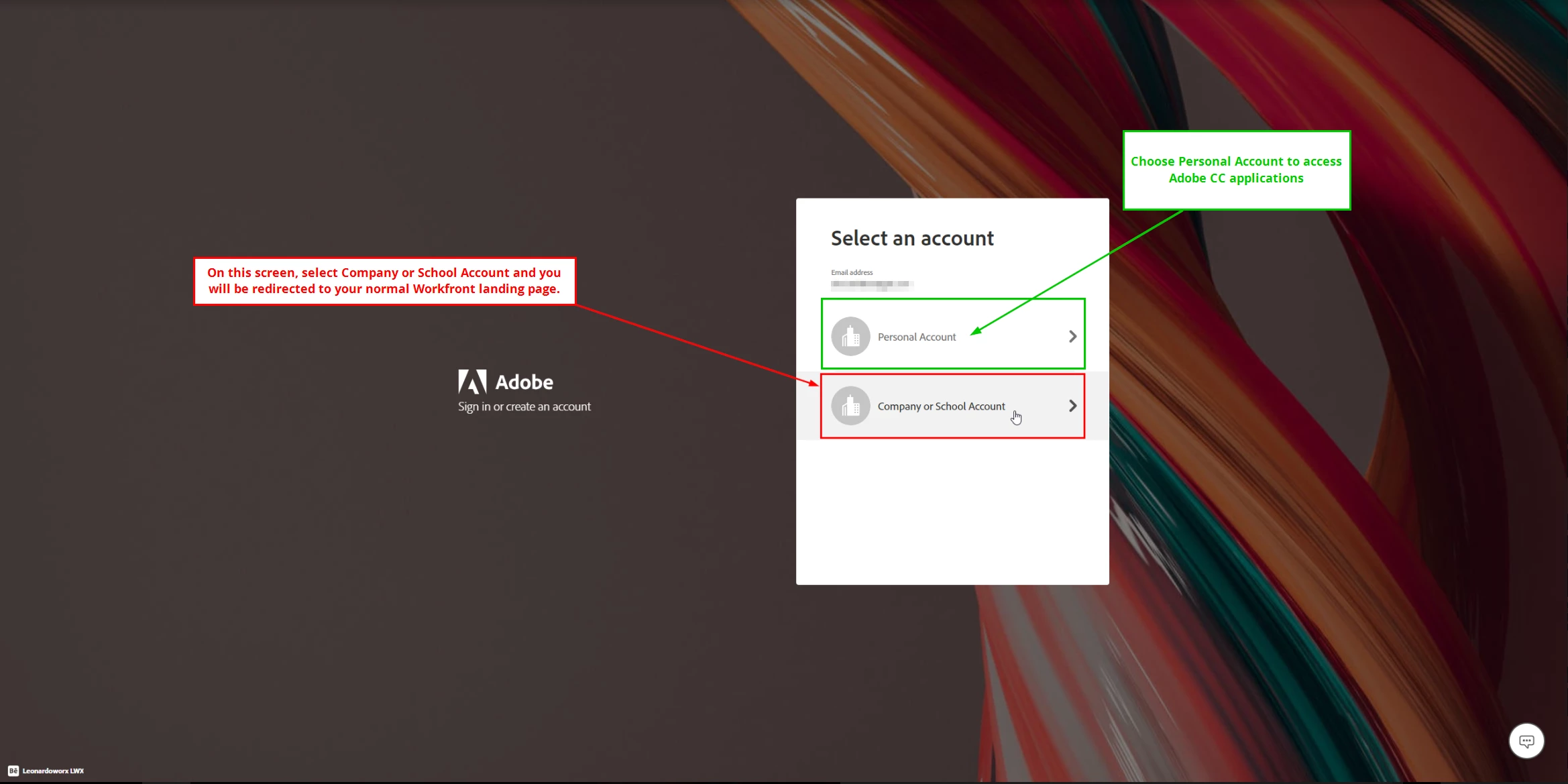
We have the same situation, our Adobe Creative Cloud apps are not SSO, but Workfront is SSO-enabled. We now have two Adobe Admin Consoles and the migration was okay. It's not a great experience for my users that have both Adobe Workfront and Adobe CC accounts (at least for us - your situation could be different) - they can't be logged into both accounts at the same time. For instance, if a user needs to update one of their Adobe CC apps, they need to log into their "Personal" account (which is still their work email address). This kicks them out of Workfront. When they're done updating their CC apps, they log out of Adobe and then log back in with their "Company or School Account" - same email address. It's clunky, but we haven't had too many complaints.


1 reply

Rafal_Bainie
Community Advisor
Community Advisor
May 16, 2024

I would reach out to migration specialist assigned to your org.
For us migration was a bit troublesome, but all issues aside, the underlying idea is to control entire organization from single (or multiple) admin console(s). With that in place I guess you setup SSO on console level. Assuming all apps are in 1 console you cannot have some of them with SSO enabled and some not. 
That's my reasoning at least.

Cheers!

EmmaG13Author
May 16, 2024

Thank you for your reply - it is as I have worried about that if all apps in one console they need to have the same way to log in.


Though your message made me realise maybe I can have more than one console - I have just asked - that would be such a relief if we could. 


Kindest

Em

EmmaG13Author
May 22, 2024

We have the same situation, our Adobe Creative Cloud apps are not SSO, but Workfront is SSO-enabled. We now have two Adobe Admin Consoles and the migration was okay. It's not a great experience for my users that have both Adobe Workfront and Adobe CC accounts (at least for us - your situation could be different) - they can't be logged into both accounts at the same time. For instance, if a user needs to update one of their Adobe CC apps, they need to log into their "Personal" account (which is still their work email address). This kicks them out of Workfront. When they're done updating their CC apps, they log out of Adobe and then log back in with their "Company or School Account" - same email address. It's clunky, but we haven't had too many complaints.


Thank you - that's brilliant to know re. the two consoles.


Em