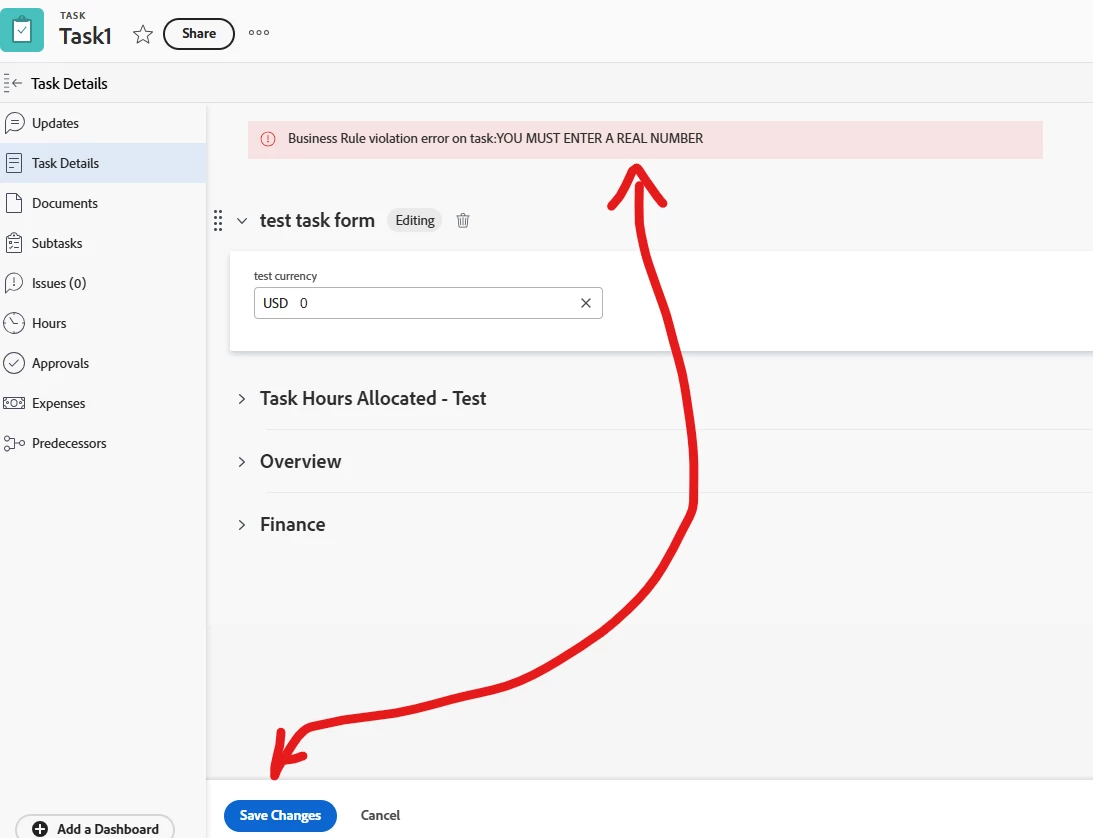
Hi all - how we can put a validation rule in a number field in Adobe Workfront so we can prevent people from entering £0 - ideally, we need to flag and not allow the user to save the custom form.
any ideas?
@MoniqueEvans not sure if you already answered this on the chat of one of the WF community calls (can't access it anymore) 😞
any guidance will be much appreciated!
Kind regards,
Priscila
Solved! Go to Solution.
Topics help categorize Community content and increase your ability to discover relevant content.
I think you may be referring to this functionality:
(According to this note, only available for organizations on the new Ultimate plan https://experienceleague.adobe.com/en/docs/workfront/using/product-announcements/product-releases/re... )
I think you may be referring to this functionality:
(According to this note, only available for organizations on the new Ultimate plan https://experienceleague.adobe.com/en/docs/workfront/using/product-announcements/product-releases/re... )
thanks @skyehansen - that is the functionality I'm after but unfortunately, we are on prime license 🙂
thanks for your help though!
Hey @PriscilaSm ! I don't believe this is possible current state (it's in the roadmap, or was at least, to be released sometime in 2025).
A way to solve for this would be to either add disclaimer text and then a checkbox that signifies they read said disclaimer text so they can't just move on, OR to validate the data after-the-fact via fusion and send a message to the user. Is this data being captured via intake or on the project/higher level?
thanks @Pan__Shahbazian ! hope it will come through then - fingers crossed
I added a disclaimer and I will consider the checkbox..
we have fusion implemented already so that will do for now 🙂
thanks very much!
Priscila
Views
Replies
Total Likes
Views
Likes
Replies
Views
Likes
Replies