AddHours not showing results | Community
Skip to main content
April 27, 2023
Solved

AddHours not showing results

  • April 27, 2023
  • 3 replies
  • 873 views

Hi all,


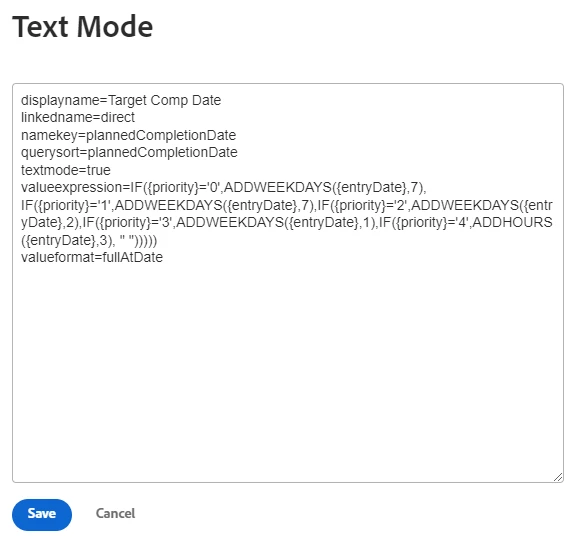
I'm new to Workfront, but not new to using formatting dates using expressions. I'm having an issue where I can add days to an existing date field, but when I want to AddHours to the same field then it outputs a blank field. Usually I would think there's either a code error or the input field isn't in the correct format, but I can't see either being the problem. Here's my example...


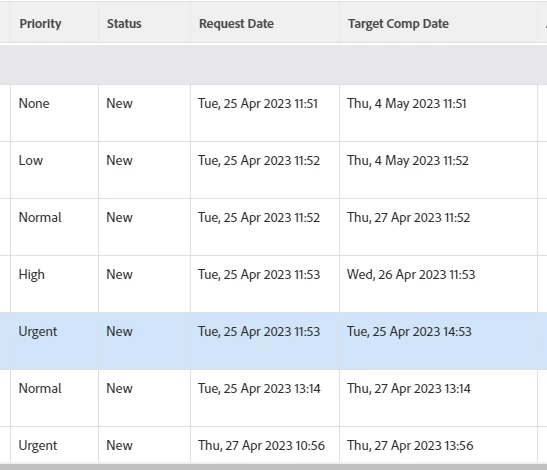
Request Date is the entrydate field in workfront. I want to add days to all of the request dates based on the priority field, but where the priority field is "Urgent" I need this to add 3 hours to the request date. Below shows that the "Target Completion Date" is resolving to blank for the urgent requests.
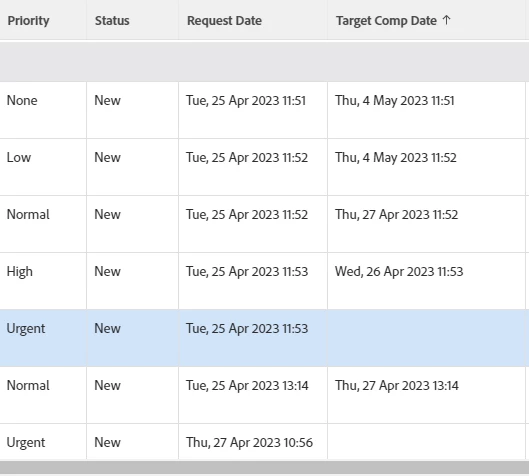
 

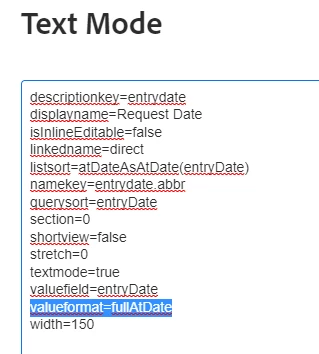
Here are the properties of the Request Date output field...
 

Here are the properties of the Target Comp Date output field...
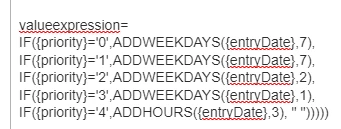
To make the logic clearer, I'll make it look pretty...
Any help will be appreciated.

Thanks!
This post is no longer active and is closed to new replies. Need help? Start a new post to ask your question.
Best answer by

Hi Doug,


I didn't get quite the result I was looking for as it returned a date 7.5 days in before the entryDate, but it did point me in the right direction. As you said, it can use decimals, so instead of using a whole number I just added a decimal to get the 3 hours added on e.g. ADDDAYS({entryDate},0.125). This now give me a lovely result, so thanks for your help on this one.

Cheers

Matt


3 replies

Doug_Den_Hoed__AtAppStore
Community Advisor
Community Advisor
April 27, 2023


Hi @17635835,


Alas, there is no built in AddHours function, and as I recall, AddDays supports only integers (although you’re welcome to comfirm that for yourself).


Many, many years ago I did create a Service Level Agreement (SLA) solution using native Workfront, so I’ll dust off my notes to remind myself how I solved for “within X hours”.


Regards,

Doug


cc: @doug_den_hoed__atappstore 

April 27, 2023

Hi @Doug_Den_Hoed__AtAppStore 


I've just noticed that the help page I was only was for Workfront Fusion, and not just Workfront. No wonder I was getting nowhere with it. If you do find something from your past, then that would be greatly appreciated.


Thanks

Matt

Doug_Den_Hoed__AtAppStore
Community Advisor
Community Advisor
April 27, 2023


Ah: gotcha Matt,


After a pleasant stroll down SLA Memory Lane (which includes some inspirational screen shots you might enjoy), I'm delighted to inform you that I was mistaken: you can indeed use a decimal with the AddDays function, as per this example from my 


Custom Parameter (datetime): SLA Response Red

Description: Computes a 5 minute lead time until the SLA Response Required, which is used to switch the highlighting to Red on reports

Formula: ADDDAYS({DE:SLA Response Required},-(5/60)/24)


Give it a whirl (in your case, using (3/24), and let me know how it goes!


Regards,

Doug


Accepted solution
April 27, 2023

Hi Doug,


I didn't get quite the result I was looking for as it returned a date 7.5 days in before the entryDate, but it did point me in the right direction. As you said, it can use decimals, so instead of using a whole number I just added a decimal to get the 3 hours added on e.g. ADDDAYS({entryDate},0.125). This now give me a lovely result, so thanks for your help on this one.

Cheers

Matt


Doug_Den_Hoed__AtAppStore
Community Advisor
Community Advisor
April 27, 2023


Excellent Matt,


Yes, in my previous post, the SLA Response Required date represents the calculated "in the future" date where where an item will be offside from an SLA perspective, which is why I was deducting five minutes from it. Since you're simply working with the entry date, though, you need to add 3 hours. I've amended my previous post accordingly to match (i.e. 3/60 = 0.125) accordingly, so it now should be the correct answer for anyone who needs to use the technique.


Regards

Doug