Add a rating column | Community
Skip to main content
Level 3
October 27, 2023
Solved

Add a rating column

  • October 27, 2023
  • 1 reply
  • 1149 views

Hello,


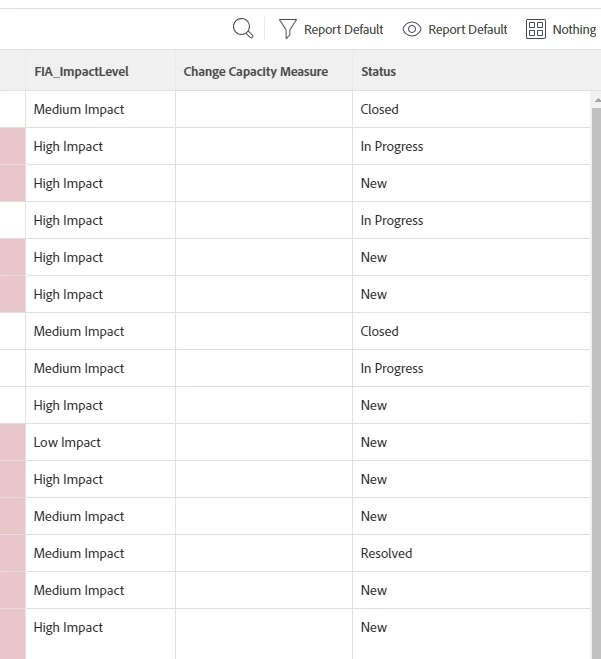
I am trying to add a rating column based on the impact level on an issue report. I have created an IF statement for the column in text mode to look at the level and assign a number, but it doesn't seem to work. I am not sure if my IF statement format is incorrect, or if there is a better way to do this? Any help is greatly appreciated.


If statement in Text Mode:

displayname=Change Capacity Measure
textmode=true
usewidth=true
valueexpression=IF({DE:FIA_ImpactLevel}="Low Impact","2",IF({DE:FIA_ImpactLevel}="Medium Impact","6",(IF({DE:FIA_ImpactLevel}="High Impact","9","")"")"")
valueformat=html
width=33


This post is no longer active and is closed to new replies. Need help? Start a new post to ask your question.
Best answer by skyehansen

how interesting. I copied your code straight out to use with one of my fields, and the following did produce the expected results:

displayname=Change Capacity Measure textmode=true usewidth=true valueexpression=IF({DE:my_fieldname}="one of my choices","2") valueformat=html width=33


(You can see I didn't even bother with the entire statement -- what to do if it is false)

I would say if this doesn't work on your side, it's acceptable to use CONCAT, i.e. valueexpression=IF({DE:my_fieldname}="one of my choices",CONCAT("2")) -- sometimes this produces a better result. Other than that though, you should be double checking the field name and choices to make sure you're not somehow typoing (I assume you're not)

1 reply

skyehansen
Community Advisor and Adobe Champion
October 28, 2023

Your syntaxing is incorrect but you would be most helped by being able to troubleshoot effectively. Start off with your initial logic statement, which is 


IF(X=Y,"do this thing","otherwise, do that thing") 


Test this one thing, and if it works, then understand that in order to add to it, you ONLY need to sub out the "otherwise" sentence for the exact same logic statement.


In other words, your first test would have been: IF({DE:FIA_ImpactLevel}="Low Impact","2","") -- you would want to get this working before you do anything else.


If you can get this to work, your next attempts would look like this:

IF(X=Y,"do this thing", IF(X=Z,"do this other thing","otherwise, do that thing")) 

IF(X=Y,"do this thing", IF(X=Z,"do this other thing",IF(X=A,"do this other other thing","otherwise, do that thing"))) 


Rafal just gave another example of how this sort of syntaxing should look in this other post:

https://experienceleaguecommunities.adobe.com/t5/workfront-questions/creating-a-calculated-field-that-uses-if-then-logic/m-p/629761/highlight/true#M57222

AnnieXLeAuthor
Level 3
October 30, 2023

I have tried your recommendation to firs test the one IF statement : IF({DE:FIA_ImpactLevel}="Low Impact","2","") and it did not work. I'm not sure if I need to define a syntax before "Low Impact" since it is one of three options from DE:FIA_ImpactLevel field. 

skyehansen
Community Advisor and Adobe Champion
skyehansenCommunity Advisor and Adobe ChampionAccepted solution
October 30, 2023

how interesting. I copied your code straight out to use with one of my fields, and the following did produce the expected results:

displayname=Change Capacity Measure textmode=true usewidth=true valueexpression=IF({DE:my_fieldname}="one of my choices","2") valueformat=html width=33


(You can see I didn't even bother with the entire statement -- what to do if it is false)

I would say if this doesn't work on your side, it's acceptable to use CONCAT, i.e. valueexpression=IF({DE:my_fieldname}="one of my choices",CONCAT("2")) -- sometimes this produces a better result. Other than that though, you should be double checking the field name and choices to make sure you're not somehow typoing (I assume you're not)