
New Home My Tasks - Display Time When Task is Due to Start and End | Community
Skip to main content
KierstenKollins
Community Advisor
Community Advisor
March 20, 2024
New

New Home My Tasks - Display Time When Task is Due to Start and End

  • March 20, 2024
  • 15 replies
  • 2118 views

Description - In My Tasks, the tasks do not display the timestamp when a task is due to start and end.

Why is this feature important to you - Our teams work by the hour and have tasks that are due throughout the day. Rarely, we have tasks that last the full business day. My concern is that users will not use the Home and will rely on reports with this not being visible to them as it is not clear what tasks need to be completed first for the day.

How would you like the feature to work - Add the start and end date timestamps to be visible.

Current Behaviour - Does not exist
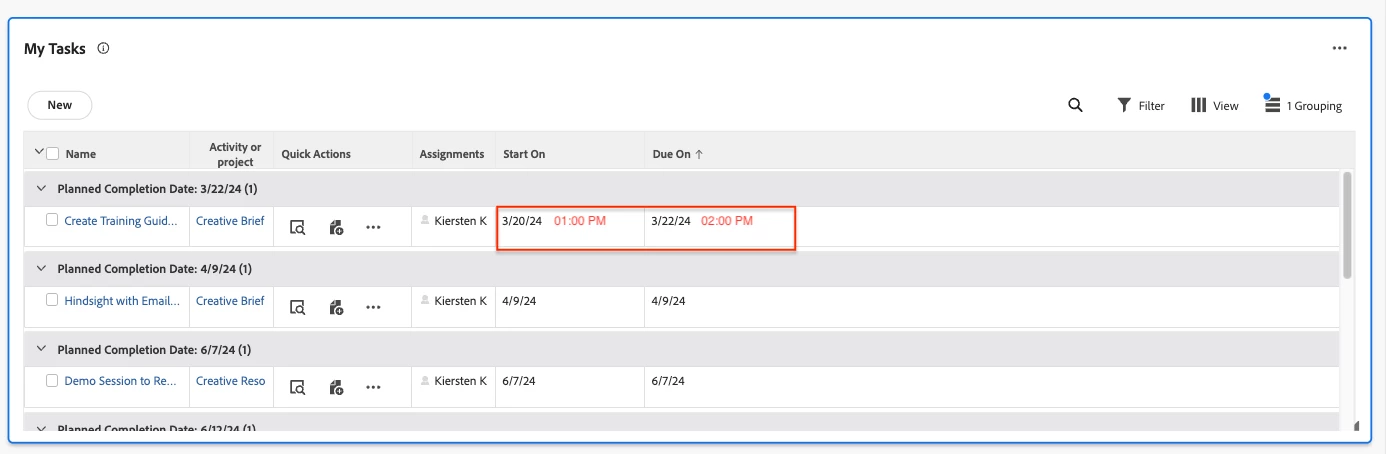


Including the Priorities idea here as well as these are related: https://experienceleaguecommunities.adobe.com/t5/workfront-ideas/priorities-display-time-when-task-is-due-to-start-and-end/idi-p/708345


15 replies

April 18, 2024

Adobe, its a request please add this feature asap , this helps our organization too.


Is there any alternate way to add a timestamp in "My task" widget ? if anyone of you following please can you help me . Thanks in advance.

June 20, 2024

Currently have the exact same issue with my creatives. With the legacy home screen going away soon, I will have creatives revolting and potentially missing deadlines as the new home screen isn't as intuitive as it was before. 


In addition to the time stamps for tasks that are due, would love the verbiage to change back to Ready to start or Not ready.

KierstenKollins
Community Advisor
Community Advisor
July 24, 2024

@jerflo - Hi Jeremy - Is there any movement or talk if the tasks deadline time will be added to the "My Tasks" widget? We are rolling out New Home to our users in a week and there is a lot of anxiousness around not having this be front and center for our users with us working by the hour. We are currently having our users use the task summary to see the deadline, but that requires an additional click and scroll to get there. Happy to hop on a call to chat more. Thanks!

jerflo
Adobe Employee
Adobe Employee
July 24, 2024

Hi @kierstenkollins - thanks for reaching out. We did explore adding task deadline time to the "My Tasks" widget a while back. However, our data showed that most customers don't use, or expose the time, so it didn't become a priority.  I understand the concern for your team, especially with the upcoming Legacy Home Deprecation targeted for Oct 2024.  Our attention has been on providing a simplified experience for task owners, and this could possibly be addressed under that initiative. It would be helpful to know if more customers share this need, as that could influence our prioritization. 


Level 2
July 25, 2024

This would be huge for us too - we work similar to Kiersten in the fact that our turnarounds are many times hours not days. It would help adoption if we were able to have this feature as well.

July 29, 2024

Hi @jerflo - thanks for the response! Curious as to what data you're referring to as it relates to exposing the time? My team did not switch to the new home last year when it was launched specifically because the task due times were not showing on their home page and I could not find a way to expose them. Is there a way to do that without having it be standard for everyone? Legacy home showed task due times automatically, and I didn't think that those were able to be hidden so I'm confused as to where the data is coming from. Thanks again!

skyehansen
Community Advisor
July 31, 2024

has anyone tried creating a calculated field showing the hour and minute of the date in question, e.g. CONCAT(HOUR({plannedCompletionDate}),":",MINUTE({plannedCompletionDate})) and exposing this field as one of the available columns in a view on one of the widgets? If it works, it could be a good workaround to use until Workfront catches up to the problem.


https://experienceleague.adobe.com/en/docs/workfront/using/product-announcements/product-releases/release-24-q2/24-q2-home-enhancements -- Workfront allowed column customizations in Home in Q2.

KierstenKollins
Community Advisor
Community Advisor
July 31, 2024

@skyehansen - That's a good idea. I will need to look into this possible idea this week. Thank you as always!

skyehansen
Community Advisor
July 31, 2024

@kierstenkollins -- I'll keep my fingers crossed for you. We fought pretty hard to have the ability to have custom fields show up in Home and are currently fighting the good fight to have longer content that line-wraps. The more general use this functionality sees, the louder our voice, and the more improvements we can gain that benefit everyone.

jerflo
Adobe Employee
Adobe Employee
August 1, 2024

Hi @melissan1 - Thank you for your feedback. I was referring to our product usage data. Currently, there is no way to expose the timestamp on the widgets. However, feedback like this helps us understand its importance for future improvements. While I can't provide a specific timeline, I will keep you all updated on any progress we make here.