Larger field to inline edit Assignments | Community
Skip to main content
Susan_Hart_DeltaDental
Level 3
June 15, 2023
New

Larger field to inline edit Assignments

  • June 15, 2023
  • 5 replies
  • 721 views

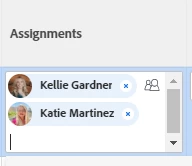
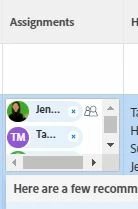
It is challenging to inline edit/add users names to the assignments field due to the small size of the box that appears. It would be ideal to expand the size of that box to prevent inadvertently assigning the wrong user because you cannot see full names. 
5 replies

RandyRoberts
Community Advisor
Community Advisor
June 16, 2023

Couldn't you use a "usewidths=true" and "width=100" or what ever pixel width you want?

Susan_Hart_DeltaDental
Level 3
June 16, 2023

Hello @randyroberts - that helped ensure all columns were as wide as the content in those columns. See screen shot below. What it didn't solve is when I click into the the assignments field to inline edit which users are assigned, the inline editable field is still too small to see full names and is challenging to add to because the scroll area is so small. See screen shot below. 


RandyRoberts
Community Advisor
Community Advisor
June 16, 2023

I was hoping that would help but I guess it just didn't do the trick. A LOT of folks have mentioned that it does make the dropdown unreadable. I would say it's a bug, and needs fixing.

KellieGardner
Community Advisor
Community Advisor
June 16, 2023

The field just has to be made large enough to accommodate. We have ours set pretty wide so that this doesn't happen. 


Edit: I just checked and our field is 200 wide. Also you can click and drag the column to resize it as needed to accommodate longer names. 

RandyRoberts
Community Advisor
Community Advisor
June 16, 2023

Thanks Kellie, I guess 100 just wasn't big enough, This is good to know. I also discovered if you re-name the column something longer, it will help as well.