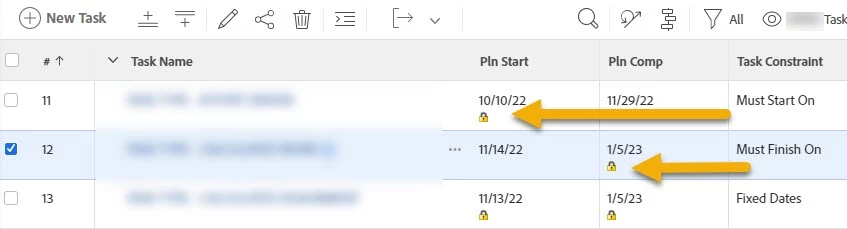
Easily Add Task Constraint Icons on Planned Start and Planned Finish Dates (Task)
Description - Some Workfront views have a little padlock to indicate whether there is a constraint on the planned finish date but there is no way to add this to other views without using the column from an existing view or using text mode.
Why is this feature important to you - It would simplify view and report creation and improve the user experience.
How would you like the feature to work - Ideally, if you add planned start or planned completion dates you would have a check box that asked something like "add constraint indicator".
Current Behaviour - Text mode or knowledge of existing views is required to capture constraint icons. Many views do not indicate the constraints which can make it difficult for users to troubleshoot.
Here is the text mode for anyone who needs it:
Planned Start Date
column.5.descriptionkey=plannedstartdate
column.5.listsort=atDateAsAtDate(plannedStartDate)
column.5.namekey=plannedstartdate.abbr
column.5.querysort=plannedStartDate
column.5.sharecol=true
column.5.textmode=true
column.5.valuefield=plannedStartDate
column.5.valueformat=atDate
column.5.width=85
column.6.image.comparison.leftmethod=boolean(hasStartConstraint)
column.6.image.comparison.operator=eq
column.6.image.comparison.operatortype=boolean
column.6.image.comparison.righttext=true
column.6.image.comparison.truetext=/interface/images/inline/constraint.gif
column.6.image.enumclass=com.attask.common.constants.TaskConstraintEnum
column.6.image.height=12
column.6.image.namekey=startconstraint
column.6.image.namevaluekey=string(taskConstraint)
column.6.image.type=ProgressStatus
column.6.image.value=
column.6.image.valuefield=progressStatus
column.6.image.valueformat=val
column.6.image.width=9
column.6.namekey=taskconstraint.abbr
column.6.textmode=true
column.6.type=image
column.6.valueformat=
column.6.width=1
Planned Completion Date
column.7.descriptionkey=plannedcompletiondate
column.7.listsort=atDateAsAtDate(plannedCompletionDate)
column.7.namekey=plannedcompletiondate.abbr
column.7.querysort=plannedCompletionDate
column.7.sharecol=true
column.7.textmode=true
column.7.valuefield=plannedCompletionDate
column.7.valueformat=atDate
column.7.width=85
column.8.image.comparison.leftmethod=boolean(hasCompletionConstraint)
column.8.image.comparison.operator=eq
column.8.image.comparison.operatortype=boolean
column.8.image.comparison.righttext=true
column.8.image.comparison.truetext=/interface/images/inline/constraint.gif
column.8.image.enumclass=com.attask.common.constants.TaskConstraintEnum
column.8.image.height=12
column.8.image.namekey=completionconstraint
column.8.image.namevaluekey=string(taskConstraint)
column.8.image.type=ProgressStatus
column.8.image.value=
column.8.image.valuefield=progressStatus
column.8.image.valueformat=val
column.8.image.width=9
column.8.namekey=taskconstraint.abbr
column.8.textmode=true
column.8.type=image
column.8.valueformat=
column.8.width=1