Workfront module Convert object - custom form data | Community
Skip to main content
lgaertner
November 15, 2023
Question

Workfront module Convert object - custom form data

  • November 15, 2023
  • 3 replies
  • 1344 views

Hello,


does anybody have experiences with the module Convert object


I have a scenario, which should do the following:


- After an issue containing a custom form was created, Fusion is watching for status changes of this issue
- as soon as a specific status is set on the issue it should be converted to a project and the custom form is attached to the new project
 
 
Unfortunately the new project's custom form does not contain any data.
If I do exactly the same manually directly in Workfront using "Convert to project", the custom form is attached and all values are filled in.
 
Can anybody perhaps help me with this?
 
Thanks in advance. 
 
Regards
Lars

This post is no longer active and is closed to new replies. Need help? Start a new post to ask your question.

3 replies

lgaertner
lgaertnerAuthor
November 16, 2023

Hello,

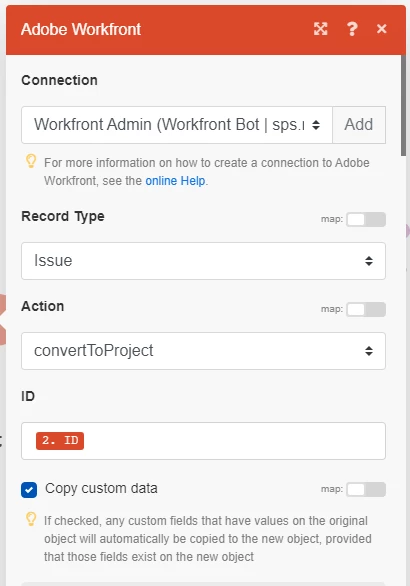
In the meantime I modified the Fusion scenario and exchanged the module Convert object to Misc action -> Issue -> convert to project. Now the values are filled into the new project.

This raises the question for me, what other differences there are between both approaches to use those modules?

undu82
November 16, 2023

Same here, we use the Misc module, and we attach a template in the same action.


ChrisStephens
Community Advisor
Community Advisor
November 16, 2023

I don't think the convert module can, see below for technical reasons. I've always used the misc. action version, and to be honest never noticed the convert object module, I'm guessing it's a relatively recent addition, and it's missing the check-box to save that metadata onto the new object like the misc. action does.


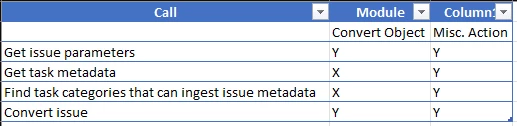
The two modules behave very differently on the back. The convert to object makes 2 calls, however the misc. action module makes 4 calls, and the 2 calls that are missing are the ones that would be required to post the metadata, see attached. In fact, inspecting the "convertToTask" call, the custom field values aren't even included in the call. The missing calls are the calls that would make Workfront go find the custom forms that would be required for the converted object to have the same parameters.


lgaertner
lgaertnerAuthor
November 17, 2023

Good Morning,


Thank you very much for all the detailed replies!

In the meantime I received an answer from the support which which coincides with the answers given here.


---


Convert object: This action first converts the request and once the conversion is done, attaches the custom forms. This can lead to data loss because the form will be blank when it's attached. 

Misc Action → Issue → Convert to Project: This action ensures that the custom form is attached to the project at the same time as the conversion and allows you to transfer the custom data from one object to another. 


Regards
Lars