Understanding Parsing/Mapping Data From A .CSV File | Community
Skip to main content
Eric_D_Miller
Level 5
May 27, 2025
Solved

Understanding Parsing/Mapping Data From A .CSV File

  • May 27, 2025
  • 2 replies
  • 1697 views

Hello,


I am attempting to pull information from a .csv file and would like to map that data to specific fields on a project. The csv is originating from a spreadsheet. There are a few cells in the spreadsheet that I would like to map data to some project fields.


The CSV file that is being uploaded parses with no data in the bundles, only the header:
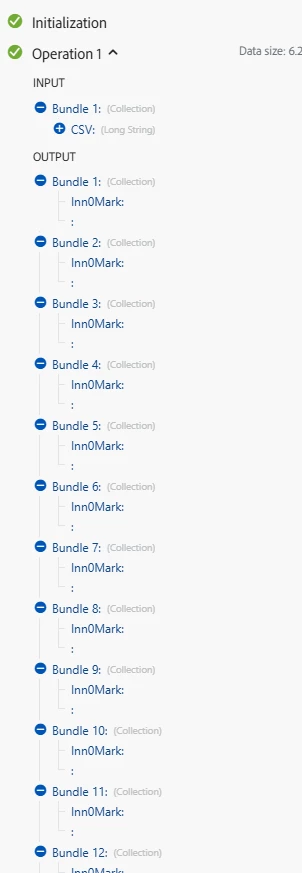
 

Any insight on what I need to do in order to access the rest of the data in the csv? Could it be how the excel sheet is formatted?

Why are my bundles showing up blank?


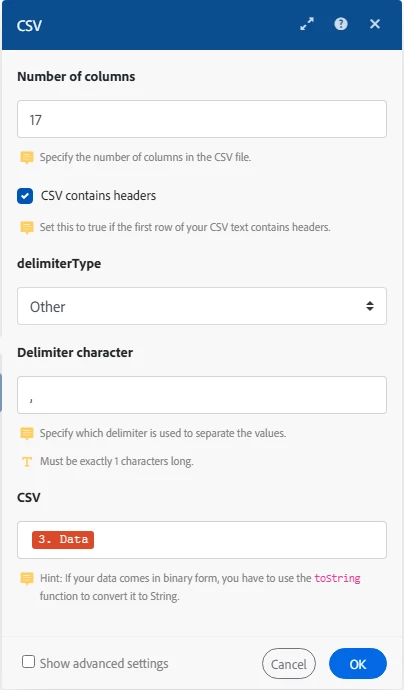
Here is my Parse CSV Module for context:
 

This post is no longer active and is closed to new replies. Need help? Start a new post to ask your question.
Best answer by Sven-iX

Sven,


Thanks for the details and the Blueprint!


I am lost on how to set the initial 'set variable' module to pull the date from the .csv being uploaded rather than the text I sent as the example.


Do I still download the document in Fusion? If so how do I push the data from the downloaded .csv to the variable?


Thank you in advance.


Hi @eric_d_miller 
you don't need that variable technically (I needed to because I didn't download the CSV)
Just use the 3.data field from the download


2 replies

Rafal_Bainie
Community Advisor
Community Advisor
May 27, 2025

2 thoughts:

1. why not select comma from delimiter dropdown? maybe that is impacting results...

2. We use aggregator into custom data structure post parse CSV module to organize everything :

I hope this helps

Rafal

Sven-iX
Community Advisor
Community Advisor
May 27, 2025

Hi @eric_d_miller 
Can you check what the {3.Data} value is? (I assume it's from a document download?)

Also - when you download the CSV and open in Excel - does it look as expected? 

Eric_D_Miller
Level 5
May 28, 2025

Hello @sven-ix ,

The  {3.Data} value is indeed from a document download. The downloaded file is a .csv format.


The .csv file is getting exported from an Excel spreadsheet that includes plenty of formatting, but when I open it via .csv all of the data is still in there.

Eric_D_Miller
Level 5
June 11, 2025

Hi @eric_d_miller 


Couple comments: 

  • Your sheet has a bunch of name-value fields , and a real CSV table starts in line 18. When you parse this - what data do you expect to read out of it? 
  • Excel is weird - for example, your columns are "filled" up until col P (16) - but an example row in the CSV shows 19 cols (counting the commas)
    ,XXXX - 9098126 E1,HEAT BEND SIGN 11 X 14 X 7,11 X 21 (FLAT) / 11 X 14 X 7 (FINISHED),SS (WHITE/0),3MIL SINTRA BLACK,"TRIM TO SIZE, APPLY HEAT BEND AT 92 °",, $XX.XX , 43 , $XXX.XX , $- , $- , $XXX.XX , $XX.XX , $XXX.XX ,,,​In my experience I have to literally "delete rows/cols" outside the area I am exporting because otherwise Excel tries to be too smart (I assume those cells are "touched" and even though they're blank, Excel exports them... )

Help me understand what your next step is after parsing this CSV. Then we'll get it working. 


I am trying to get the $ amount from the:

  1. STANDARD VENDOR VCBs (Sign Count)
  2. SUBTOTAL
  3. TAX(7%)
  4. 33%

Does this help?