Turn off inherited permissions on task level using Fusion / API | Community
Skip to main content
lgaertner
Level 9
April 17, 2024
Solved

Turn off inherited permissions on task level using Fusion / API

  • April 17, 2024
  • 2 replies
  • 2153 views

Hello,


perhaps I just looked at the wrong places, but I am trying to find a solution for this:


If a task is set to a specific status, the users should not be able to modify the dates within the task.
As I am not aware of any other solution, I would like to implement the following workaround, which fulfils my needs.


Since we have the new sharing modal, there is the possibility to turn off inherited permissions. Afterwards I would like to grant access to the project's group with view access only. This will prevent editing all fields in the task, but I think there is no other way.


Now I need to find a solution to automate this using Fusion:


Watch Event for status change -> Turn off inherited permissions -> Grant access to project group


Does anybody know, if there is an easy way to do that?


In the meantime I will have a look at the ACSRUL endpoint and try my luck...


Thanks in advance.


Regards

Lars


Best answer by KIMBERLYREA

We turned off inherited permissions on a folder. I'm sure it's the same. I hope this helps. 


2 replies

Rafal_Bainie
Community Advisor
Community Advisor
April 19, 2024

I don't know the answer, but if you figure out how to enable/disable inherited permissions, please let me know 🙂

lgaertner
lgaertnerAuthor
Level 9
April 23, 2024

Hello Rafal,


I did bit "reverse engineering" and found out some stuff, but unfortunately I was not successful at the end.


  • per default: inherited Permissions is turned on, only directly visible in the UI

    • the collection accessRules is empty "accessRules": []

    • the fields securityRootID & securityRootObjCode are relating to the parent project

    • using the unsupported API there is also a field  called securityAncestorsDisabled which is set to false, if the inheritance is turned on, and to true, if turned off. Unfortunately I cannot modify this field using the API / Fusion, although I do not get an error message

  • If an additional rule is created, all rules of the parent object are applied to the object and get isInherited: true and the fields securityRootID & securityRootObjCode get related to the task itself. Both fields are read_only.


It is absolutely frustrating, as I tried around a lot, but without success.


Perhaps someone has another idea...


Regards

Lars

lgaertner
lgaertnerAuthor
Level 9
April 23, 2024

the only thing that I saw was that inherited permissions are controlled by an option:


this gets cleared when inherited permissions are in place


Yes, there is also a thread here, relating to this option and doing a call, which "emulates" the user action to turn off the inheritance and save.


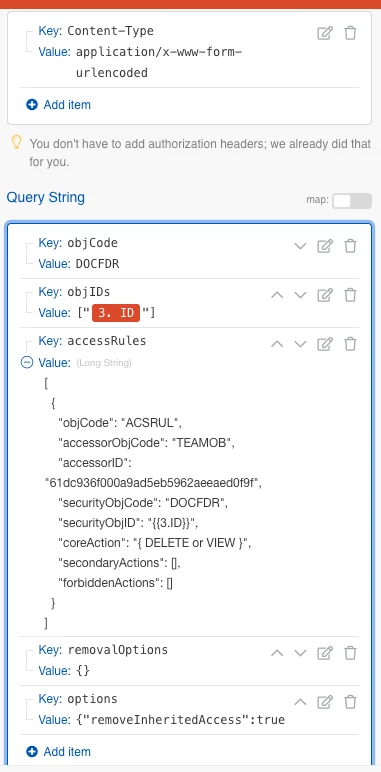
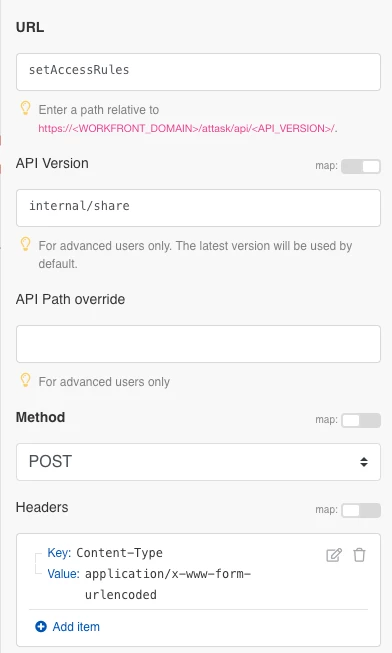
This is using the "endpoint" /internal/share/setAccessRules.


The content-type needs to be application/x-www-form-urlencoded then. Unfortunately I was not able to adapt this whole thing into Fusion, so I tried to find a way using the API.

Besides that I also do not really like this solution, as any changes in the UI could break the whole thing...


But I do not want to give up yet, so perhaps I will give this workaround another try...


Regards

Lars

KIMBERLYREA
Community Advisor
KIMBERLYREACommunity AdvisorAccepted solution
Community Advisor
April 23, 2024

We turned off inherited permissions on a folder. I'm sure it's the same. I hope this helps.