Trouble creating a Workfront Custom API call for Nested Updates | Community
Skip to main content
Level 2
March 31, 2022
Question

Trouble creating a Workfront Custom API call for Nested Updates

  • March 31, 2022
  • 2 replies
  • 3437 views

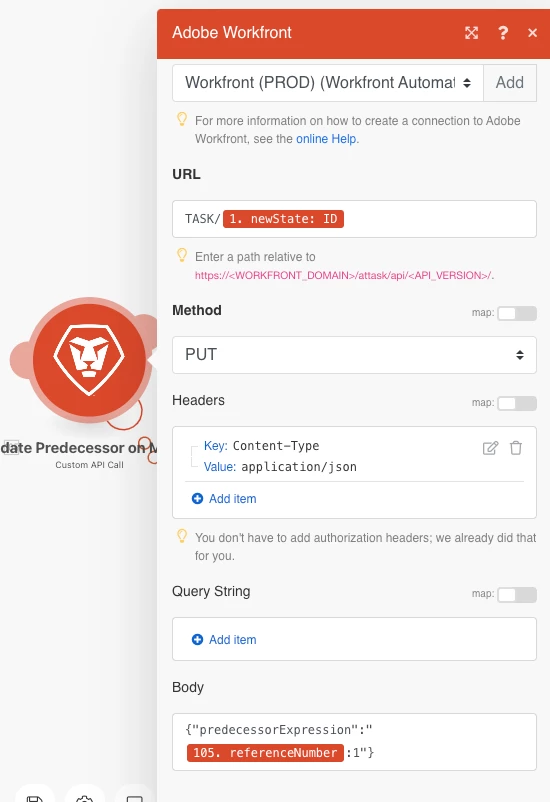
I have created an API Custom API Call to update the predecessor of a task. I have received an error on the module below.

I am wondering if I am just missing some commas or quotes in the body or if I am completely off. The error says "[422] APIModel INTERNAL does not support field data (Task)" so I am wondering if updating nested fields is not even possible.

Any help is greatly appreciated!

This post is no longer active and is closed to new replies. Need help? Start a new post to ask your question.

2 replies

AndyHess
Adobe Employee
Adobe Employee
March 31, 2022

This is a fantastic question.

Predecessors are one of the curiosities of the Workfront API. You can not PUT/POST directly to the predecessor object either through the task or directly. Instead WF engineered a READ-ONLY field into the API called predecessorExpression. In effect here you would literally place the same string you would when entering a predecessor into the UI. Take a look at the attached example on how to do this. Note in my example it is a cross project predecessor, but the idea is the same. Instead of the reference number of a different project, just put your "Task Number" + the secondary elements like ff or such.

Level 2
September 2, 2022

@andyhess Where is the example? I am looking to do the same thing.

Level 2
September 6, 2022

Hmm.... sorry about that.  It looks like the attachment may have been lost when we converted content in the Adobe Experience.


Here you go. this is a pretty simple API call.   In the example, you see the 'referenceNumber' is being applied because this is a cross project predecessor to the 1st task of that project.  


Let's say this were to a task #15 in the same project, then it would not need a 'referenceNumber:TaskNumber' and could just be TaskNumber ff'.  Basically this is the string that you would type into the UI to create a predecessor.


Thanks Andy! That worked. I really appreciate your help!

Level 3
July 15, 2022

@Andy Hess‚ Is there a way to add a predecessor in addition to the existing one using Fusion? Say if task A has a predecessor B already and after the Fusion run I want the task A to have both predecessor B and C. Thanks

AndyHess
Adobe Employee
Adobe Employee
July 15, 2022
Certainly, there are several ways. My favorite is to use the tasks predecessorExpression field in a PUT. Here you simply place the same value you would if you were typing the predecessor in the UI. Don’t think it is destructive and adds one. You can also replace the predecessor object and add another value to the existing one using a JSON data structure. Andy Hess Workfront, an Adobe company | c. 561.252.3329 | andyhess@adobe.com Need to schedule a meeting? Choose your 60 minute meeting here for Integration Consulting