
Retaining "Text with Formatting" field formatting in Email module | Community
Skip to main content
KierstenKollins
Community Advisor
Community Advisor
October 14, 2024
Solved

Retaining "Text with Formatting" field formatting in Email module

  • October 14, 2024
  • 3 replies
  • 925 views

Has anyone managed to keep the formatting (like bullets and numbers) from a “text with formatting” field when it’s transferred into the body of an email module?


I am returning the below when the email has been sent. I am using the HTML content type option.
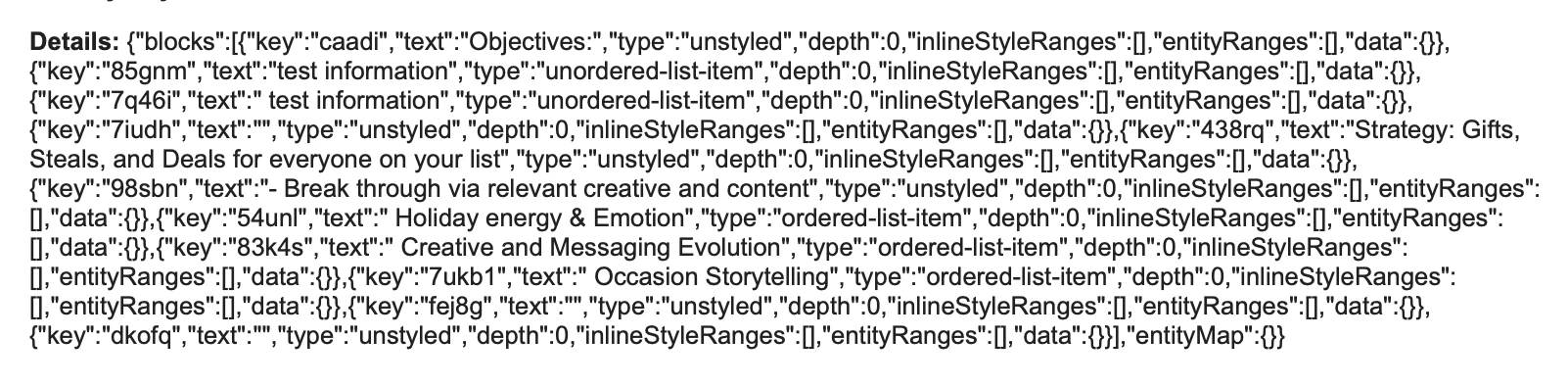


Our team wants to bullet or number key information and ensure that this formatting is preserved when it appears in the email.
This post is no longer active and is closed to new replies. Need help? Start a new post to ask your question.
Best answer by KierstenKollins

Throwing out a workaround for others that may need formatting in their email.


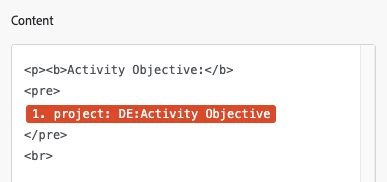
I reverted back to using a paragraph field. Within the email module content area, I used the <pre></pre> html tags around the field to be able to retain formatting from the paragraph field.


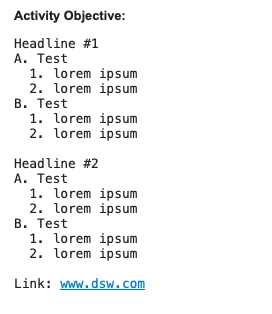
After doing a few quick tests, numbering and lettering seems to be the cleanest and most organized compared to copied and pasted in bullets.


3 replies

Sven-atClient
Level 3
October 14, 2024

@kierstenkollins 
you'll need to find out what the email module accepts as format. I'm almost certain it's not the JSON from the RTF field. 

Doug_Den_Hoed__AtAppStore
Community Advisor
Community Advisor
October 14, 2024


Ehm...breaking it to you gently @kierstenkollins,


The GOOD: We hit a similar request a couple of years ago when we added the ability to interpret the "block" format shown above and honor it as intended (i.e. with bullets, italics, etc.) in our Magic Reports solutions, but


The BAD: Although well structured, the block format did not appear (at least last at that time) to have any translation libraries available (at all...let alone Fusion specific), so


The UGLY: we wrote our own, as I'd expect you'd need to do, too


Regards,

Doug 

KierstenKollins
Community Advisor
Community Advisor
October 14, 2024

Darn it. Thanks @doug_den_hoed__atappstore

KierstenKollins
Community Advisor
KierstenKollinsCommunity AdvisorAuthorAccepted solution
Community Advisor
October 15, 2024

Throwing out a workaround for others that may need formatting in their email.


I reverted back to using a paragraph field. Within the email module content area, I used the <pre></pre> html tags around the field to be able to retain formatting from the paragraph field.


After doing a few quick tests, numbering and lettering seems to be the cleanest and most organized compared to copied and pasted in bullets.


Doug_Den_Hoed__AtAppStore
Community Advisor
Community Advisor
October 15, 2024


Inspired, @kierstenkollins!


I'm pleased you found an adequate workaround.


Regards,

Doug