
"Watch Events" module getting triggered twice | Community
Skip to main content
_Manish_Singh
Level 9
March 18, 2024
Solved

"Watch Events" module getting triggered twice

  • March 18, 2024
  • 3 replies
  • 2608 views

I have a situation where a scenario is getting triggered twice whenever the "assignments" field is updated. The first module is "Watch Events" with record type "Assignment". Every time I add 1 or more assignment, the scenario triggers twice for each assignment.

I've noticed that the "Exclude events made by this connection" checkbox is not present for the "Assignment" record type. Could someone verify if this is the cause of the issue? or a share potential solution please?
This post is no longer active and is closed to new replies. Need help? Start a new post to ask your question.
Best answer by undu82

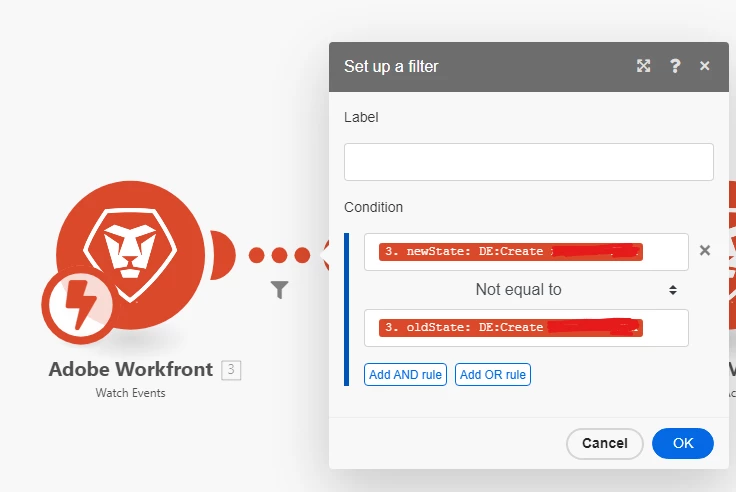
Hi, you can try adding this filter after the watch event


Just compare that the oldState is not equal to the newState

3 replies

Level 4
March 18, 2024

Hi Manish, it could be that and I recommend you tick that box to prevent self-generated events.  However, it could also be running multiple times if you have more than one assignee.  Check the number of bundles coming out of the upstream modules. All the best, Stuart

_Manish_Singh
Level 9
March 18, 2024

Hi @stuartcairns - Unfortunately, the checkbox is missing for record type "Assignments" by default.

You're right, it runs multiples times. I'm expecting it to run 2 times when I add 2 assignees. However, it runs 4 times (2x) in my case (don't know why).

Level 4
March 18, 2024

Hi Manish, it'll be running twice for each of your two assignees.  Try putting an array aggregator on, linking back to the object, presumably a task, the assignees are assigned to, so you have a single output bundle.


Stuart  

undu82
undu82Accepted solution
Level 2
March 18, 2024

Hi, you can try adding this filter after the watch event


Just compare that the oldState is not equal to the newState

Level 4
March 18, 2024

Can you explain what this does exactly? I can tell from reading it, but can you share your intent here? 😄 Thank you kindly.

undu82
Level 2
March 18, 2024

Yes, I have something like a button (yes/no) that is the trigger of this scenario at the project level. As it's a Watch event scenario, each time that someone touch anything in the project, it retriggered, so I use that filter to only run it if it was a change of the button. 


I used to have a similar issue in Saleforce, so we added timestamps or system buttons and some rules around them, like it can only run 1 minute after the timestamp, but you can get a similar approach using the old versus new status.


For example, you can use:
Old Status | lastUpdateDate March 14, 2024 12:05 PM

New Status | lastUpdateDate March 18, 2024 10:23 AM
 

Hope it helps

Doug_Den_Hoed__AtAppStore
Community Advisor
Community Advisor
March 18, 2024


Hi @_manish_singh,


I happen to re-read this popular post last week, and at the very end (noting it takes hitting “Load more” twice to get there), rediscovered one reason that can cause two updates to fire in quick succession.


It’s worth a full read in context, so I won’t repeat it all, but in short: if you have custom calculated parameters in play, that can do it….


Regards,

Doug

Level 4
March 19, 2024

Excellent - thank you. 😄