Optional filter date syntax | Community
Skip to main content
FrankatMSC
March 26, 2025
Solved

Optional filter date syntax

  • March 26, 2025
  • 2 replies
  • 419 views

I have a task watch record module that I am trying to use the optional filter to capture only tasks that have an actual completion date of todays date.  

I have tried actualCompletionDate=now but it errors out.  Does anyone know the right syntax?


In addition, is there any documentation on using the optional filter?


Thanks in advance for any any all help.


Frank

Best answer by Sven-iX

What's the trigger then - if it's "tasks that completed today" I'd recommend the instant webhook- it fires right when the status changes and you don't have to do any filtering on date

2 replies

lgaertner
March 26, 2025

Hello Frank,


now represents the current time down to Milliseconds in ISO 8601 format.
You will therefore most likely never be able to run a scenario with this setting.


So you will need to work with the Greater than / Less than filters, to get a working trigger.


Regards

Lars

Sven-iX
Community Advisor
Sven-iXCommunity AdvisorAccepted solution
Community Advisor
March 26, 2025

What's the trigger then - if it's "tasks that completed today" I'd recommend the instant webhook- it fires right when the status changes and you don't have to do any filtering on date

FrankatMSC
March 27, 2025

Thank you @sven-ix .  That sounds like an intriguing option.  I haven't used a instant webhook yet.  They seem a bit confusing.  I'll have to read up on exactly how to set them to capture task events.

Sven-iX
Community Advisor
Community Advisor
March 27, 2025

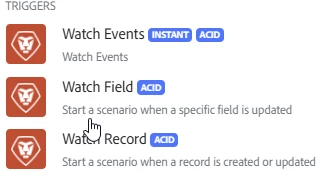
There are 3 WF webhooks : Watch Events, Fields and records, respectively. 
A record = business object that is tracked

A field = specific field on a record

Event - any change/create/delete event on tracked objects.


They each have slightly different option, best to play with each one. The main difference is that the Watch Record/Field hooks only function by polling the accumulated events. They are never instant. 

The filtering on the Instant trigger is annoying because the UI doesn't support OR filters. The other modules are - annoying because you get to type in the text-mode filter yourself - but that also gives you some freedom.


Fusion/Workfront set up the event subscriptions automagically under the hood. You just put the trigger module in, and configure filters etc. then continue processing. 

Note: I would always set the "max events" to 1 - in some weird cases Fusion got duplicates (very rare - but baffling)