Need help using the "contains" function | Community
Skip to main content
Level 3
November 2, 2020
Solved

Need help using the "contains" function

  • November 2, 2020
  • 1 reply
  • 938 views

The documentation for "contains" isn't too helpful ... the (Hello World,Hello) example doesn't show how to check a field.

I'm trying to see if a field contains the word Anniversary. If true, I'll set a project ID. If not, nada. Right now, I'm just testing and I'm getting nowhere.

I know the field contains Anniversary, but I keep getting a false. Anyone out there know how to do this?

This post is no longer active and is closed to new replies. Need help? Start a new post to ask your question.
Best answer by darin_patterson

Hi Howard,

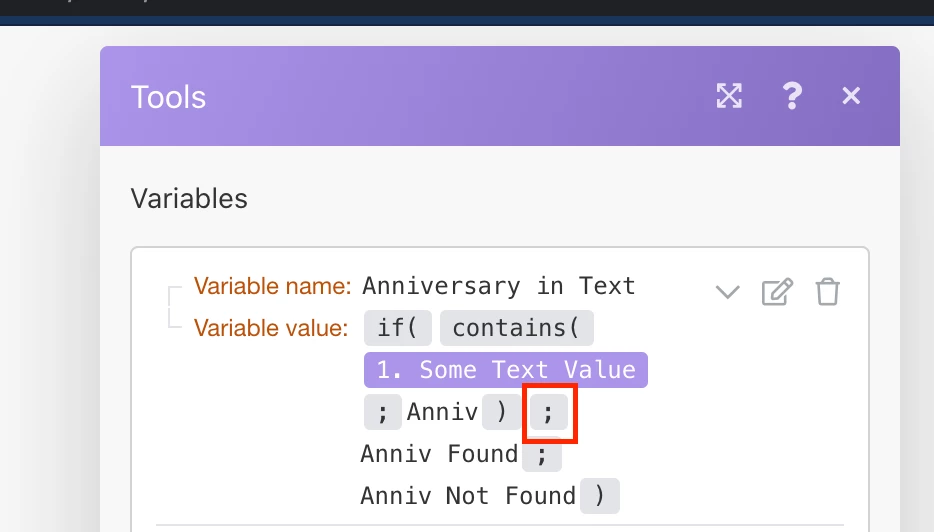
Your variable value is so close! But missing a semicolon.

right now your function is something like:

{{if(contains(1.`Some Text Value`; "Anniv") + "Anniv Found"; "Anniv Not Found")}}

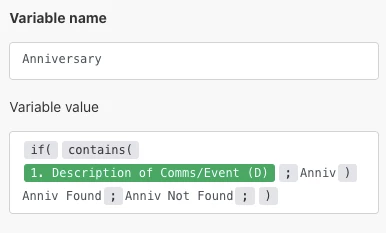
but it should be:

{{if(contains(1.`Some Text Value`; "Anniv"); "Anniv Found"; "Anniv Not Found")}}

(you can copy and paste this text and then you can swap out the variable values.

contains works as you would expect, returning a true or false if the value is found in that text. In this situation, the contains was not actually the problem. Instead, your if statement was missing the semicolon after the first expression. As a useful tip in the future, you can strip out the if and test the contains by itself to get more insight.

I should also note that "contains" may work differently if you are dealing with an array. I've attached a simple blueprint you can import anywhere to confirm how it works with both a text and an array. I hope this helps.
1 reply

darin_pattersonAccepted solution
Level 4
November 2, 2020

Hi Howard,

Your variable value is so close! But missing a semicolon.

right now your function is something like:

{{if(contains(1.`Some Text Value`; "Anniv") + "Anniv Found"; "Anniv Not Found")}}

but it should be:

{{if(contains(1.`Some Text Value`; "Anniv"); "Anniv Found"; "Anniv Not Found")}}

(you can copy and paste this text and then you can swap out the variable values.

contains works as you would expect, returning a true or false if the value is found in that text. In this situation, the contains was not actually the problem. Instead, your if statement was missing the semicolon after the first expression. As a useful tip in the future, you can strip out the if and test the contains by itself to get more insight.

I should also note that "contains" may work differently if you are dealing with an array. I've attached a simple blueprint you can import anywhere to confirm how it works with both a text and an array. I hope this helps.

HowardWi1Author
Level 3
November 4, 2020

The dreaded SEMI-COLON!

Thank you so much for the help.