Manually refreshing the authentication token - External Lookup field API in Custom Forms | Community
Skip to main content
Level 3
February 15, 2024
Question

Manually refreshing the authentication token - External Lookup field API in Custom Forms

  • February 15, 2024
  • 2 replies
  • 1749 views

Considering the current limitation of manual token refresh, what steps can be taken to mitigate the associated risks and improve the efficiency of the authentication process? 

Currently, we have to do a manual refresh of the token used for authentication. There is no direct way to automatically update the token within the system. Therefore, each time the token needs to be refreshed, it must be manually updated in the Headers field.

This is for the field type, External Lookup, and currently our token refreshes about every 20 minutes due to security but also results in errors. 
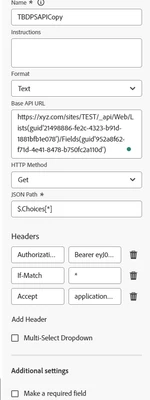


Is there a way to avoid this and have this somehow set up using Adobe Fusion? 

This post is no longer active and is closed to new replies. Need help? Start a new post to ask your question.

2 replies

Level 4
February 20, 2024

Hi @saadi2 

As Per my understanding, If the third-party system supports Refresh Token, then Adobe Fusion should be able to refresh the token automatically. In the External Lookup configuration where you put API base URL and Headers, you also need to define OAuth2 configuration with Client Id, Client Secret, and scope. Also, you provide Access Token URL (which is used to get the initial access token) and Refresh Token URL (which will be used to refresh the access token when it expires).


Also as an alternative, if you have the ability to implement a separate automation (like a script or a bot), this could automatically renew the tokens for you every 20 minutes and update the corresponding headers in Adobe Fusion. This process will depend heavily on the APIs supported by Adobe Fusion.


Hope this Helps.


Thanks,

Venkat

SAadi2Author
Level 3
February 20, 2024

Hello Venkat @jagarlamudive , I appreciate your prompt and comprehensive reply. Currently, we're using Sharepoint and it requires us to refresh the token regularly. In Fusion, this is straightforward because we have modules set up with Client Secrets that create a new authentication token for SharePoint which we use in our Fusion Scenarios. 

However, I'm unsure how to set this up in Custom Forms for an external lookup field. Is there a method to update the header on an external lookup field? I don't see a way to do this, even within the internal fusion flow.

If yes, how should my headers look like? 

I'm eager to hear your thoughts on this matter!

William--
Community Advisor
Community Advisor
March 28, 2024

I just posted something on this same topic. It is the same concept as mentioned by Jvenkat, but explains in detail on how to set up and configure:

https://experienceleaguecommunities.adobe.com/t5/workfront-fusion-2-0-questions/how-to-authenticate-your-external-lookup-fields-to-apis-using/m-p/663221/highlight/true#M1446

If you like my content, please take a moment to view and vote on my Idea Requests: https://tinyurl.com/4rbpr7hf
SAadi2Author
Level 3
April 3, 2024

@william-- Any update on your response above? I am unable to view your response 🙂