In/Not In Operator | Community
Skip to main content
Level 3
March 31, 2021
Solved

In/Not In Operator

  • March 31, 2021
  • 2 replies
  • 2743 views

Hi All

So i find myself a bit stuck with using the "In" operator.

Fusion 2.0 suggests i should do this as i want to find all Projects that are either "AWA"" or "PLN" (I am aware my screenshot only shows "PLN" at present)
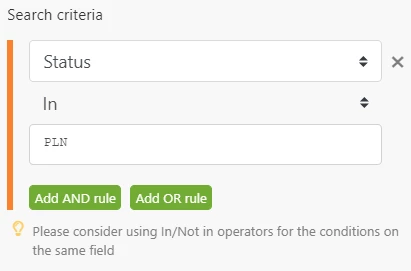
What i cant seem to figure is how to do this in the above module? There will be several other "AND Rules" statements to follow this.

I have written countless API queries and always end up going down the road of something like:

proj/search?status=AWA&status=PLN&status_Mod=in

So how can i replicate this using the "In" operator as above?

Thanks

This post is no longer active and is closed to new replies. Need help? Start a new post to ask your question.
Best answer by darin_patterson

Hi everyone,

This is a great question and you are so close to the right answer.

When you use the "in" operator in the Workfront Search module, Fusion is expecting to compare the field to an array of possible values.

In other words, to find a list of projects with the status of "AWA" or "PLN" you wold compare Status with "IN" and then use the following formula:

{{add(emptyarray; "AWA"; "PLN")}}

(you can, of course, include additional values in the array as necessary as well).

I've included a screenshot as well.

The advantage of this approach over using "OR" is you can combine multiple complex criteria more effectively (and not have to repeat common criteria).

Cheers.

2 replies

Level 4
March 31, 2021

Hi Jonathan, that's a great question and something I ignored possibly to my detriment, I do use "OR" to split out duplicate fields in a search criteria (or more often the custom API card if it's a large criteria);

This would produce the below query to WF api, which does look like an efficient search;

/PROJ/search

{

....

"actualCost": "1",

"actualCost_Mod": "eq",

"status": "PLN",

"status_Mod": "eq",

"OR:1:actualCost": "1",

"OR:1:actualCost_Mod": "eq",

"OR:1:status": "AWA",

"OR:1:status_Mod": "eq"

}

There is probably good reason they have placed that message in the module, maybe @Darin Patterson - inactive‚ could weigh in.

darin_pattersonAccepted solution
Level 4
April 5, 2021

Hi everyone,

This is a great question and you are so close to the right answer.

When you use the "in" operator in the Workfront Search module, Fusion is expecting to compare the field to an array of possible values.

In other words, to find a list of projects with the status of "AWA" or "PLN" you wold compare Status with "IN" and then use the following formula:

{{add(emptyarray; "AWA"; "PLN")}}

(you can, of course, include additional values in the array as necessary as well).

I've included a screenshot as well.

The advantage of this approach over using "OR" is you can combine multiple complex criteria more effectively (and not have to repeat common criteria).

Cheers.

JonnyTh1Author
Level 3
April 14, 2021

Hi Darin

Thanks for this, just what i needed! This will make things a whole lot easier as you say for not having to repeat common criteria!

Thanks again

Level 4
April 14, 2021

Hi Jonathan ,

That is strange -- my testing does not show that and I can't fully see your testing because I can't see what values actually existed for "status".

For testing purposes only -- I would create a simple scenario with two nonsense modules, then experiment with the filter between them. In this case, you'd use directly written values rather than mapping them to a previous module's values.

When I do that, I can see the "contains" array approach work. But the "or" approach only "deceptively works" when the value happens to match the first value before the "or" (it doesn't match subsequent ones).

Right now, I'm guessing that you may have selected the "text operator contains" comparison rather than the "array operator contains" comparison. See screenshot of both.

If that doesn't bring clarity, then send me an email with a link to your scenario execution and I'll take a closer look.