How to upload a document to workfront? I don't have a "Related Record ID" but it requires one. | Community
Skip to main content
Level 2
July 9, 2025
Solved

How to upload a document to workfront? I don't have a "Related Record ID" but it requires one.
  • July 9, 2025
  • 2 replies
  • 395 views

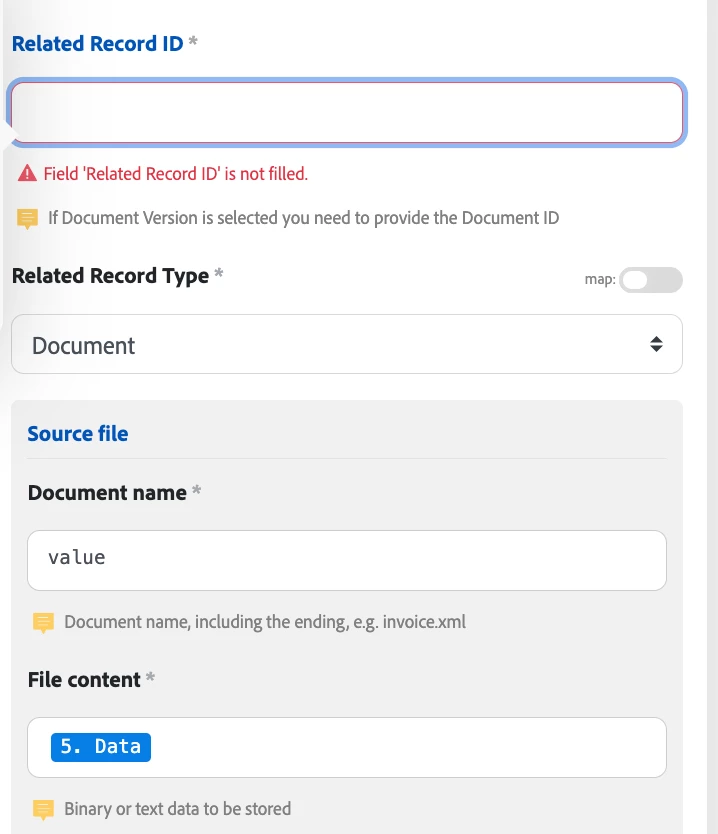
Using the Workfront module-Upload Document it requires a related Record ID BUT using the API you don't need that.

I don't have a related record ID, I just want to upload the file. How do you upload a file without that record ID?

Best answer by Sven-iX

When you use the API directly and don't specify a relatedRecordID it will use the API user as related record.


You can verify this by using Fusion's ReadARecord module: If you select referenceObjID and referenceObjectName it will show your name/ID on those documents you "just" uploaded. 


So if you don't need to associate a doc with a business object such as project or task etc, you need to supply a user. 

2 replies

Sven-iX
Community Advisor
Sven-iXCommunity AdvisorAccepted solution
Community Advisor
July 9, 2025

When you use the API directly and don't specify a relatedRecordID it will use the API user as related record.


You can verify this by using Fusion's ReadARecord module: If you select referenceObjID and referenceObjectName it will show your name/ID on those documents you "just" uploaded. 


So if you don't need to associate a doc with a business object such as project or task etc, you need to supply a user. 

Rafal_Bainie
Community Advisor
Community Advisor
July 18, 2025

Sven is correct,

Document is a relative object in Workfront and doesn't exist on it's own. Therefore one of the fields is always not-empty:

taskID

issueID

userID

projectID

programID

portfolioID

if you don't know where to store document you can use your ID (userID) for the field related record ID, this is equivalent of opening Documents page and uploading there random document. Such doc gets by default assigned to you.
I hope this helps