How to update an Excel table using the Make an API call excel module in Fusion | Community
Skip to main content
esalraz
Level 2
October 9, 2025
Solved

How to update an Excel table using the Make an API call excel module in Fusion

  • October 9, 2025
  • 1 reply
  • 401 views

Hello Workfront Community,


A Fusion newbie here.


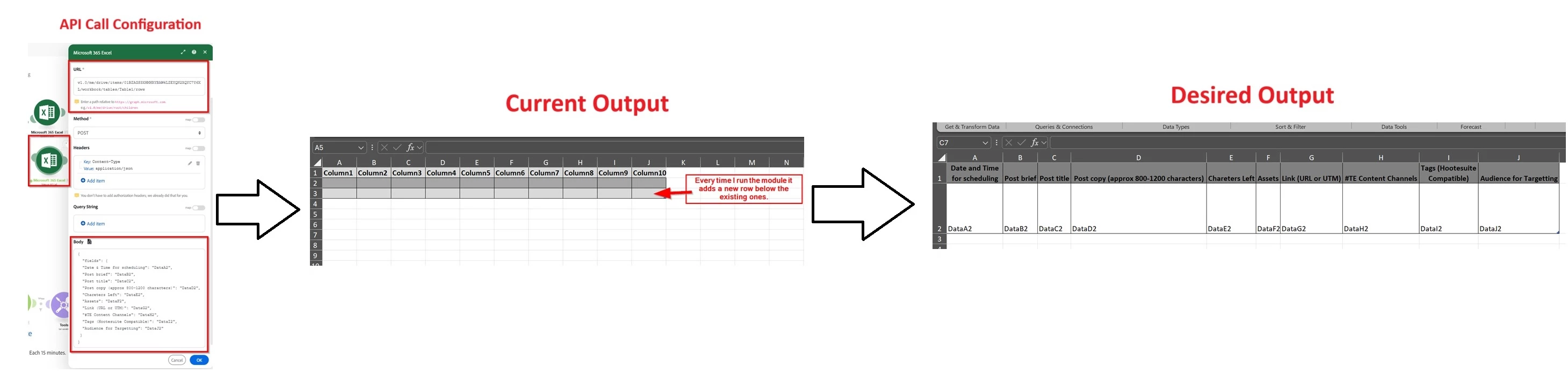
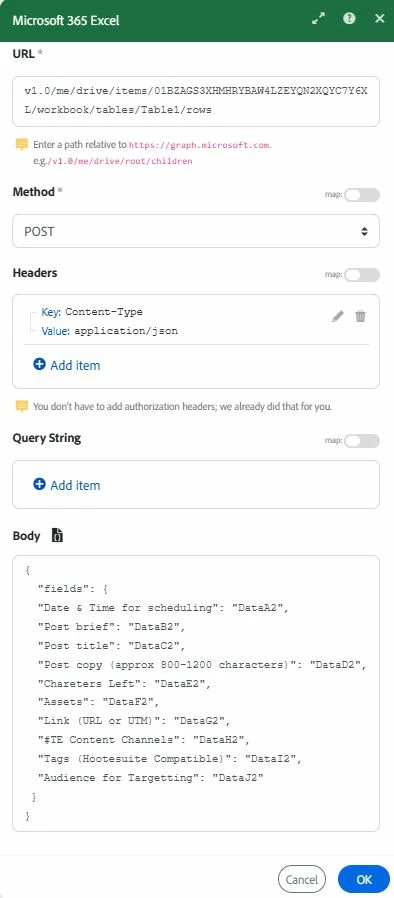
I have an Excel file stored on my OneDrive in which I´d like to update an existing table through "Make an API call" of Microsoft 365 Excel module in Fusion but I'm not sure what I'm doing wrong. With my current configuration module only adds a new row instead of modifying the table content (See attachments).


Could you let me know what I missed?
 

Thanks in advance.

Samuel

Best answer by AshpektSolutions

@esalraz 
With your current setup, the graph API /rows endpoint expects a list of arrays, not object with key value pairs. 

If your OneDrive Excel as headers, try this:
"values": [ ["DATAA2", "DATAB2", "DATAC2", "DATAD2", "DATAE2", "DATAF2", "DATAG2"]]}
Otherwise:
{"values": [[
"Date & Time for Scheduling",
"Post Brief",
"Post Title",
"Post Copy",
"Characters Left",
"Assets",
"Link"],[
"DATAA2",
"DATAB2",
"DATAC2",
"DATAD2",
"DATAE2",
"DATAF2",
"DATAG2"]]}

Each inner array represents as an new row.
References : 
1) https://learn.microsoft.com/en-us/graph/api/table-post-rows?view=graph-rest-1.0&tabs=http
2) https://experienceleague.adobe.com/en/docs/workfront-fusion/using/references/apps-and-their-modules/... 

If this helps, please mark it as correct answer so others can benefit too✅

1 reply

AshpektSolutions
AshpektSolutionsAccepted solution
Level 2
October 12, 2025

@esalraz 
With your current setup, the graph API /rows endpoint expects a list of arrays, not object with key value pairs. 

If your OneDrive Excel as headers, try this:
"values": [ ["DATAA2", "DATAB2", "DATAC2", "DATAD2", "DATAE2", "DATAF2", "DATAG2"]]}
Otherwise:
{"values": [[
"Date & Time for Scheduling",
"Post Brief",
"Post Title",
"Post Copy",
"Characters Left",
"Assets",
"Link"],[
"DATAA2",
"DATAB2",
"DATAC2",
"DATAD2",
"DATAE2",
"DATAF2",
"DATAG2"]]}

Each inner array represents as an new row.
References : 
1) https://learn.microsoft.com/en-us/graph/api/table-post-rows?view=graph-rest-1.0&tabs=http
2) https://experienceleague.adobe.com/en/docs/workfront-fusion/using/references/apps-and-their-modules/... 

If this helps, please mark it as correct answer so others can benefit too✅

esalraz
esalrazAuthor
Level 2
October 14, 2025

Hello @ashpektsolutions 


Thank you so much for help me. It worked  😀


Best Regards!