How to trigger a flow based on certain custom fields changing? | Community
Skip to main content
February 28, 2025
Solved

How to trigger a flow based on certain custom fields changing?

  • February 28, 2025
  • 1 reply
  • 635 views

Hi! I have 7 particular custom fields on a Project form, and I need to trigger a fusion flow whenever any of them is changed. I made a calculated field that concatenates the values of those 7 fields, as many answers on this forum suggest--the trouble is, calculated fields aren't selectable in the Watch Field module nor readable in the old state/new state of the Watch Events module, so I have no way of validating whether those fields changed at the start of the module. The operations that follow are somewhat lengthy, so I don't want to trigger them every single time a Project is updated. The alternative is making a separate flow for each field, but that will be a nightmare to maintain. Any tips?
Best answer by Sven-iX

Hi @colinji1 


Simple approach:

  1. Change your scenario to start with a webhook
  2. Create 4 listening scenarios, one for each custom field. as Filter, use DE:field name = changed
  3. Then add a HTTP module that calls the scenario in #1, passing the newState and oldState objects


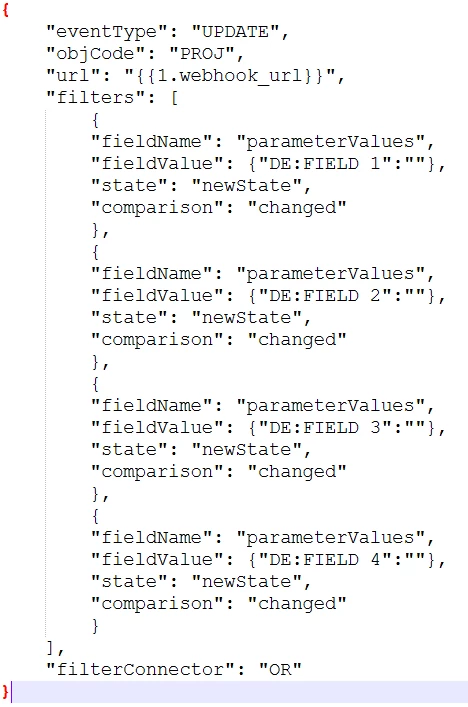
I recently learned (thanks JustinG and @chrisstephens) that you can create a custom event subscription: 
The watch event module gives only a simplified version - most annoying that it doesn't allow OR filters.


Check out here Event Subscription API

You can use Fusion to a) remove existing subscriptions that point the your event module, then b) add the needed subscription and filters. In your case something along the below might work.


1 reply

Sven-iX
Community Advisor
Sven-iXCommunity AdvisorAccepted solution
Community Advisor
March 1, 2025

Hi @colinji1 


Simple approach:

  1. Change your scenario to start with a webhook
  2. Create 4 listening scenarios, one for each custom field. as Filter, use DE:field name = changed
  3. Then add a HTTP module that calls the scenario in #1, passing the newState and oldState objects


I recently learned (thanks JustinG and @chrisstephens) that you can create a custom event subscription: 
The watch event module gives only a simplified version - most annoying that it doesn't allow OR filters.


Check out here Event Subscription API

You can use Fusion to a) remove existing subscriptions that point the your event module, then b) add the needed subscription and filters. In your case something along the below might work.


ColinJi1Author
March 1, 2025

@sven-ix This sounds fantastic! The latter solution might be a bit over my head (not even sure where to start with setting up an event subscription), but the "simple approach" sounds like it'd get the job done. I've never used an HTTP module before, can you give me a nudge in the right direction? This was my best guess but it definitely doesn't like it (with the full webhook URL entered, of course).

Thank you!


ColinJi1Author
March 1, 2025

Figured out something that works! I couldn't figure out how to send the whole old and new states along, but for the sake of any others who might come across this thread in the future: it was enough for me to send this along in the HTTP and query the project in the webhook scenario based on which listening scenario triggered it (passed along using fieldThatChanged).