How to fully unassign users and job roles from a task using Fusion? | Adobe Higher Education
Skip to main content
Level 3
April 24, 2025
Resuelto

How to fully unassign users and job roles from a task using Fusion?

  • April 24, 2025
  • 1 respuesta
  • 521 visualizaciones

Hi everyone,


Does anyone know how to completely unassign a task from its current assignees using Fusion?


I was able to remove the user from the task, but the associated job role still remains. Is there a way to remove both the user and the job role entirely, so I can assign a new user via Fusion?


Many thanks!

 

Mejor respuesta de danperkins

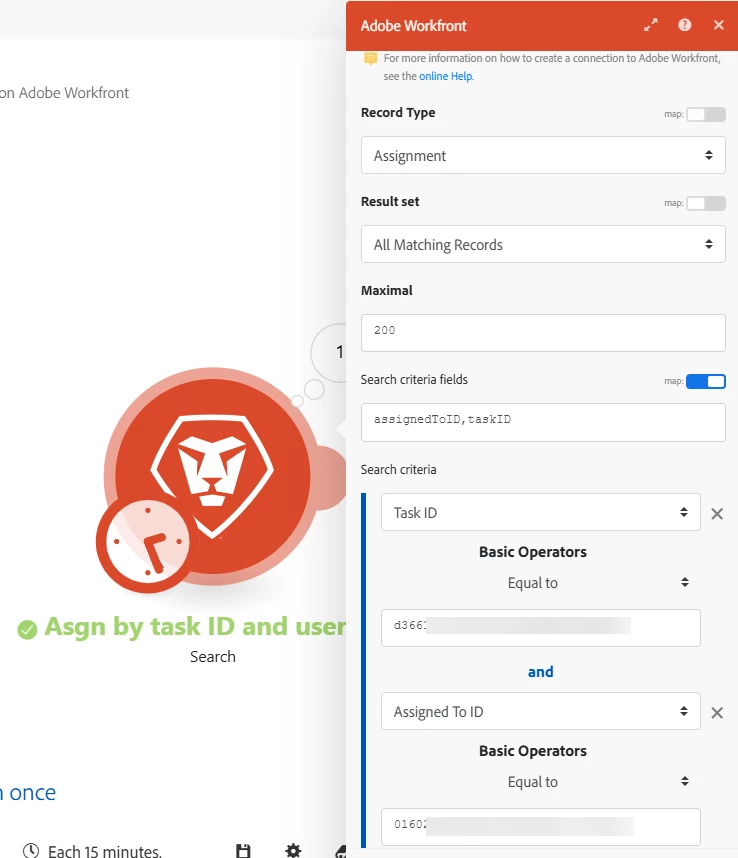
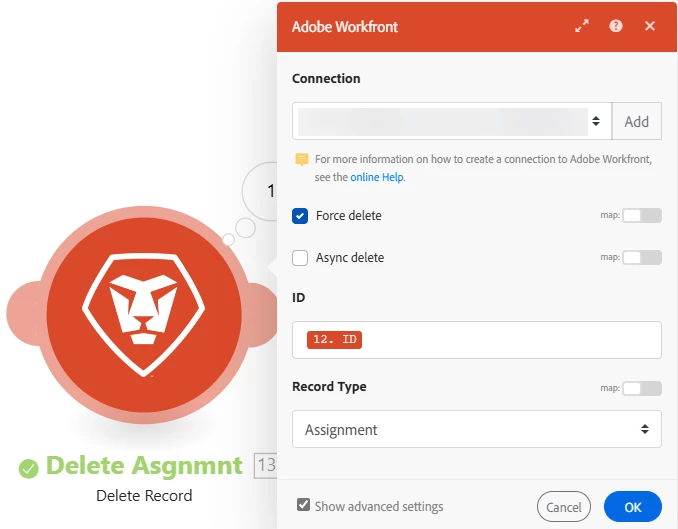
There's a couple of options depending on the circumstance, but I think the simplest might be first to use a Workfront "Search" module for Assignments where the Task ID matches the one you are looking for and the user ID matches the assigned to ID. The output for the search module is just "ID". Then you can use the Workfront Delete module to delete the Assignment by its ID. This will remove the user and the role at the same time.

The filter between the modules is to check if the assignment "ID" exists.

Here is the search criteria:

And the Delete:

I selected "Show advanced settings" to check the "Force delete" box. 

1 respuesta

danperkins
danperkinsRespuesta
Level 2
April 24, 2025

There's a couple of options depending on the circumstance, but I think the simplest might be first to use a Workfront "Search" module for Assignments where the Task ID matches the one you are looking for and the user ID matches the assigned to ID. The output for the search module is just "ID". Then you can use the Workfront Delete module to delete the Assignment by its ID. This will remove the user and the role at the same time.

The filter between the modules is to check if the assignment "ID" exists.

Here is the search criteria:

And the Delete:

I selected "Show advanced settings" to check the "Force delete" box. 

ab_cdefAutor
Level 3
April 25, 2025

This works - thanks so much @danperkins 


The only tweak I made for my scenario was to keep only the Task ID and uncheck the "Assigned To ID" field in Search as I needed to search for whoever is assigned to the task (outputting the Assignment ID) and then delete that record.


I also noticed that in my case, the result set needs to be set to "First matching record", otherwise, I get the "Validation failed for 1 parameter(s." error.