
How can I pull the ID of the user who approved an issue? | Community
Skip to main content
amybillmayer
Level 4
September 20, 2024
Solved

How can I pull the ID of the user who approved an issue?

  • September 20, 2024
  • 1 reply
  • 2248 views

Hi all - still fairly new to Fusion, but here's what I'm trying to do:


When a user approves an Issue, I'm using Fusion to auto-convert to a Project with a specific template applied.


I'd like to pull the ID of the user that approved the issue and assign them as the project owner at project conversion. I cannot for the life of me figure out how to get that user ID!!


Hopefully this is super simple - I appreciate you taking the time to look.
This post is no longer active and is closed to new replies. Need help? Start a new post to ask your question.
Best answer by Lawson02

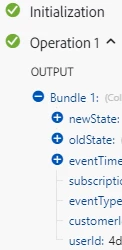
If you are using an instant watch event saying, trigger when the issue is approved, you can pull the userID from the event time bundle at the bottom. If not I suggest looking into the API to find something 

https://developer.adobe.com/workfront/api-explorer/


1 reply

Lawson02
Lawson02Accepted solution
Level 6
September 20, 2024

If you are using an instant watch event saying, trigger when the issue is approved, you can pull the userID from the event time bundle at the bottom. If not I suggest looking into the API to find something 

https://developer.adobe.com/workfront/api-explorer/


amybillmayer
Level 4
September 24, 2024

This worked! I have a few more issues to work out, but this was by far the biggest hurdle. Many, many thanks to you!

amybillmayer
Level 4
September 25, 2024

When I need to create a webhook that indicates a status is changed to lets say "NEW" I need to add status = NEW and status Changed. Adding the second clause may eliminate duplicate events.


You NAILED it!! It works perfectly now. Thank you so much for your time and patience. You and the rest of this community are amazing!