Fusion converting time values at runtime | Community
Skip to main content
Level 4
February 18, 2025
Solved

Fusion converting time values at runtime

  • February 18, 2025
  • 1 reply
  • 582 views

When Fusion reads a Date field with timestamp at runtime, I've noticed it converts the time... presumably based on the server timezone and how it differs from my own? Please see this screenshot:
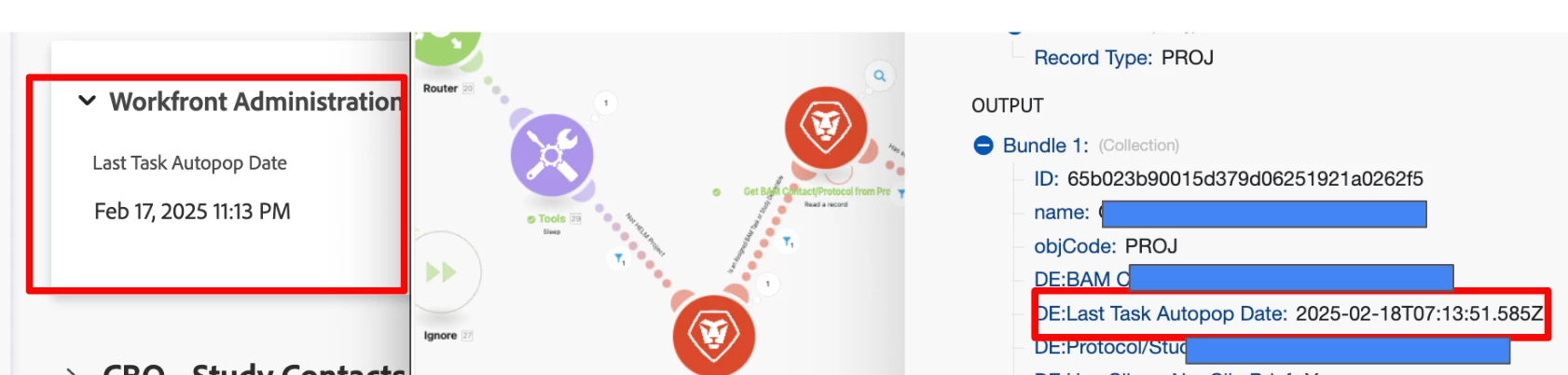
 The first red box is the value stored in Workfront. The 2nd red box is how Fusion interpreted the date/time at runtime (adding 8 hours and thus changing the date from Feb 17 to 18. ) 


This caused an error for my user because of a filter that stops the scenario if the field "Last Task Autopop..." value = today. (maybe TMI, but I take the last autopop value in WF and set a variable that strips it of its timestamp, making it just a date, and that is the actual variable that gets evaluated in the filter).


What might be the best way to keep the the date stored in Workfront in sync with the way the date is read at runtime?


Thanks for reading. 

 

Best answer by _Manish_Singh

Hi @mylah_d 

The time zone for your scenarios date and time can be found on one of these pages:
https://app-eu.workfrontfusion.com/user/timezones

https://app.workfrontfusion.com/user/timezones


You can consider adjusting the date and time output using the addHours() or addMinutes() functions.

Alternatively, you can use the format date function. For example: formatDate(date;DD.MM.YYYY HH:mm;timezone). You can copy the time zone from the "Notes" column in this article: List of tz database time zones - Wikipedia. Example: formatDate(date;DD.MM.YYYY HH:mm;Africa/Nairobi)

I'm not sure how to make such adjustments in Workfront. Adjusting in Fusion might be the best approach.

1 reply

_Manish_Singh
_Manish_SinghAccepted solution
Level 9
February 19, 2025

Hi @mylah_d 

The time zone for your scenarios date and time can be found on one of these pages:
https://app-eu.workfrontfusion.com/user/timezones

https://app.workfrontfusion.com/user/timezones


You can consider adjusting the date and time output using the addHours() or addMinutes() functions.

Alternatively, you can use the format date function. For example: formatDate(date;DD.MM.YYYY HH:mm;timezone). You can copy the time zone from the "Notes" column in this article: List of tz database time zones - Wikipedia. Example: formatDate(date;DD.MM.YYYY HH:mm;Africa/Nairobi)

I'm not sure how to make such adjustments in Workfront. Adjusting in Fusion might be the best approach.

Mylah_DAuthor
Level 4
February 19, 2025

Wow! I did not know about the formatDate "timezone" parameter (time for me to bookmark the documentation :/). That is exactly what I'll implement. Thank you!