Custom API call POST request | Community
Skip to main content
October 22, 2024
Solved

Custom API call POST request

  • October 22, 2024
  • 3 replies
  • 1934 views

Hi, I'm making a post request using 'Make a custom API call' module from workfront fusion scenario and getting 500 Error. Could anyone suggest what changes are needed in below configuration? Thanks in advance!
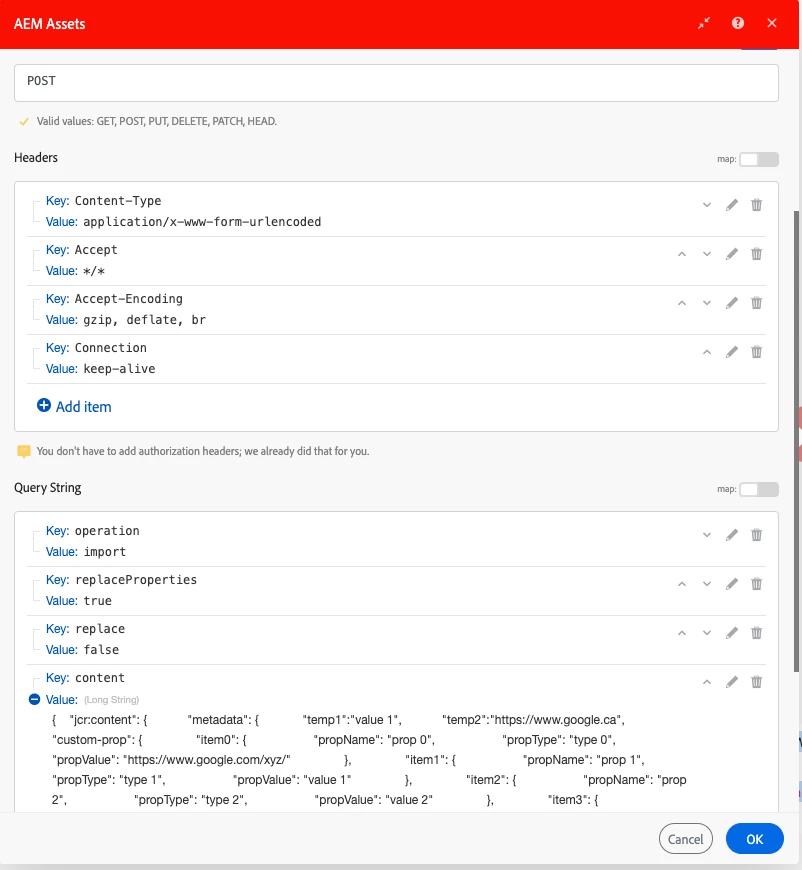
This post is no longer active and is closed to new replies. Need help? Start a new post to ask your question.
Best answer by aembee

This was resolved by setting the content into Request body instead of query string parameter

3 replies

October 22, 2024

That's a very large string for content.  Typically, you'd set Content-Type to application/json and POST the body as the JSON itself.  What API are you trying to hit?

aembeeAuthor
October 22, 2024

Hi @cverges I'm creating new nodes in AEM dam and need to make a POST call with content type application/x-www-form-urlencoded

October 22, 2024

I don't have an AEM Assets connection, so I can't screenshot anything.  However, typically in the Custom API modules, there's a URL entry that points to a specific API endpoint (defined via mechanisms such as https://developer.adobe.com/experience-cloud/experience-manager-apis/api/stable/sites/).  To really understand what API you're trying to use and why it may be erring, what's the URL that's in your module?

Sven-iX
Community Advisor
Community Advisor
October 22, 2024

Hi @aembee 


I'm not worried about the content size, I've done larger but: 

  • use SetVariable module(s) prior to your AEM module and then use those variable in the AEM module. 
    I find it easier to troubleshoot that. 
  • validate the JSON to ensure there's no illegal char

I don't know what URL you're hitting here, but 500 means AEM didn't like what you sent. Could be content type; names of parameters etc. 

Do click the toolkit icon in Fusion to see the actual call made. And check that it 100% matches what the Assets API spec expects. 

aembeeAuthorAccepted solution
October 30, 2024

This was resolved by setting the content into Request body instead of query string parameter