Creating a URL field that displays as clickable text in a custom form. | Adobe Higher Education
Skip to main content
Level 4
November 20, 2025
Resuelto

Creating a URL field that displays as clickable text in a custom form.

  • November 20, 2025
  • 2 respuestas
  • 221 visualizaciones

I'm attempting to create a link on an issue form that takes users directly to the project overview section.  I'm able to generate the link with a fusion flow that adds the project ID to the following formula using and open text field: https://experience.adobe.com/#/@f####/so:###Production/workfront/project/{{2.ID}}/overview 

I use fusion to plug-in the project ID and it works to provide a link on the issue.  However, I can't figure out how to get the link to display as clickable text.  Ideally I would want the text to display as "Click here to review project details."

Mejor respuesta de Richard_Le_

Hi Ivan,


That is correct. My proposed solution would embed the URL behind the clickable text "Click Here" in a view only. This is the simplest way to display a URL embedded behind clickable text.


If the URL needs to be displayed as "Click Here" on the custom form itselft, writing this value to a single line text field (or any plain text format) will not work. You cannot embed URL's in plain text fields, you can only display the URL in it's entirety (i.e., "https://experience.adobe.com/#/@f####/so:###Production/workfront/project/{{2.ID}}/overview ")


To meet the requirement of embedding the URL behind clickable text in the custom form itself, you would need to use a Rich Text field. Fusion would need to create a JSON string (with the applicable formatting tags for Rich Text) to populate the URL. You can read more on this here.


As a quick example, if I post the following JSON string to a Rich Text field called "Actions" using Fusion, the URL displays as clickable text.


{"blocks":[{"key":"1lcoc","text":"Click Here","type":"unstyled","depth":0,"inlineStyleRanges":[],"entityRanges":[{"offset":0,"length":10,"key":0}],"data":{}}],"entityMap":{"0":{"type":"LINK","mutability":"MUTABLE","data":{"url":"https://experience.adobe.com/#/@f####/so:###Production/workfront/project/{{2.ID}}/overview"}}}}
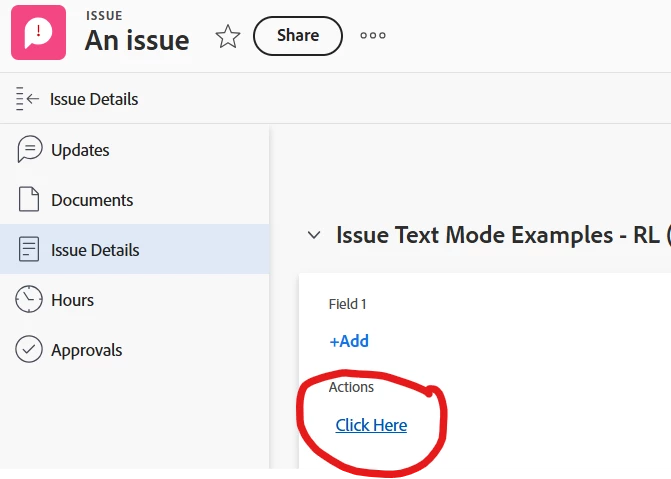
 

Best Regards,

Rich.


2 respuestas

IvanBebek-iX
Level 5
November 20, 2025

Hi @omahaomaha ,


This functionality can be achieved by using Single Line Text field and adding it to the custom form, and then populating the value via fusion once you have created the URL.


Basically on an Issue custom form

  1. Add field called Project overview or some name that works
  2. Create URL as already mentioned above
  3. Update the Issue via fusion adding to url to the Project overview field

Hopefully this is what you are looking for. If you have any questions please reach out.


Best regards,
Ivan 

Community Advisor
November 20, 2025

Hi @omahaomaha,


You need to configure a view using text mode to display the URL string as a clickable URL.


Let's assume the custom field that Fusion writes the URL to is called "Project Details". Using the following text mode to create a column in a view for issues will display "Click Here" when there is a URL present.


displayname=clickable url link.url=customDataLabelsAsString(Project Details) linkedname=html(URL) valueexpression=IF(ISBLANK({DE:Project Details}),"","Click Here") valueformat=HTML


Hope that helps.


Best Regards,

Rich.


IvanBebek-iX
Level 5
November 20, 2025

Hi @richard_le_,


would this not be applicable only for the reports/tabular views? Per subject of the ticket "Creating a URL field that displays as clickable text in a custom form." this seems to be related to the custom form only and not report, could you please clarify this @omahaomaha .


Thank you in advance.


Best regards,
Ivan

Level 4
November 20, 2025

Hi Richard, I believe this is what I was attempting to do.  Going to give it a shot.  Thanks for the input, much appreciated.


IT WORKED!!!!