Convert MS Word document to HTML in Fusion? | Community
Skip to main content
_Manish_Singh
Level 9
January 13, 2025
Solved

Convert MS Word document to HTML in Fusion?

  • January 13, 2025
  • 1 reply
  • 1194 views

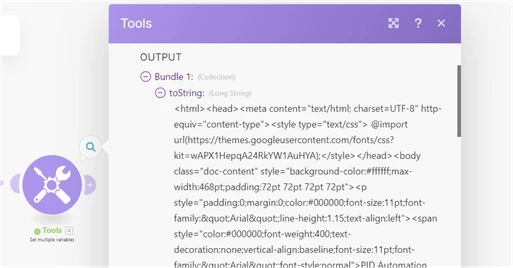
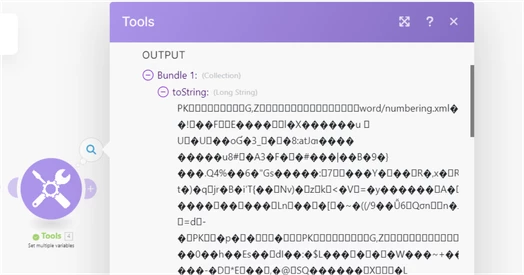
I am trying to download an MS Word document from Workfront, but I need to convert it to an HTML file first because the output from the MS Word document is not readable. Is it possible to convert it in Fusion without doing it manually? I'm sharing examples below. FYI, have used toString() function in Tools app.

MS Word output (unreadable):


MS Word converted to HTML (manually):

This post is no longer active and is closed to new replies. Need help? Start a new post to ask your question.
Best answer by monicacardoso

Hi @_manish_singh


Thank you for your question! Can I ask: is there a reason that you are using a word document to store HTML code? 


I ask because the Download Document module for Workfront only outputs the raw data available; this is the strange string with lots of unreadable characters. The module is meant to retrieve the document and serve as an aid to move it from Workfront into another application (for example, move a document from Workfront into Google Drive). The module is not meant to be retrieved from Workfront and then read in Fusion. 


https://experienceleague.adobe.com/en/docs/workfront-fusion/using/references/apps-and-their-modules/adobe-connectors/workfront-modules#:~:text=The%20module%20returns%20the%20document%E2%80%99s%20content%2C%20filename%2C%20file%20extension%2C%20and%20file%20size.%20You%20can%20map%20this%20information%20in%20subsequent%20modules%20in%20the%20scenario.


If what you're trying to achieve is simply to get HTML code into Fusion, there are other options available: 


1) Hard code the HTML into Fusion through the use of a Create Variable module. 


or 


2) If the HTML code is coming from users who submit this word document, you could setup a request queue with a field for the HTML code. Then use Fusion to read the contents of the custom field and do something with it. 


or 


3) Upload that HTML to GitHub and then call GitHub's API to output it.


If you'd like to see this functionality implemented into Fusion in the future, I would recommend submitting a feature idea to our innovation lab. 


https://experienceleague.adobe.com/en/docs/workfront/using/basics/tips-tricks-for-basics/idea-exchange


- Monica 

1 reply

monicacardosoAdobe EmployeeAccepted solution
Adobe Employee
January 22, 2025

Hi @_manish_singh


Thank you for your question! Can I ask: is there a reason that you are using a word document to store HTML code? 


I ask because the Download Document module for Workfront only outputs the raw data available; this is the strange string with lots of unreadable characters. The module is meant to retrieve the document and serve as an aid to move it from Workfront into another application (for example, move a document from Workfront into Google Drive). The module is not meant to be retrieved from Workfront and then read in Fusion. 


https://experienceleague.adobe.com/en/docs/workfront-fusion/using/references/apps-and-their-modules/adobe-connectors/workfront-modules#:~:text=The%20module%20returns%20the%20document%E2%80%99s%20content%2C%20filename%2C%20file%20extension%2C%20and%20file%20size.%20You%20can%20map%20this%20information%20in%20subsequent%20modules%20in%20the%20scenario.


If what you're trying to achieve is simply to get HTML code into Fusion, there are other options available: 


1) Hard code the HTML into Fusion through the use of a Create Variable module. 


or 


2) If the HTML code is coming from users who submit this word document, you could setup a request queue with a field for the HTML code. Then use Fusion to read the contents of the custom field and do something with it. 


or 


3) Upload that HTML to GitHub and then call GitHub's API to output it.


If you'd like to see this functionality implemented into Fusion in the future, I would recommend submitting a feature idea to our innovation lab. 


https://experienceleague.adobe.com/en/docs/workfront/using/basics/tips-tricks-for-basics/idea-exchange


- Monica 
_Manish_Singh
Level 9
January 23, 2025

Basically, my MS Word is set up as a change request template, and most of the content is in tables. Here's an example:

KeyValue
Enter ProjectProject X
OwnerManish
Change ApproverSingh
Decision Date01/01/25
Impact if not ImplementedNA
and so and so......


If I can convert this document to HTML, in the next steps of the scenario, it'll be easier for me to see that 'Project X' is linked to 'Enter Project' and not something else, because HTML tables have structure, and there is no chance of going wrong.

The Download Document module in Workfront isn't just for moving docs between apps, it can also be used for parsing like handling CSV files. From my testing, it handles text documents pretty well, but I'm not sure why it messes up with MS Word.

_Manish_Singh
Level 9
January 23, 2025

Thanks for clarifying which module you're using after the Download Document module. The behavior you're seeing will differ with each file type. 


This is due to the underlying structure and encoding of each file type. Each file format represents its content differently, and the toString() function converts the binary data of the file to a string without interpreting its specific encoding or structure.


Here are the results you'll see: 


1) Text (.txt) files are simple and contain plain, human-readable text. When the toString() function is applied, it directly converts the file's binary data into a readable string because there’s no complex encoding or metadata in a .txt file.


Output Example:

"test"


2) Notepad (.notepad or similar) files often include metadata such as background color, text color, and additional formatting details. When the toString() function processes them, it outputs a JSON-like structure or encoded metadata along with the note content.


Output Example:

{"bgColorIndex":0,"textColorIndex":0,"note":"test"}


3) Rich Text (.rtf) files store text along with rich formatting options (e.g., fonts, colors, alignment). The toString() function converts the raw binary data into its string representation, which includes the RTF control codes and formatting metadata.


Output Example:

{\rtf1\ansi\ansicpg1252\cocoartf2639 \cocoatextscaling0\cocoaplatform0{\fonttbl\f0\fswiss\fcharset0 Helvetica;} {\colortbl;\red255\green255\blue255;} {\*\expandedcolortbl;;} \margl1440\margr1440\vieww11520\viewh8400\viewkind0 \pard\tx720\tx1440\tx2160\tx2880\tx3600\tx4320\tx5040\tx5760\tx6480\tx7200\tx7920\tx8640\pardirnatural\partightenfactor0 \f0\fs24 \cf0 Test}


4) Microsoft Word (.docx) files are not plain text; they are zipped XML-based archives containing multiple files, such as:


  • Document content (XML)
  • Styles and formatting metadata
  • Embedded media


The toString() function outputs unreadable binary data because the .docx file is compressed and cannot be directly represented as text.


Output Example:

PK!ߤ�lZ [Content_Types].xml �(����n�0E�����Ub袪*�>�-R�{V��Ǽ��QU� l"%3��3Vƃ�ښl �w%�=���^i7+���-d&�0�A�6�l4��L60#�Ò�S O����X��*��V$z�3��3������%p)O�^� ���5}nH"d�s�Xg�L�`���|�ԟ�|�P�rۃs��?�PW��tt4Q+��"�wa���|T\y���,N���U�%���-D/��ܚ��X�ݞ�(���<E��)��;�N�L?�F�˼��܉��<Fk�


If you need to transform the MS Word document into HTML code in Fusion, you need to build a custom solution. I found the below API that might help you, but please note that Workfront Support cannot assist with implementing this solution. 


https://www.convertapi.com/docx-to-html


You would use an HTTP Make a Request module after the Download Document module and call to the "convert/docx/to/html" endpoint. 


https://experienceleague.adobe.com/en/docs/workfront-fusion/using/references/apps-and-their-modules/universal-connectors/http-module-make-a-request 


Thank you, I will try ConvertAPI, but I hope Workfront could add a built-in feature in the Download Document module for compatible conversions, because it is tough to convince management to use third-party apps. For example, when the module detects a .docx file, it should provide an option to convert it to compatible file types like .txt, .html, .pdf, etc. Similarly, for .xlsx files, it should provide options for .csv or other compatible formats (not a good example, but to get the gist). 🙂

Thanks for sharing your thoughts @monicacardoso